Personal Access Tokens & basic auth are being retired across Azure DevOps, Jira, ServiceNow & more. Switch to OAuth 2.0 — fully supported in ADL Connect.
ADL Connect vs. Peeklogic Connector: Why Pay $3,600 a Year for Two-Way Sync in 2026?
Posted on
Updated on November 20, 2026
Author : ADL Solution
ADL Connect vs. Peeklogic · Connector Comparison 2026
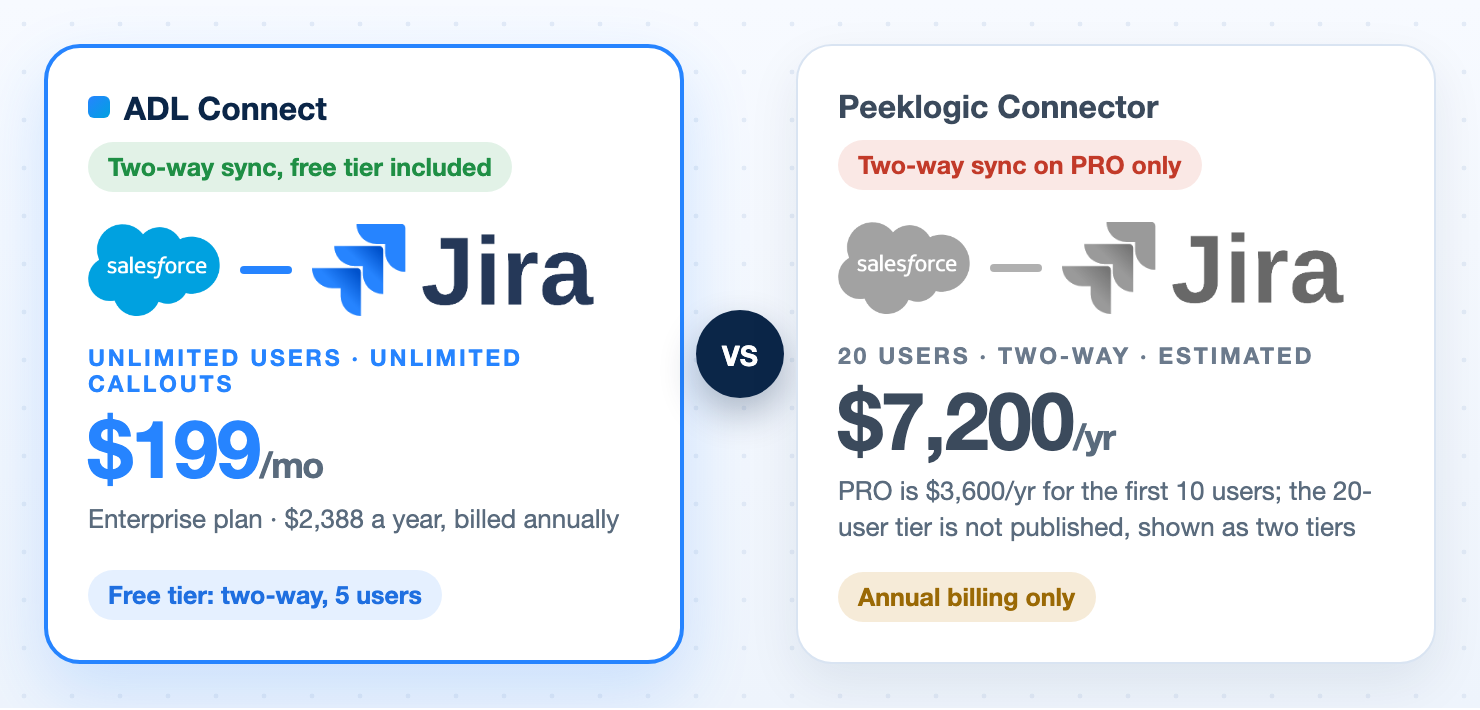
Peeklogic charges $3,600 a year to close the loop between Salesforce and Jira, and that price covers only the first 10 users. ADL Connect closes it for free, and gives unlimited users for $199 a month.
Every Salesforce–Jira comparison eventually arrives at the same moment of truth: the free plan looks generous until you realise it only pushes data one way. Your agent logs a case, it appears in Jira, a developer fixes it, and nobody in support ever finds out. To close that loop, you upgrade.
That upgrade is where the two products in this article part company. With the Peeklogic connector, closing the loop costs $3,600 a year, quoted for the first 10 users, and Peeklogic does not publish what the next tier costs. With ADL Connect, two-way sync is in the free tier, and the Enterprise plan removes every user and callout limit for $199 a month, billed annually. That is $2,388 a year for a team of any size, against $3,600 for Peeklogic's first 10 users alone.
Both products are Salesforce-native. Both avoid middleware. So this comparison comes down to what you actually pay for a real team, what happens when that team grows, and what you get for running the integration after go-live. We compare at 20 users, because that is where a support-plus-engineering rollout usually starts, and every price below was taken from each vendor's public pages on 12 November 2026, with the sources linked at the end.
The short version
ADL Connect vs. Peeklogic in Six Points
If you only read one section, read this one.
Two-way sync is free with ADL Connect
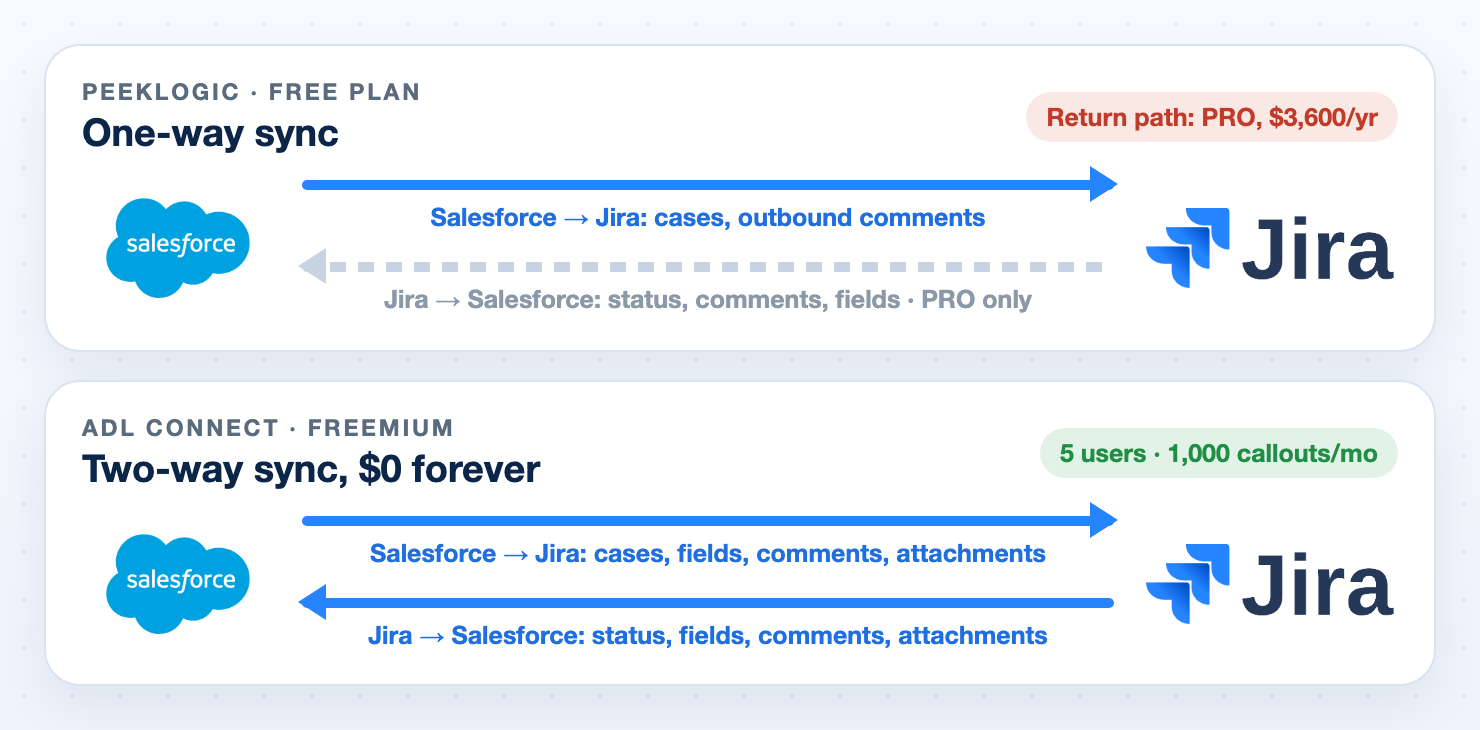
Peeklogic's free plan, on AppExchange and on the Atlassian Marketplace, is one-way only. Bi-directional sync is a PRO feature at $3,600 a year.
$199 a month for unlimited users vs. $3,600 a year for 10
ADL Connect Enterprise is $2,388 a year with no user cap. Peeklogic PRO is $3,600 a year for the first 10 users, annual only; a 20-user team needs two tiers, about $7,200, because the next tier is not published. ADL Connect is a third of that, for any team size.
Flat price, no user tier
A 20-agent team and a 200-agent team pay ADL Connect the same amount. Peeklogic anchors its price to a user tier, so growth is a renegotiation.
Pay only for the connector you use
One AppExchange package installs all five connectors: Jira, Azure DevOps, ServiceNow, Xurrent (4me) and Zendesk. Licensing is per connector, per org, on the same price ladder. No bundle you did not ask for.
Two platforms Peeklogic does not serve
If your service desk is Xurrent (4me) or Zendesk, Peeklogic has no app for you. Its family is Jira, Azure DevOps, ServiceNow and NetSuite.
A free ServiceNow-side app in Q1 2027
ServiceNow admins get native OAuth 2.0 setup and inbound sync from their own platform, at no cost. Peeklogic prices its ServiceNow connector at $8,000 to $12,000 a year.
One thing both vendors share: neither refunds a single-year subscription. Both are annual commitments you should pilot before signing. ADL Connect at least lets you pilot in production, two-way, for free.
Round 1
The Free Plan That Is Not an Integration
Both free plans stop at 5 users. Only one of them sends anything back.
Peeklogic publishes two free entry points, and both land in the same place. On the Atlassian Marketplace, Peeklogic Connector for Salesforce and Jira is genuinely free and well reviewed (5/5 from 86 ratings, 220 installs), but it is Jira Cloud only, it still requires the Salesforce-side managed package, and its feature list is explicit: one-way sync from Salesforce to Jira, basic Flow actions, outbound comments. Real-time bi-directional sync requires the PRO plan.
The free AppExchange plan tells the same story from the Salesforce side: manual issue creation, a Lightning component, outbound comments, no return path.
ADL Connect's Freemium tier is bi-directional. Zero dollars, forever, no credit card: status changes, comments and attachments move in both directions, with 1,000 outbound callouts a month and up to 5 connected users. You can run a real support-to-engineering loop in production and decide whether to pay after you have seen it work, not after you have seen half of it work.
Round winner: ADL Connect. A one-way integration is a demo. A two-way integration is a product.
Round 2
The Price of Closing the Loop for 20 Users
Peeklogic prices its Jira PRO plan at $3,600 a year for the first 10 users. Read that qualifier twice. A 20-user team is already above it, and the next tier is not published.
PRO, est.About $7,200/yr: PRO is $3,600 for the first 10 users and the next tier is not published, so 20 users are shown as two tiers
About $4,812/yr, 67% less
200 users
Same price$2,388/yr, unlimited users and callouts
By tierWell above $7,200, by user tier
The gap widens with every seat
Try two-way sync
UnlimitedFree in production, for as long as you want
30 daysPRO trial window only
No deadline
Both vendors bill annually. Peeklogic's pricing page states it offers no monthly billing; ADL Connect quotes a simple monthly price, billed once a year. The difference is not the billing cycle. It is the number on the invoice, and whether that number has a user count attached to it.
Round winner: ADL Connect. A third of the price at 20 users, and the gap widens with every seat.
Round 3
What Happens When the Team Grows
This is the quiet one, and it is the reason finance teams end up re-opening a connector decision 18 months later.
Peeklogic: anchored to a user tier
The published price stops at 10 users. Add a second support region, roll the connector out to your delivery team, or absorb a seasonal case spike, and the integration becomes a renegotiation at a price you cannot look up.
ADL Connect: $199 a month, unlimited
Enterprise is unlimited connected users and unlimited monthly callouts at $199 a month, billed annually. A 200-agent service org pays the same $2,388 a year as a 20-person team.
Flat pricing means your cost per user falls as you grow instead of rising. That is the opposite of how a tiered licence behaves, and it is the difference between a line item that stays approved and one that comes back to the budget meeting every year.
Round winner: ADL Connect. Flat beats tiered, every time, in every budget cycle.
Round 4
Licensed Per Connector, So You Pay for What You Use
ADL Connect is one security-reviewed managed package with five connectors inside, and every connector sits on the same price ladder.
A single AppExchange install gives you the Salesforce–Jira connector, the Salesforce–Azure DevOps connector, the Salesforce–ServiceNow connector, Xurrent (4me) and Zendesk. Licensing is per connector, per Salesforce org, with no per-record or per-call fees, and each connector can sit on a different plan. Pilot Jira on Freemium while ServiceNow runs on Enterprise, if that is what your rollout looks like. No per-tool vendors, no separate contracts.
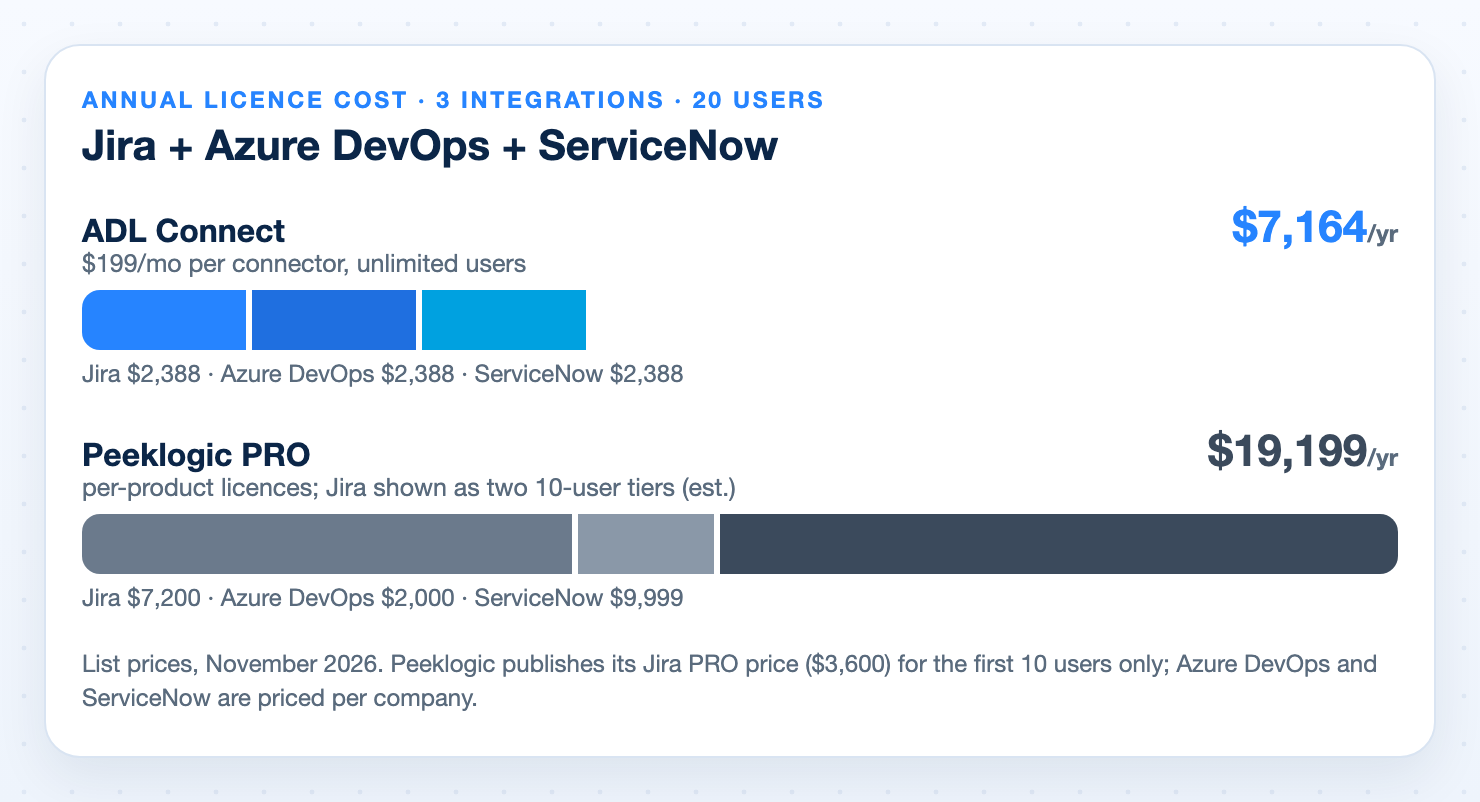
Peeklogic is also sold as separate products, but at separate, and much higher, prices. For a 20-user team:
What you are integrating
ADL Connect, unlimited users
Peeklogic, 20 users
Jira only
$2,388/yr
About $7,200/yr (two 10-user PRO tiers, estimated)
Jira + Azure DevOps
$4,776/yr
About $9,200/yr (Azure DevOps PRO is $2,000 per company)
Jira + Azure DevOps + ServiceNow
$7,164/yr
About $19,199/yr (ServiceNow PRO is $9,999 per company)
Xurrent (4me)
AvailableSame ladder
No app
Zendesk
AvailableSame ladder
No app
NetSuite
Not offered
$7,500–$17,500/yr
Peeklogic's per-product PRO licences add up fast. ServiceNow alone is $9,999 a year, and the Jira licence covers only 10 users.
Peeklogic's ServiceNow connector starts at $8,000 a year for Basic, $9,999 for PRO and $12,000 for Premium. ADL Connect's ServiceNow connector is the same $0 / $199 per month ladder as every other connector in the package. Multi-connector and multi-org bundles are available by custom quote, so real-world totals land below the figures above.
Coming in Q1 2027: the ServiceNow-side app. ADL Connect is releasing a dedicated ServiceNow-to-Salesforce app with native OAuth support in the first quarter of 2027, giving ServiceNow admins the same install-and-authenticate experience Salesforce admins get today: OAuth 2.0 from the ServiceNow side, no shared credentials, no custom scripted REST plumbing to maintain. It is the piece most enterprise IT teams ask for first, and the app is free. No five-figure Premium tier, no upgrade gate, no new licence for existing customers.
Round winner: ADL Connect. Same architecture, same per-connector model, a fraction of the invoice, and two platforms Peeklogic simply does not serve.
Round 5
Sync Depth: What Actually Moves
Credit where it is due: on PRO, Peeklogic syncs properly. ADL Connect matches the core and then pulls ahead where day-two operations live.
Capability
ADL Connect
Peeklogic
Status and field updates, both ways
YesAll plans, including free
PRO only
Comments, both ways
YesSalesforce rich text to Atlassian document format, @mentions preserved
PROOutbound only on free
Attachments, both ways
YesImages, PDFs, ZIPs, Office docs, size-aware streaming for large files
PRO
Delivery model
Event-drivenWebhooks: seconds, not a 15-minute cron
Real-timePRO
Record relationships
Many-to-manyOne case to many issues, one incident to many cases
Issue links, subtasks, watchers, history
Field mapping
No-codePer-platform validation before you save a broken mapping
PROAdvanced mapping
Monitoring
YesSync dashboards, charts and a dedicated error log backed by platform events
Not published
Automation
YesBuilt-in inbound and outbound rules engine per platform, plus Flow and Apex
Flow actions; advanced automation on PRO
Objects
YesCases, Accounts, Opportunities, custom objects and record types
Standard and custom objects
Jira Service Management and Assets
Partial
YesJSM and Assets coverage
Two of these matter more than they look on a feature grid. Many-to-many linking is how real support works; one escalation rarely maps to exactly one ticket. And a sync dashboard plus a real error log is the difference between knowing your integration is healthy and finding out from an angry customer. Most connectors hand you debug logs and wish you luck. For the mechanics of what a good sync should cover, see our complete Salesforce Jira integration guide.
Round winner: ADL Connect. On operations and data modelling. Peeklogic keeps the edge on Jira Service Management and Assets depth.
Round 6
Security and Deployment
Here the two products are genuinely close, and you should know that before a security review rather than after.
Neither vendor sits in the data path. Peeklogic states that records travel straight between Salesforce and Jira with no third-party servers. ADL Connect is a 100% Salesforce-native managed package: sync inherits your org's permissions, sharing rules, field-level security and audit trail, and nothing is hosted by ADL.
Authentication is OAuth 2.0 with PKCE over named credentials with encrypted secrets.
There is no ADL-hosted copy of your data and zero sub-processors for customer records, confirmed in writing on our trust page.
The managed package has passed Salesforce security review and is re-reviewed on their cycle.
The architecture is SOC 2-aligned; ADL does not currently hold a SOC 2 or ISO 27001 certificate in its own name, and says so.
Peeklogic publishes ISO 27001, HIPAA and GDPR assessments on its trust centre and describes its connectors as SOC 2 compliant. If your procurement team requires a HIPAA attestation on paper today, that is a real and legitimate reason to put Peeklogic on the shortlist.
Round winner: A tie. With the honest caveat that certifications on a PDF and sub-processors in an architecture are two different questions. Ask both.
Round 7
Authentication, Delivery and Access Control
How each product authenticates, delivers changes and controls access, based on each vendor's published setup documentation.
Peeklogic's Salesforce-to-Jira connection is configured with a Legacy Named Credential that holds a Jira username and an API token (Jira Cloud) or a password (Jira Server). OAuth 2.0 is used in the reverse direction on the PRO plan, where a Salesforce External Client App with Full Access scope lets the Jira app call back into Salesforce. ADL Connect authenticates the outbound connection with OAuth 2.0 with PKCE over named credentials, on every plan.
Point
ADL Connect
Peeklogic
Salesforce to Jira authentication
OAuth 2.0 + PKCENamed credentials, encrypted secrets, no stored password
API token / passwordLegacy Named Credential with a username and API token (Jira Cloud) or password (Jira Server)
Jira to Salesforce authentication
OAuth 2.0Webhook delivery over OAuth 2.0, on every plan
PRO onlyOAuth 2.0 External Client App for Jira Cloud; for Jira Server and Data Center, unauthenticated webhooks to a public Salesforce Site with a static token in the URL
Azure DevOps authentication
OAuth 2.0 + PKCEEntra ID sign-in, no personal tokens
PATPersonal Access Token stored as the password of a Legacy Named Credential
ServiceNow authentication
OAuth 2.0
Username / passwordBasic authentication with a username and password
Access control
Integration userA dedicated integration user whose object and field-level access your admin grants or restricts like any other user
Full accessA Jira integration user with all permissions to Jira projects and issue types, and a Salesforce app with Full Access scope
Record delivery
Webhooks, both waysChanges land in seconds, no scheduled job to run
MixedFlow actions outbound; real-time push inbound on PRO for Jira Cloud; webhooks for Jira Server
Comments and attachments
WebhooksSynced as they happen, in both directions
Page loadUnless a real-time setting is on, comments and attachments are pulled when someone opens the Case page; a comment added outside the component waits for the next page open
Jira field and picklist changes
Validated at mapping time
Scheduled jobA scheduled sync job on chosen weekdays and times, or a manual run
ServiceNow inbound sync
Webhook-drivenIncidents, changes and problems flow back to Salesforce
Not documentedOutbound Flow actions and a live-view component; no inbound sync path documented
Three of these matter beyond a security questionnaire. A connection that stores a Jira password or a Personal Access Token is only as safe as that credential's rotation policy. An integration user with full access cannot be scoped down when a regulated object joins the sync; ADL Connect's can. And a comment that waits for someone to open the Case page is a comment the engineer did not see.
Round winner: ADL Connect. OAuth 2.0 on every connection, webhooks in every direction, and an integration user your admin controls.
Round 8
The Commercial Fine Print
Read this part before you sign anything, with either vendor.
Neither ADL Connect nor Peeklogic refunds a single-year subscription. Peeklogic's pricing FAQ states that no refunds are issued for single-year subscriptions, with the first six months non-refundable on two-year or longer plans. ADL Connect does not offer refunds either. An annual connector licence is a commitment at both companies.
Which is exactly why the free tier is the whole argument. With Peeklogic, the thing you can trial for free is one-way, so the capability you are actually buying, bi-directional sync, is only visible during a 30-day paid trial window. With ADL Connect, the capability you are buying runs free, in production, for as long as you want, on up to 5 users. You sign only once it has already proved itself, and a paid year costs $2,388.
Support is included on every ADL Connect tier, including the free one.
Enterprise carries Gold 24×7 support with a sub-4-hour response, a dedicated account manager and quarterly health checks, included in the $199 a month price.
Every ADL Connect plan installs from AppExchange with no credit card and no sales call.
Round winner: ADL Connect. Same no-refund reality, far less money at risk, and far less risk of ever needing one.
The verdict
ADL Connect vs. Peeklogic: The Scorecard
Seventeen criteria, scored on what each vendor publishes today.
Criterion
ADL Connect Winner
Peeklogic
Free two-way sync
Yes
One-way
Price for 20 users
$2,388/yr
About $7,200/yr, est.
Unlimited-user plan
$199/mo
Not published
Licensed per connector
Yes
Yes
Xurrent (4me) support
Yes
No
Zendesk support
Yes
No
Many-to-many record links
Yes
No
Dashboards and error log
Yes
Not published
Salesforce-native, no middleware
Yes
Yes
OAuth 2.0 on the outbound connection
Yes
API token / PAT / password
Comments sync without opening the record
Yes
Setting-dependent
Integration user with admin-scoped access
Yes
Full access
Support on the free tier
Yes
Partner supported
Refunds on annual plans
No
No
NetSuite connector
No
Yes
HIPAA attestation published
No
Yes
Jira Service Management / Assets depth
Partial
Yes
ADL Connect wins this comparison on the three things that decide connector projects: price, scale and visibility. It does two-way sync for free where Peeklogic charges $3,600 a year for it, gives unlimited users for $199 a month where Peeklogic stops publishing prices at 10, and ships the dashboards and error logging you need the week after go-live.
Peeklogic remains a credible product with a long review history, and there are three narrow cases where it is the right call: you need NetSuite, you need Jira Service Management and Assets depth specifically, or procurement needs a HIPAA attestation on file today. For everything else, Jira, Azure DevOps, ServiceNow, Xurrent and Zendesk, ADL Connect delivers the same Salesforce-native architecture at a fraction of the cost, with no ceiling on your team size. See how the wider market compares in our Salesforce Jira connector comparison and ADL Connect vs. Exalate.
Customer feedback
What AppExchange Reviewers Say About ADL Connect
ADL Connect holds a 4.96 out of 5 rating from 23 reviews on the Salesforce AppExchange. These are three of them, quoted as written.
★★★★★
“ADL Connect was simple to configure and is easy to use. Seeing all Salesforce cases linked to a DevOps card helps us prioritize enhancements based on real customer impact. This tool is saving us hours of work and coordination every week.”
LN
Liz NeileyAppExchange review, September 2026
★★★★★
“Have used both for ADO and Jira, 10/10 experience. App works great, is easy to use. It was great to try it out a few times via the free version. Anytime I ran into a problem their support team was awesome and very responsive.”
AE
Aaron EthridgeAppExchange review, July 2025
★★★★★
“The tool is very flexible, supporting both a 1:1 Case to Dev Ops Work Item model and a many-to-many relationship as well. The support team is very responsive and willing to walk through all our questions on a call.”
BS
Ben SouthwellAppExchange review, September 2025
Pricing
ADL Connect Plans, Per Connector
One AppExchange package, five connectors, the same ladder for each. Unlimited users from $199 a month.
Plan
Price
Key inclusions
StartupFree forever
$0
Up to 5 users, 1,000 callouts a month, bi-directional sync, the native AppExchange package and business-hours support.
SilverSmall teams
$129 / month
Up to 10 users, 2,000 callouts a month, and email & chat support with a 24-hour response.
EnterpriseUnlimited users
$199 / month
$2,388 a year, billed annually. Unlimited users and callouts, 24×7 priority support with a sub-4-hour response, and a dedicated account manager.
Prices are billed annually, per connector, per Salesforce org. See the full plan and support-tier comparison on the ADL Connect products page.
FAQ
Frequently Asked Questions
Is ADL Connect one app or several?
One AppExchange managed package, five connectors: Jira, Azure DevOps, ServiceNow, Xurrent (4me) and Zendesk. Licensing is per connector, per Salesforce org, on the same pricing ladder, so you pay only for the connectors you use.
Is the ADL Connect free plan actually two-way?
Yes. Freemium includes bi-directional sync with comments and attachments, 1,000 outbound callouts a month and up to 5 connected users, and it runs in production with no time limit.
What does $199 a month actually buy?
The Enterprise plan: unlimited connected users, unlimited outbound callouts, Gold 24×7 support and a dedicated account manager, for one connector in one Salesforce org. It is billed annually, $2,388 a year, a third of what Peeklogic charges for 20 users.
What counts as a connected user?
A Salesforce user who uses the connector’s components or triggers a sync. Freemium allows 5, Silver allows 10, and Enterprise is unlimited.
What is a callout, and is 1,000 a month enough?
Each outbound API call to the connected platform is one callout. 1,000 a month fits a small team running a pilot; Silver doubles it to 2,000 and Enterprise removes the cap entirely.
Do I need middleware, MuleSoft or an iPaaS with either product?
No. Both products run inside Salesforce. ADL Connect uses named credentials and webhooks; nothing is hosted by the vendor, and your data is never copied to a third party.
Can I get a refund if it does not work out?
Neither vendor refunds single-year subscriptions, which is precisely why the free, bi-directional ADL Connect production tier matters: prove it before you pay.
When is the ServiceNow-side ADL Connect app available?
The dedicated ServiceNow-to-Salesforce app with native OAuth support is scheduled for Q1 2027, and it is free. Salesforce–ServiceNow sync runs from the Salesforce side today; the new app adds OAuth-based setup and inbound flow managed from within ServiceNow itself, at no cost and with no change to the pricing above.
Is the Peeklogic Atlassian Marketplace app really free?
It is, and it is well reviewed. But it is Jira Cloud only, it still needs the Salesforce-side package, and it is one-way. Two-way sync requires the Peeklogic PRO plan at $3,600 a year for the first 10 users.
Start With the Free Plan, Not a Sales Call
Install the ADL Connect app for your platform from the AppExchange, connect it with OAuth in a few minutes, and run bi-directional sync on up to 5 users for $0. When the team outgrows it, unlimited users cost $199 a month. Want to see the Jira panel inside a Salesforce case first? Read about the Salesforce Jira plugin.
Prices and features cited are from each vendor’s public pages as of 12 November 2026 and are subject to change. ADL Connect Enterprise is $199 a month, billed annually. Where a vendor publishes a price for the first 10 users only, its 20-user figure is estimated as two tiers.
Sources: Peeklogic Connector pricing · Peeklogic: Getint vs. Peeklogic Jira Connector · Peeklogic Connector for Salesforce and Jira, Atlassian Marketplace · Peeklogic Jira product page · Peeklogic docs: setting up the Jira connector · Peeklogic docs: Jira Server webhooks · Peeklogic docs: case comment synchronisation · Peeklogic docs: scheduled Jira schema sync · Peeklogic docs: Azure DevOps named credentials · Peeklogic docs: ServiceNow named credentials · ADL Connect products and pricing · ADL Connect Salesforce–Jira integration · ADL Connect Salesforce–ServiceNow integration