Personal Access Tokens & basic auth are being retired across Azure DevOps, Jira, ServiceNow & more. Switch to OAuth 2.0 — fully supported in ADL Connect.
ADL Connect vs. Exalate: Why Salesforce Teams Pay $6,600 a Year for a Sync They Can Get for $199 a Month
Posted on
Updated on November 20, 2026
Author : ADL Solution
ADL Connect vs. Exalate · Connector Comparison 2026
Exalate is a genuinely powerful integration hub. What is in dispute is what a Salesforce team should pay for it, and whether a Salesforce–Jira sync needs a hub at all.
Exalate has earned its reputation. It connects a long list of systems, lets each side script its own sync rules in Groovy, ships an AI assistant that writes those scripts, and more than 2,500 organisations run it. None of that is in dispute. If your integration map looks like a subway diagram, it belongs on your shortlist.
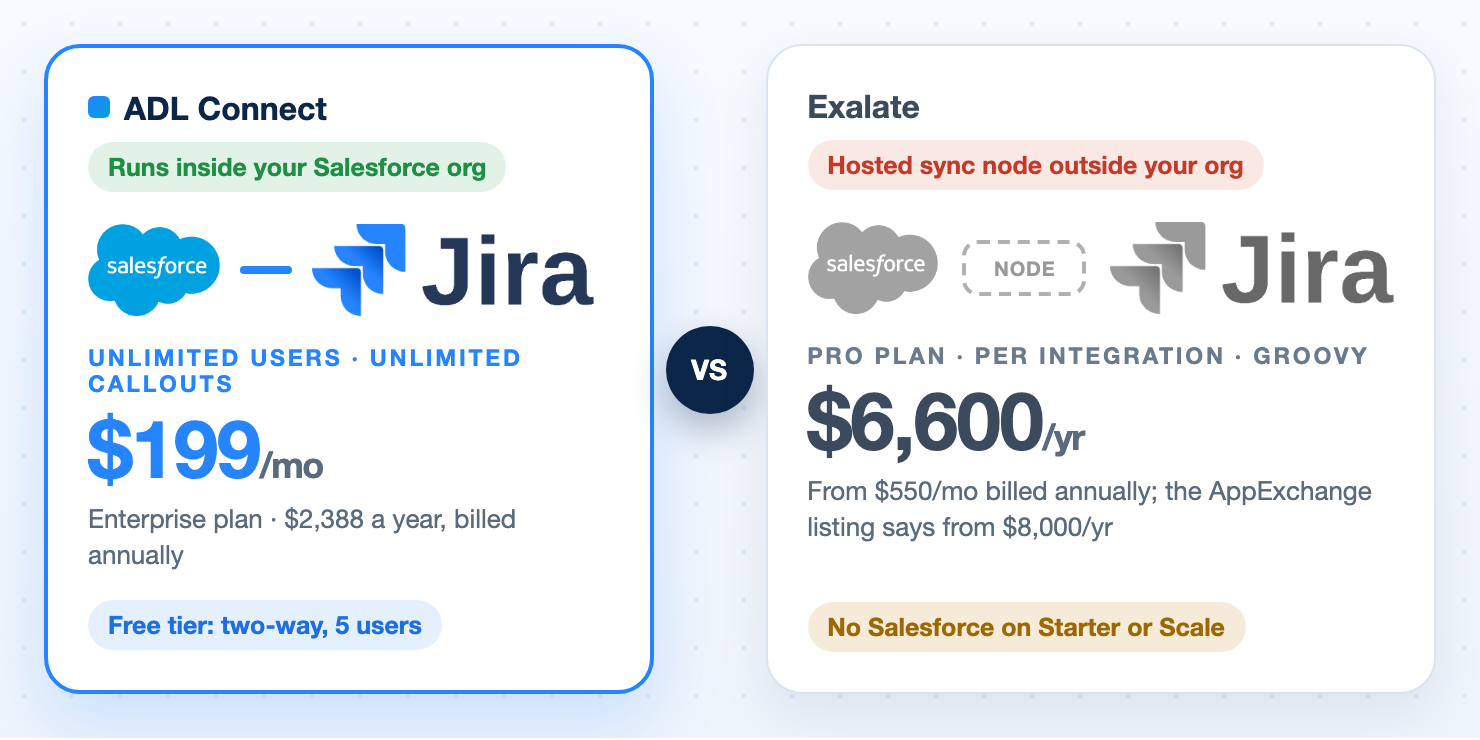
Exalate's pricing, though, has two properties that quietly decide your invoice. First, Salesforce is a Pro-tier connector: you cannot buy the $100 Starter plan or the $325 Scale plan at all. Salesforce requires Pro, from $550 a month billed annually (about $6,600 a year), and the Salesforce AppExchange listing starts at $8,000 per integration and items in sync per year, no matter how small your use case. Second, you are billed by active items in sync, per integration, so the price follows the number of records you keep connected and the number of systems you connect.
ADL Connect prices the same job at $199 a month with unlimited users and unlimited callouts (the Enterprise plan, $2,388 a year), with no item metering at all, inside your own Salesforce org, and a free tier that runs bi-directional sync in production forever. We compare at 20 users, because that is where a support-plus-engineering rollout usually starts. Every figure comes from each vendor's public pages on 13 November 2026, with sources linked at the end, and Exalate's real strengths are called out where they apply.
The short version
ADL Connect vs. Exalate in Six Points
The decisions that matter, before the detail.
No third system in the data path
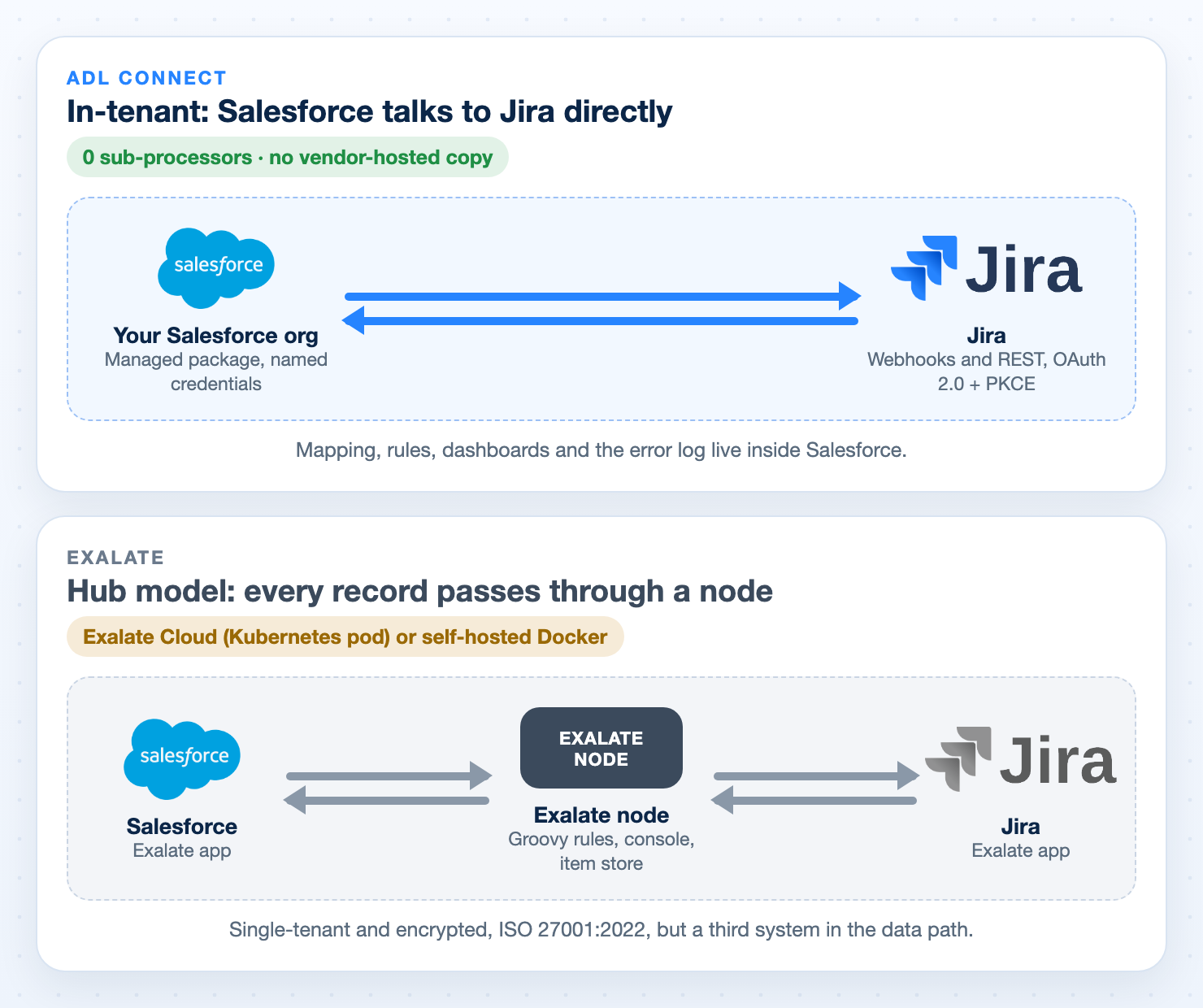
ADL Connect syncs directly between your Salesforce org and Jira. Exalate routes every record through an Exalate node, hosted in Exalate Cloud or self-hosted on Docker.
$199 a month vs. $6,600 to $8,000 a year
ADL Connect Enterprise covers unlimited users for $2,388 a year, 64% less than Exalate's $6,600 Pro entry price and 70% less than the $8,000 its AppExchange listing quotes. Salesforce is not available on Exalate's Starter or Scale plans.
Free forever, not a 30-day trial
ADL Connect Freemium is bi-directional, in production, with no end date. Exalate has no free plan for Salesforce: a 30-day trial capped at 500 items, after which the sync pauses.
No Groovy required
ADL Connect maps fields, picklists and lookups in a drag-and-drop mapper with validation, plus a built-in rules engine. Exalate for Salesforce runs on Basic mode or Groovy Script mode, with Aida AI to help write the scripts.
Exalate meters your linked records; ADL Connect does not
Exalate counts active items in sync per integration: 25 on Starter, 100 on Scale, a negotiated number on Pro. ADL Connect has no item concept at all, and Enterprise has no user or callout cap either.
Per connector, not per integration
Three platforms on Exalate means three Pro integrations, about $19,800 a year. Three ADL Connect connectors with unlimited users are $7,164 a year, and a free ServiceNow-side app with native OAuth arrives in Q1 2027.
Where Exalate genuinely leads: breadth of platforms (GitHub, Asana, Freshdesk, Freshservice, ServiceDesk Plus and more), Jira-to-Jira and multi-system topologies, unlimited custom logic, and an ISO 27001:2022 certificate in its own name. Those are real advantages, and we say so where they apply.
Round 1
Architecture: In-Tenant or Through a Hub
One of these diagrams has a box your security team will ask about.
Exalate is a hub. Its own documentation describes each instance as running "in its own environment: separate process, storage, and database", and when deployed on Exalate Cloud "it is running inside a Kubernetes pod". That is a well-engineered, single-tenant, encrypted design. It is also, by definition, a third system that holds a copy of the records it synchronises and that a vendor-security review has to assess.
ADL Connect has no such box. It is a managed package inside your Salesforce org that talks to Jira over named credentials and webhooks. Sync inherits your org's permissions, sharing rules, field-level security and audit trail. There is no ADL-hosted copy of your data and zero sub-processors for customer records, which we confirm in writing on our trust page.
Exalate states it "is NOT a data processor as defined in GDPR Art 4" and compares itself to an email system. Your DPO may or may not accept that framing. With ADL Connect the question never comes up.
Round winner: ADL Connect. The shortest data path is the one with nothing in the middle.
Round 2
The Price of Connecting Salesforce for 20 Users
Exalate's pricing page lists four plans. Salesforce appears only on Pro and Enterprise, so the advertised $100 entry price is not available to you.
From $550/mo billed annually (about $6,600/yr); AppExchange lists from $8,000/yr
Custom, negotiated
YesAdds Salesforce, ServiceNow, Jira Data Center, Azure DevOps Server, Xurrent, TOPdesk, ServiceDesk Plus, Ivanti, SolarWinds, ConnectWise, HaloITSM
Enterprise
Custom quote
Unlimited
YesPlus data residency, priority support, managed services
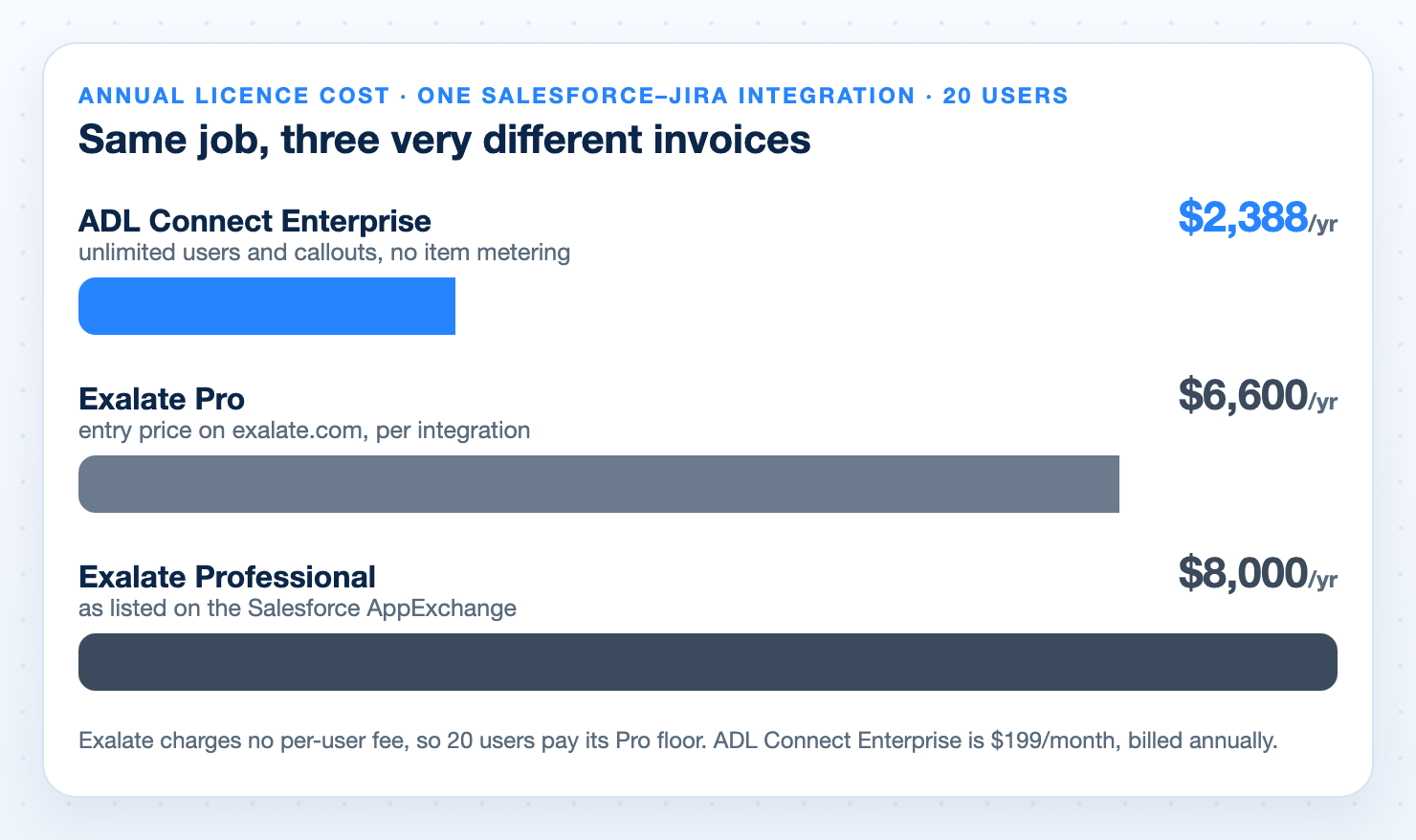
A Salesforce–Jira sync with ten cases in it costs the same Pro-tier floor as one with ten thousand. Exalate charges no per-user fee, so a 20-user team pays the same floor as a 10-user team. Here is what that means against ADL Connect's ladder:
What you need
ADL Connect Lower
Exalate
You keep
Pilot, up to 5 users
Free$0 forever, bi-directional, in production
30 daysTrial, up to 500 items, then about $6,600/yr
$6,600/yr
20 users
Enterprise$2,388/yr ($199/mo, billed annually), unlimited users and callouts
ProAbout $6,600/yr (Pro floor) and up, by item volume
$4,212/yr, 64% less
As listed on AppExchange
Enterprise$2,388/yr
ProfessionalFrom $8,000 per integration and items in sync per year
$5,612/yr, 70% less
What the bill counts
Nothing on Enterprise: users and callouts are unlimited
Active items in sync, per integration, plus systems, environments and support
No metering
Exalate describes the Pro figure as the entry price for its lowest-cost integration; the final price depends on which systems you connect, items in sync, environments, support level and add-ons, and Salesforce is one of the enterprise connectors with a higher base price. In other words, $6,600 is the floor, not the quote.
Round winner: ADL Connect. Nearly three times cheaper, and the gap does not depend on how many records you sync.
Round 3
Configuration: Drag-and-Drop or Groovy
This is the round where the two products are built for different people.
ADL Connect: configured, not coded
Project mapping, field mapping (standard and custom fields, picklists, dates, lookups, custom objects and record types), inbound and outbound rules and many-to-many links are all set up inside Salesforce by an admin, with per-platform validation before a broken mapping can be saved. Flow and Apex hooks exist for the edge cases.
Exalate: scripted, by design
Sync rules are Groovy scripts in the Exalate console. For Salesforce the documented modes are Basic and Script; Visual mode is documented for Jira Cloud. Aida AI can draft the scripts from a description, Test Run lets you dry-run them against real data, and script versioning lets you roll a change back.
Credit where it is due: Exalate wins on arbitrary conditional logic. If you need to transform a value three ways depending on two other fields and the phase of the sprint, a script is the right tool and Exalate has the better one, with genuinely useful tooling around it. Each side of an integration also configures independently, which large organisations with separate IT owners value.
The cost is who has to be in the room. A field rename, a new picklist value or a changed workflow each becomes a scripting task, so teams without a developer who owns the integration end up waiting, or paying for Exalate's managed services. Scripts live outside your org, in a console most Salesforce admins will not open, and when the person who wrote them leaves, so does the understanding. Our guide to Salesforce Jira field mapping covers the mapping problems that no-code validation catches before they reach production.
Round winner: ADL Connect for the 90% case. Exalate if you genuinely need arbitrary code. If your mapping rules require a programming language, that is a legitimate reason to choose Exalate.
Round 4
Metered by Your Own Backlog
Exalate prices on "active items in sync": a case paired with a Jira issue is one item. Exalate's documentation is clear that it counts items currently syncing, not everything ever synced, and that an item stops counting only when you stop syncing it. In practice a support team that links 40 cases a month and keeps them linked holds a growing number, not a steady one.
Starter allows 25 per integration, Scale 100, Pro a negotiated figure, Enterprise unlimited. A mid-size service desk can pass 100 linked records in its first quarter, which is one reason Salesforce teams land on Pro and stay there, with the bill tracking volume upward from that point. The trial follows the same logic: 30 days, up to 500 items, and when it ends "your sync will pause" until you choose a paid plan.
ADL Connect does not meter records at all. There is no active-item concept and no cap on how many cases, incidents or work items you keep linked. On Enterprise there is no cap on users or callouts either: $199 a month, billed annually. That is $2,388 a year, against $6,600 at Exalate's entry price and $8,000 at the AppExchange-listed price, with no item ceiling to manage and no quote to renegotiate when the integration succeeds.
Round winner: ADL Connect. Predictable beats proportional when the thing being measured only ever goes up.
One year, one Salesforce–Jira integration, 20 users, list prices.
Round 5
Per Integration or Per Connector
Exalate defines one integration as a connection between two unique system URLs. Every extra platform is another Pro plan.
Connect Salesforce to Jira, Salesforce to Azure DevOps and Salesforce to ServiceNow on Exalate and you are buying three integrations, each needing Pro, because Salesforce and ServiceNow are both enterprise connectors. ADL Connect is one AppExchange package with five connectors inside: Jira, Azure DevOps, ServiceNow, Xurrent (4me) and Zendesk, each licensed per connector on the same $0 / $199 per month ladder, and each able to sit on a different plan while you roll out.
What you are integrating
ADL Connect, unlimited users
Exalate
Salesforce and Jira
$2,388/yr
About $6,600/yr (Pro floor)
Jira + Azure DevOps
$4,776/yr
About $13,200/yr
Jira + Azure DevOps + ServiceNow
$7,164/yr
About $19,800/yr
Xurrent (4me)
Standard ladderSame $0 / $199 per month plans
Pro onlyListed among the Pro-tier connectors
Second Salesforce org
Per connector, per org; bundles by quote
Another integration, another plan
Multi-connector and multi-org bundles are available from ADL by custom quote, so real-world totals land below the figures above. Coming in Q1 2027: the ServiceNow-side app, free. ADL Connect is releasing a dedicated ServiceNow-to-Salesforce app with native OAuth support, so ServiceNow admins get OAuth 2.0 setup and inbound sync from their own platform at no cost. On Exalate, ServiceNow is an enterprise connector that pulls you onto another Pro-tier integration.
Round winner: ADL Connect. The more systems you connect, the wider the gap.
Round 6
Sync Depth: Breadth vs. Depth
Both products do real two-way sync. The differences are in what you get without writing anything, and how many platforms you can reach.
Capability
ADL Connect
Exalate
Status and field updates, both ways
YesAll plans, including free
YesPaid plans and trial
Comments and attachments, both ways
YesRich text to Atlassian format, @mentions preserved; images, PDFs, Office docs
YesVia sync rules
Delivery model
Event-drivenWebhooks: seconds, not a 15-minute cron
Real-timeThrough the Exalate node
Record relationships
Many-to-manyOne case to many issues, one issue to many cases, configured
YesPurpose-built Lightning components for search, linking, creation, comments, attachments and activity
Sync PanelBrowser extension plus the Exalate console
Salesforce objects
YesCases, Accounts, Opportunities, custom objects and record types
YesAny standard or custom object in Script mode
Jira editions
YesJira Cloud and Data Center
YesJira Cloud and Data Center, plus Jira Service Management and Product Discovery
Platforms beyond Jira
FiveJira (Cloud and Data Center), Azure DevOps (Services and Server), ServiceNow, Xurrent (4me), Zendesk, all on the standard ladder
Twelve+Adds GitHub, Asana, Freshdesk, Freshservice, ServiceDesk Plus, Ivanti, TOPdesk and more; Xurrent on Pro only
Jira-to-Jira sync
No
Yes
If you need GitHub, Asana or Freshservice in the same fabric, or Jira-to-Jira, Exalate is the stronger product and this article will not pretend otherwise. If you need Salesforce in sync with Jira, Azure DevOps, ServiceNow, Xurrent or Zendesk, both products reach the same destination and only one of them asks you to write the route. Two things ADL Connect emphasises that Exalate's per-item model does not: many-to-many record linking, and operational visibility inside Salesforce, so a failed sync surfaces immediately instead of in a debug log. The complete Salesforce Jira integration guide covers what a full sync scope should include.
Round winner: Exalate on breadth, ADL Connect on Salesforce depth and day-two operations. Pick the one that matches the shape of your integration map.
Round 7
Security and Compliance
Both vendors take this seriously. They answer different questions.
Exalate publishes a strong security posture: ISO 27001:2022 certified, single-tenant isolation per instance, encryption in transit and at rest, TLS 1.3, OAuth 2.0 or token authentication, 24×7 threat monitoring, a published DPA and a Cloud Fortified badge on its Jira Cloud app. Data residency is an Enterprise-plan feature, which tells you there is vendor-side processing to locate. Exalate also cites more than 2,500 client organisations, an install base ADL does not match.
ADL Connect runs entirely inside your Salesforce org; the managed package has passed Salesforce security review and is re-reviewed on their cycle.
Authentication is OAuth 2.0 with PKCE over named credentials with encrypted secrets.
There is no vendor-hosted copy of your data and zero sub-processors for customer records, so there is no DPA to negotiate for the sync itself.
The architecture is SOC 2-aligned; ADL does not hold a SOC 2 or ISO 27001 certificate in its own name, and says so.
If your procurement checklist requires the vendor to hold an ISO 27001 certificate, Exalate has one and ADL does not. If your checklist asks where customer data goes, ADL Connect's answer is "nowhere", and Exalate's answer is a well-secured Kubernetes pod.
Round winner: ADL Connect on architecture, Exalate on certifications and references. If the hard requirement is "no third party processes our case data", ADL Connect answers it with zero sub-processors. If it is an ISO 27001 certificate plus enterprise references, Exalate has those today.
Round 8
Support and the Commercial Fine Print
Read this honestly, because it cuts both ways.
Exalate's support plans page draws a clear line. Standard support, included with Pro, promises a next-business-day initial response for critical production issues and 8-hour progress reporting. Priority support, with a 2-hour initial response, Slack access, a dedicated customer success manager and help with installation and first sync, is "purchased separately" at a price that is not published. Starter and Scale get "support with no SLA". We could not find a refund policy on any Exalate page we read.
Exalate asks you to decide inside 30 days, with a 500-item ceiling during the trial, before committing to a Pro plan that starts around $6,600 a year and scales with your item count. That is a reasonable enterprise motion, but it front-loads the risk.
ADL Connect does not refund annual subscriptions either. The free tier is the answer: bi-directional sync with comments and attachments runs free, in production, on up to 5 users, for as long as you like, and a paid year costs $2,388.
Support is included on every ADL Connect tier, including the free one.
Enterprise carries Gold 24×7 support with a sub-4-hour response, a dedicated account manager and quarterly health checks, included in the $199 a month price.
Round winner: ADL Connect. Less money at risk, and less pressure to decide on the vendor’s clock. The support you would need to buy separately from Exalate is in the ADL Connect price.
The verdict
ADL Connect vs. Exalate: The Scorecard
Eighteen criteria, scored on what each vendor publishes today.
Criterion
ADL Connect Winner
Exalate
Runs inside your Salesforce org, no hub
Yes
Hosted node
Free forever tier
Two-way, in production
30-day trial, 500 items
Price for 20 users
$2,388/yr
About $6,600/yr
Unlimited users
$199/mo
No per-user fees
No record or item metering
Yes
Active items in sync
Salesforce available on entry plan
Yes
Pro only
No-code field and picklist mapping
Yes
Basic mode
Unlimited custom logic via scripting
Flow and Apex
Groovy
Many-to-many record links, configured
Yes
Scripted
Dashboards and error log
Yes
Activities, Test Run
Xurrent (4me) on the standard plan
Yes
Pro only
Free ServiceNow-side OAuth app (Q1 2027)
Yes
No
Platforms beyond Salesforce and Jira
Four more
Twelve+
Jira-to-Jira and multi-hub topologies
No
Yes
ISO 27001 certificate held by vendor
No
27001:2022
Enterprise references at scale
23 AppExchange reviews
2,500+ clients
Zero sub-processors for customer data
Yes
Not a processor, per Exalate
Support included on all tiers
Yes
Priority sold separately
ADL Connect wins on the economics, and it is not close. The same bi-directional Salesforce sync for a 20-user team costs 64% less, with unlimited users, and it starts free, forever, instead of on a 30-day clock. Exalate's model charges you a Pro-tier floor simply for having Salesforce in the picture, then meters the records you keep linked, per integration, as you add systems.
Choose Exalate in two specific situations: you need platforms ADL Connect does not cover (GitHub, Asana, Freshdesk, Freshservice, or Jira-to-Jira), or your mapping logic genuinely requires arbitrary code. For a Salesforce team syncing Jira, Azure DevOps, ServiceNow, Xurrent or Zendesk with no-code mappings, ADL Connect delivers the same real-time bi-directional outcome for a fraction of the price, with nothing hosted outside your org. For a vendor closer to ADL Connect's model, see ADL Connect vs. Peeklogic, or the whole market in our Salesforce Jira connector comparison.
Customer feedback
What AppExchange Reviewers Say About ADL Connect
ADL Connect holds a 4.96 out of 5 rating from 23 reviews on the Salesforce AppExchange. Three of them, quoted as written.
★★★★★
“The functionality is exactly what it promises: seamless, reliable bi-directional syncing between Salesforce and Azure DevOps. Data flows the way you would expect it to. It has become a core part of how our teams collaborate across the business and engineering sides of the house.”
JO
Jessica O'SheaAppExchange review, April 2026
★★★★★
“The application works seamlessly and has already brought clear benefits to our organization, especially with our many-to-many setup, where the flexibility and structure provided by ADL made a significant difference.”
LB
Luis BloisAppExchange review, November 2025
★★★★★
“The sync between our systems is truly seamless. Data flows effortlessly without any manual intervention, which has saved us significant time and eliminated integration headaches.”
DW
Darius WoodsonAppExchange review, July 2026
Pricing
ADL Connect Plans, Per Connector
One AppExchange package, five connectors, the same ladder for each. Unlimited users from $199 a month. No per-item fees.
Plan
Price
Key inclusions
StartupFree forever
$0
Up to 5 users, 1,000 callouts a month, bi-directional sync, the native AppExchange package and business-hours support.
SilverSmall teams
$129 / month
Up to 10 users, 2,000 callouts a month, and email & chat support with a 24-hour response.
EnterpriseUnlimited users
$199 / month
$2,388 a year, billed annually. Unlimited users and callouts, 24×7 priority support with a sub-4-hour response, and a dedicated account manager.
Prices are billed annually, per connector, per Salesforce org. See the full plan and support-tier comparison on the ADL Connect products page.
FAQ
Frequently Asked Questions
Why can’t I use Exalate’s $100 Starter plan with Salesforce?
Because Exalate lists Salesforce among its Pro-tier connectors. Starter and Scale cover Jira Cloud, Azure DevOps Cloud, Zendesk, Freshdesk, GitHub, Freshservice and Asana. Salesforce requires Pro, which starts at $550 a month billed annually; the AppExchange listing quotes from $8,000 a year.
What is an “active item in sync”?
A work entity currently synchronised between two systems, such as a case paired with a Jira issue. Exalate counts items that are syncing now, not everything ever synced, and an item stops counting when you stop syncing it. The count sets your Exalate tier. ADL Connect has no equivalent charge.
Is Exalate middleware?
Functionally, yes. Every synchronised record passes through an Exalate node that runs outside both connected systems, either in Exalate Cloud or self-hosted on Docker. Exalate describes each node as single-tenant and encrypted. ADL Connect has no node: the managed package in your Salesforce org talks to Jira directly.
What does $199 a month actually buy?
The ADL Connect Enterprise plan: unlimited connected users, unlimited outbound callouts, no item metering, Gold 24×7 support and a dedicated account manager, for one connector in one Salesforce org. It is billed annually, $2,388 a year, 64% below Exalate’s Pro entry price.
Does Exalate’s free Atlassian Marketplace app mean the integration is free?
No. The Jira-side connector app installs free (it is rated 5 out of 5 from 4 reviews), but syncing requires an Exalate subscription, and with Salesforce on the other end that is the Pro plan.
Do I need to write Groovy to use Exalate?
For anything beyond standard-field mapping on Salesforce, the documented path is Script mode, which is Groovy. Exalate’s Aida AI can draft scripts from a description. ADL Connect is configured with a drag-and-drop mapper and rules engine; Flow and Apex are optional for edge cases.
When is the ServiceNow-side ADL Connect app available?
The dedicated ServiceNow-to-Salesforce app with native OAuth support is scheduled for Q1 2027, and it is free. Salesforce–ServiceNow sync runs from the Salesforce side today; the new app adds OAuth-based setup and inbound flow managed from within ServiceNow itself, at no cost.
What does ADL Connect not do?
It does not connect GitHub, Asana, Freshdesk or Freshservice, it does not support scripted transformations in a programming language, and it does not hold an ISO 27001 certificate. If any of those is a hard requirement, Exalate is the better fit. Our trust page sets out exactly what we do and do not claim.
Try It Before You Budget for It
Install ADL Connect from the AppExchange, authenticate with OAuth in minutes, and run bi-directional sync on up to 5 users for $0, with no trial expiry, inside your own org, with nothing to script and nothing hosted elsewhere. When the team outgrows it, unlimited users cost $199 a month.
Prices and features cited are from each vendor’s public pages as of 13 November 2026 and are subject to change. Exalate's Pro pricing is an entry price that varies with connected systems, item volume, environments and SLA. ADL Connect Enterprise is $199 a month, billed annually. Exalate is a trademark of its owner; ADL Solution is not affiliated with Exalate.