
Legacy auth is being retired. Stay connected.
Personal Access Tokens, basic auth and legacy API access are being sunset across Azure DevOps, Jira, ServiceNow, Zendesk, Xurrent & Salesforce. Here's every official deadline — and how OAuth 2.0 in ADL Connect keeps your Salesforce integrations running.
Every date links to the vendor's official announcement. Last reviewed September 2026.
| Platform | What's being retired | Key date | Status | Move to |
|---|---|---|---|---|
| Azure DevOps | Global Personal Access Tokens | Dec 1, 2026 | Hard cutoff | Entra / scoped PAT |
| Jira Cloud | Basic auth with password | Jun 3, 2019 | Removed | API token / OAuth 2.0 |
| Jira Cloud | Non-expiring API tokens | Mar–May 2026 | Expiring | Rotated tokens (≤1 yr) |
| Zendesk | Password access for APIs | Jan 12, 2026 | Phasing out | API token / OAuth |
| Zendesk | API tokens | Apr 30, 2027 | Deactivating | OAuth 2.0 |
| Salesforce | OAuth username-password flow | Feb 20, 2027 | Enforced | Web-server / client-cred. |
| ServiceNow | Basic auth (inbound REST) | No fixed date | Restricting | OAuth 2.0 / mTLS |
| Xurrent (4me) | Basic auth (recommendation) | No fixed date | Advisory | OAuth 2.0 / PAT |
Microsoft is decommissioning global Personal Access Tokens in Azure DevOps — the PATs scoped to "all accessible organizations." If your Salesforce–Azure DevOps sync authenticates with one of these tokens, it stops working overnight when the cutoff lands.
1What’s changing
A global PAT authenticates against every organization your account can reach with a single secret — convenient, but a broad blast radius if it leaks. Microsoft is moving to short-lived, Microsoft Entra-backed authentication so tokens can be governed by organizational policy, scoped tightly, and revoked centrally. Global PATs are the first casualty of that shift; organization-scoped PATs continue to work.
3How to migrate to OAuth
- Audit where global PATs are used (User settings → Personal access tokens → look for the "All accessible organizations" scope).
- Re-issue each as an organization-scoped PAT, or better, switch the integration to Microsoft Entra / OAuth 2.0.
- Update every stored credential (CI/CD variables, connectors, scripts) and confirm the sync reconnects well before Dec 1, 2026.
ADL Connect authenticates to Azure DevOps with OAuth 2.0 / Entra-backed auth, so there is no global PAT to expire. Your Salesforce–Azure DevOps sync keeps running straight through the cutoff — no manual token juggling.
Jira Cloud has two overlapping shifts: basic authentication with a password was removed years ago, and more recently Atlassian put a hard expiry on API tokens. Together they mean "set-and-forget" credentials no longer exist on Jira.
1What’s changing
Legacy — basic auth is gone. Authenticating the Jira REST API with your Atlassian account password (and the old cookie-based session endpoint) was progressively disabled starting June 3, 2019. Any integration still passing a raw password has been broken for years; the supported replacements are basic auth with an API token, OAuth 2.0 (3LO), or Atlassian Connect.
Newer — tokens now expire. Atlassian removed the "never expires" option. From December 15, 2024, new API tokens carry a configurable lifetime capped at one year, and older non-expiring tokens are being force-expired on a rolling schedule.
3How to migrate to OAuth
- Replace any password-based auth with an API token or, preferably, OAuth 2.0.
- Inventory long-lived tokens and rotate them onto the ≤1-year expiry model.
- Put token rotation on a calendar reminder — or use an integration that refreshes tokens for you automatically.
ADL Connect uses OAuth 2.0 for Jira, so there is no password to leak and no manual token to expire — the connection refreshes itself and sails through Atlassian's token-expiry rollout.
Zendesk is retiring its two oldest API authentication methods in sequence. First password access is phased out, then API tokens themselves are removed — leaving OAuth 2.0 as the destination for every integration.
1What’s changing
Legacy — password access. Signing API requests with a Zendesk account password is being phased out. Announced in mid-2024 and already off for new accounts, it begins rolling out of all remaining accounts on January 12, 2026 over roughly ten days. The interim path is an API token in the form user@example.com/token:xxxx.
Newer — API tokens removed. Zendesk then removes API tokens entirely. Rollout begins July 28, 2026, and by April 30, 2027 all remaining API tokens are permanently deactivated — any call still using one fails with an authentication error.
3How to migrate to OAuth
- Move password-based calls onto API tokens now as an interim step.
- Register an OAuth client in Zendesk and migrate integrations to OAuth 2.0 before Apr 30, 2027.
- Retire and delete legacy tokens once OAuth is confirmed working.
ADL Connect supports OAuth 2.0 for Zendesk, so your ticket and customer sync jumps straight to the method Zendesk is standardizing on — clearing both the 2026 and 2027 deadlines in one move.
Salesforce is retiring the OAuth 2.0 username-password flow for connected apps — the flow that passes a user's raw credentials in the token request. Convenient, but a security liability, and Salesforce will stop supporting it on a fixed date.
1What’s changing
When this release update is enforced, Salesforce stops honoring the username-password flow, and every connected-app integration that still uses it breaks. Salesforce points integrations to the web-server flow (with PKCE) for user-facing logins and the client-credentials flow for server-to-server integrations — both keep the raw password out of the request.
3How to migrate to OAuth
- Find connected apps using the username-password flow (Setup → review OAuth usage and integration credentials).
- Re-implement user logins with the OAuth 2.0 web-server flow + PKCE; move server-to-server jobs to the client-credentials flow.
- For apps you didn't build, contact the vendor for an updated auth path.
ADL Connect is a Salesforce-native AppExchange app that already uses approved OAuth flows — it never relied on the username-password flow, so nothing about your setup breaks on Feb 20, 2027.
ServiceNow is tightening basic authentication rather than deleting it. There is no vendor-wide "off" date — instead, inbound Basic Auth REST requests are increasingly gated, and the platform steers every integration toward OAuth 2.0.
1What’s changing
Inbound Basic Auth API requests are evaluated and allowed only through approved paths — appropriate roles, the "Web Service Access Only" flag, or an explicit exception — controlled by an admin-enabled property (glide.authenticate.basic_auth.restriction.enforce). It is an enforcement dial, not a removal, but the direction of travel is unmistakable, and the client-credentials OAuth grant is supported from the Washington DC release onward.
3How to migrate to OAuth
- Review inbound integrations using basic auth (the "Action Required" banner lists affected accounts).
- Register an OAuth 2.0 endpoint (client-credentials grant), or move to certificate-based auth / mTLS.
- Apply REST API Access Policies to lock the surface down.
ADL Connect supports OAuth 2.0 for ServiceNow, so it sits on the approved path from day one — no basic-auth exception to maintain, and no surprise when your admin flips the restriction on.
Xurrent — the ITSM platform formerly known as 4me — is the gentlest case here: it recommends OAuth 2.0 over basic authentication but has not announced a deprecation date. This is guidance to get ahead of, not a deadline to beat.
1What’s changing
Xurrent's developer documentation states OAuth is preferred over Basic Authentication because tokens can be limited to specific data types and revoked by users at any time. Basic auth still works, but new integrations are steered toward OAuth 2.0 or scoped Personal Access Tokens. The OAuth flow issues an access token valid for one hour and a refresh token valid for two weeks; a Personal Access Token is offered as a scoped alternative that behaves like an OAuth access token.
3How to migrate to OAuth
- Register an application in the Xurrent Applications console to obtain a Client ID and Secret.
- Adopt the OAuth 2.0 Authorization Code flow, or issue a scoped Personal Access Token for simpler integrations.
- Retire any lingering basic-auth credentials once OAuth is in place.
ADL Connect supports OAuth 2.0 for Xurrent, so your ITSM bridge already uses the method Xurrent recommends — scoped, revocable, and ready for any future policy change.
This page summarizes publicly available vendor announcements for convenience and links to each official source. Dates can change — always verify against the linked official page before planning a migration. ServiceNow and Xurrent have no fixed retirement date at time of writing. Not affiliated with or endorsed by Microsoft, Atlassian, ServiceNow, Zendesk, Xurrent or Salesforce.
From legacy tokens to OAuth 2.0 — without downtime
ADL Connect sits between your tools and Salesforce. When a vendor retires legacy credentials, only the authentication method changes — your field mappings, sync rules and data keep running untouched.
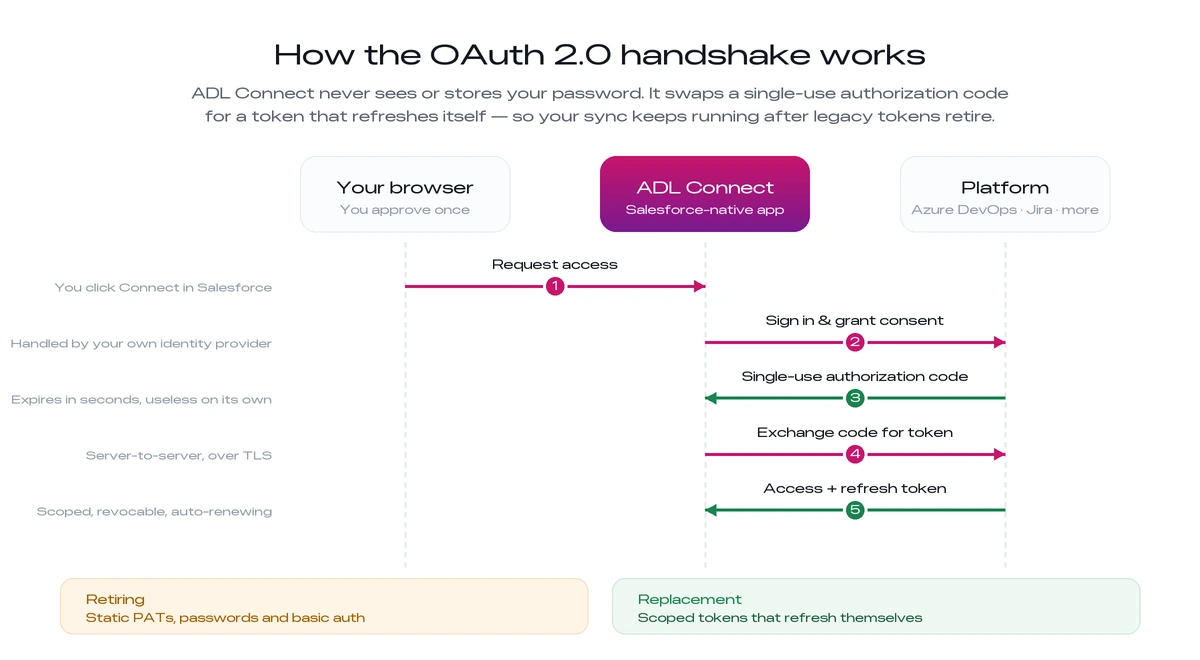 Swipe the diagram to see every step
Before you start the migration
A short pre-flight checklist for a safe switch
- 1Give yourself a buffer. Start ahead of each retirement date, and confirm who owns the credentials in every connected system.
- 2Check admin access. Make sure an administrator can approve the new OAuth consent screen for each platform.
- 3Map your environments. Note every sandbox or staging environment that has to be updated alongside production.
- 4Pilot one integration. Switch a single non-critical connection first and watch a full sync cycle run end to end — both ways, no errors — before rolling out the rest.
Stay connected through every deprecation
ADL Connect uses secure OAuth 2.0 across all five connectors — so when legacy tokens are retired, your Salesforce integrations keep running without a break.