
Jira Knowledge Base
Step-by-step guides for installing, configuring, and using ADL Connect — covering both the Salesforce→Jira and Jira→Salesforce connectors.
Prefer to watch? Follow the full setup video
A short walkthrough of connecting Salesforce and Jira with ADL Connect — from install to your first synced issues.
Salesforce ↔ Jira
Full connector setup, start to finish
- 01 Install ADL ConnectAdd the app from Salesforce AppExchange in a couple of clicks.
- 02 Connect JiraAuthenticate your Salesforce org and Jira account securely.
- 03 Map fields both waysMatch objects, fields & picklists so data lines up perfectly.
- 04 Go live with syncSwitch on real-time, two-way sync and watch issues update instantly.
Salesforce to Jira Connector - (AppExchange)
ADL Connect – Salesforce – Jira Integration Overview
ADL Connect is a powerful, bidirectional integration tool that connects Salesforce with Jira to create a unified workflow across Support, Sales, and Engineering teams. Available on the Salesforce AppExchange, this connector enables seamless synchronization of Jira issues, comments, attachments, and status updates directly within Salesforce.
By consolidating cross-system activities, ADL Connect eliminates the need for manual updates, improves response times, and significantly reduces context switching between applications.
Through its intuitive configuration interface and secure authentication model, ADL Connect allows organizations to centralize issue management while maintaining data accuracy and consistency across both platforms.

Purpose
The primary objective of ADL Connect is to provide a frictionless bridge between Salesforce users and Jira users, ensuring that customer issues, development tasks, and product enhancements move efficiently through their lifecycle.
This integration is particularly beneficial for:
Salesforce Administrators
- Require a configurable, scalable, and secure integration to support internal teams.
Developers
- Need consistent and accurate Jira issue visibility tied to Salesforce cases or internal records.
Project Managers and Product Owners
- Benefit from streamlined communication and reduced duplication of work across systems.
Support and Operations Teams
- Can create, link, and track Jira issues directly from Salesforce without switching tools.
ADL Connect ensures that both customer-facing teams and engineering teams operate with a single source of truth, ultimately improving collaboration and accelerating issue resolution.
What This Article Covers
This introductory article provides a high-level understanding of ADL Connect and what users can expect from the integration. The following topics are covered:
1. Core Features of ADL Connect
An overview of the essential capabilities, including:
- Creating and updating Jira issues directly from Salesforce
- Bidirectional synchronization of:
- Fields
- Comments
- Attachments
- Direct search and linking of existing Jira issues
- Secure authentication using Jira API tokens
- Configurable field and object mapping to align Salesforce records with Jira projects
These features ensure smooth operational workflows and reliable data synchronisation across both systems.
2. Installation and Initial Setup
A brief overview of the setup process, including:
- Installing ADL Connect from the Salesforce AppExchange
- Authenticating Salesforce and Jira using secure API tokens
- Performing initial project mapping and data model configuration
This establishes the foundation required to successfully activate and use the integration.
3. How Jira and Salesforce Data Sync Works
An explanation of the bidirectional synchronisation model, covering:
- How outbound synchronisation pushes Salesforce updates into Jira
- How inbound synchronisation retrieves Jira updates into Salesforce
- The role of:
- Field mapping
- Record ID mapping
- Sync rules and conditions
- Handling of comments and attachments across both platforms
This section helps users understand the expected behaviour of the connector once configured.
4. Key Benefits for Operational Teams
A summary of the practical advantages organisations gain by using ADL Connect:
- Reduced manual data entry and administrative overhead
- Improved visibility into engineering progress for customer-facing teams
- Faster issue resolution through centralized communication
- Enhanced collaboration between Sales, Support, and Development teams
- Increased data consistency, traceability, and auditability
These benefits lead to stronger cross-functional alignment and improved service delivery outcomes.
Installation and Connection Setup
Installation and Connection Setup
To begin using ADL Connect, the first step is to install the package from the Salesforce AppExchange and complete the initial connection configuration. This setup establishes a secure communication channel between Salesforce and Jira, enabling all subsequent synchronization activities.
1. Install the ADL Connect Package
Navigate to the Salesforce AppExchange and locate the ADL Connect listing. Link
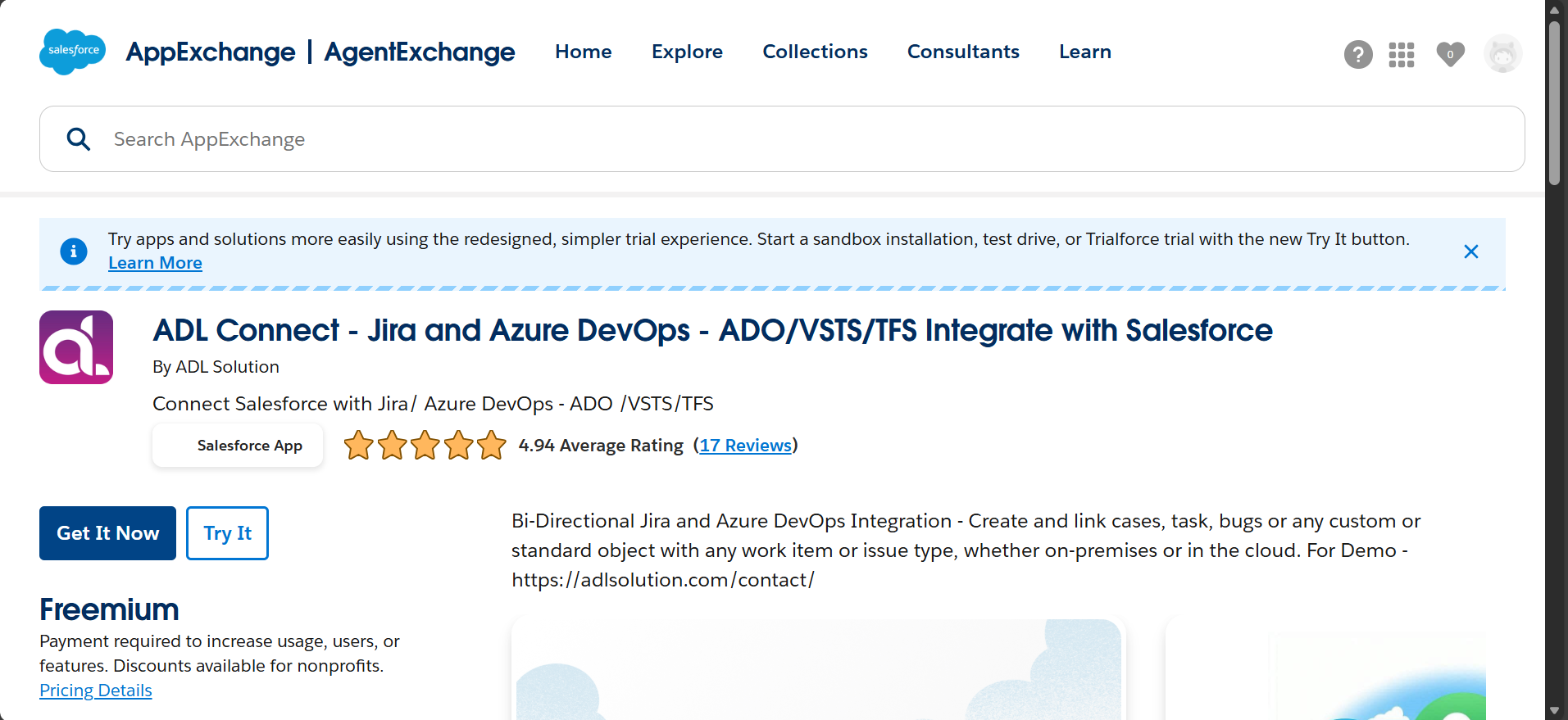
During installation, choose the target environment:
- Get It Now --> Install in Production
- Try It --> Install in Sandbox
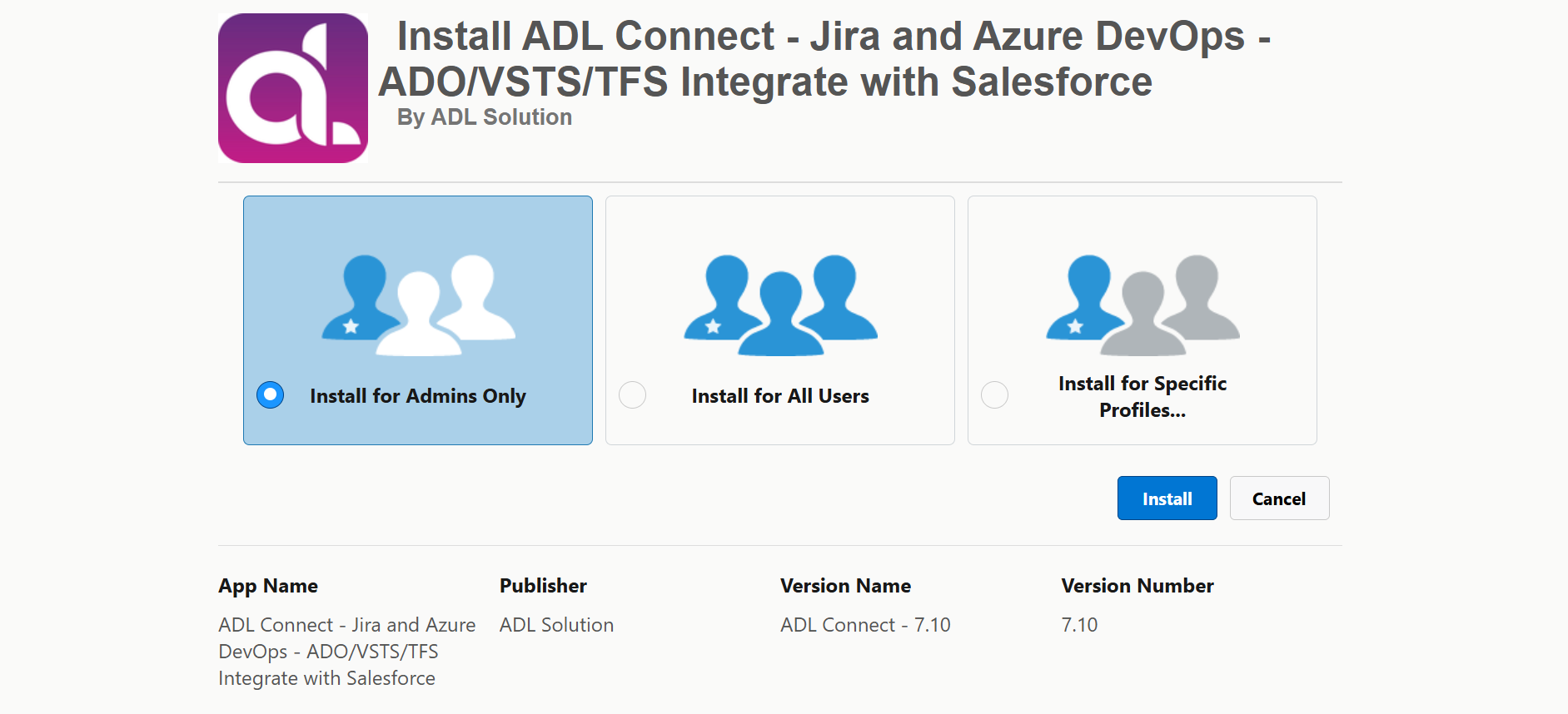
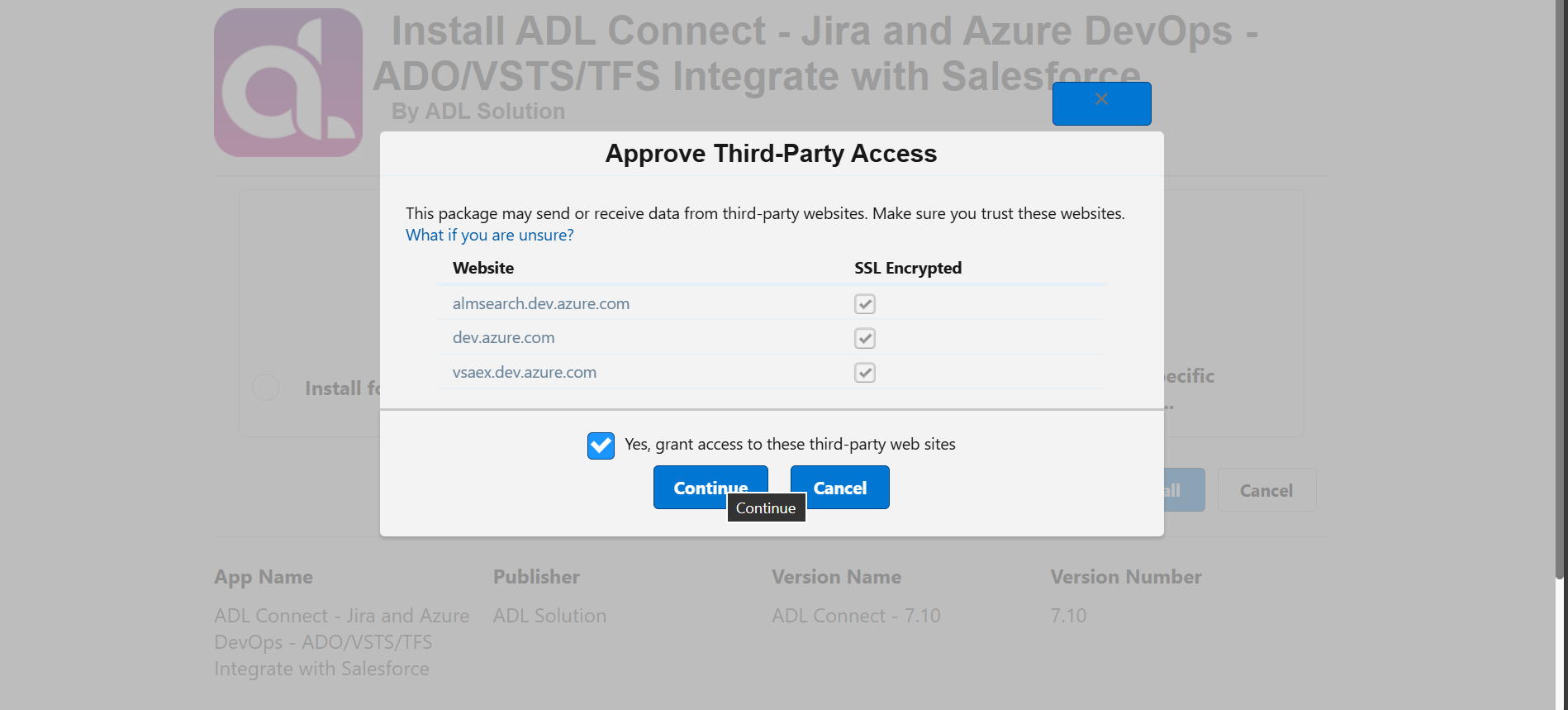
Review and approve the required permissions requested by the package.
Select the installation scope:
- Install for Administrators only, or
- Install for All Users, based on organisational requirements.
Note: (If you require only specific users to create or modify Jira work items, select ‘Install for Administrators only’. You can then grant outbound permission to specific users once after installation)
Once the installation is complete, ADL Connect will be available in the Salesforce App Launcher and ready for configuration. (Please wait until you receive the confirmation email. ET: 5-6 Min)
2. Launch the Configuration Console
After installation, open the ADL Connect Setup Console from the Salesforce App Launcher.
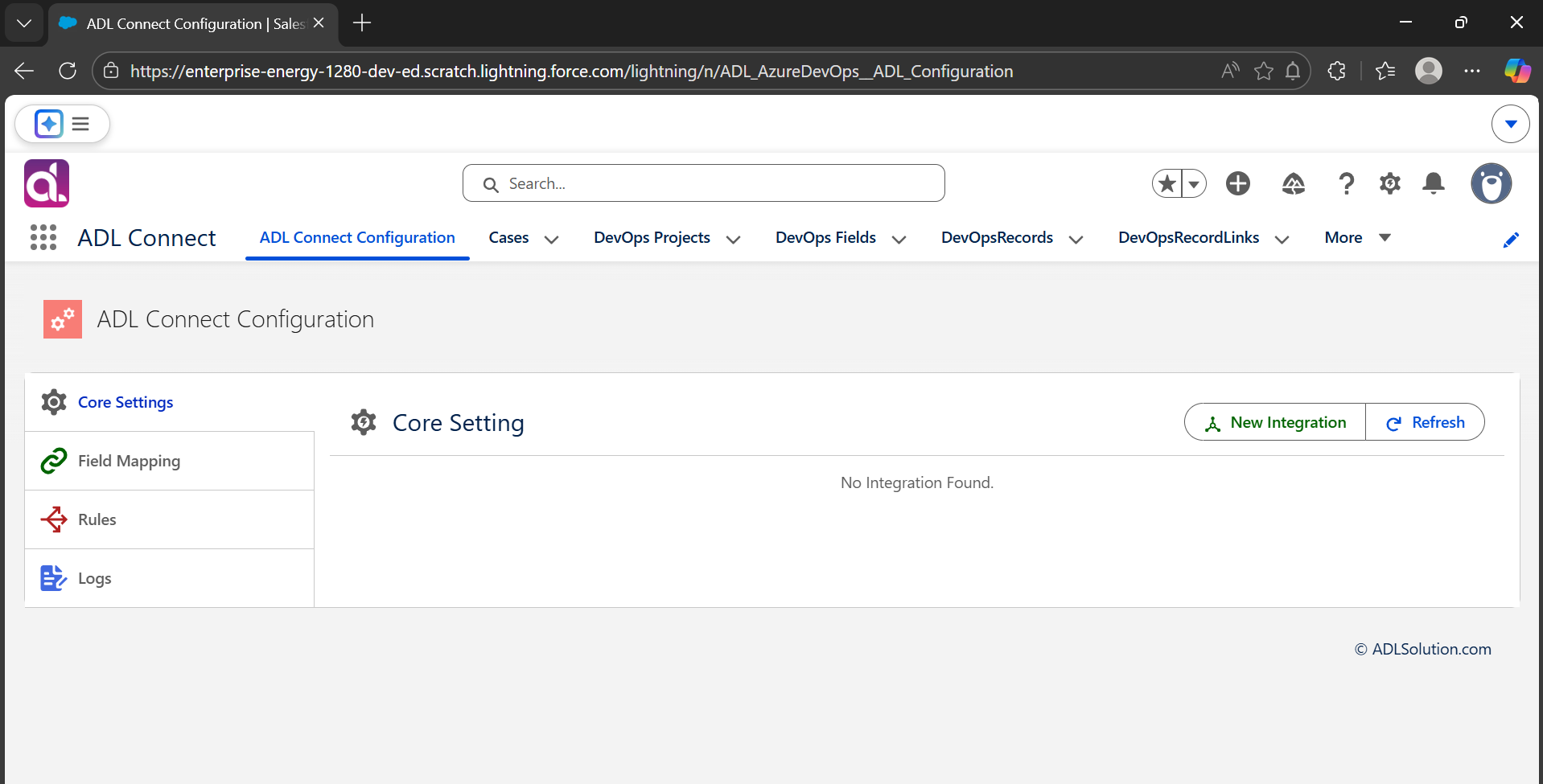
The configuration console serves as the central workspace for managing the integration, including:
- Providing Salesforce and Jira authentication details
- Configuring Jira project and Salesforce object mappings
- Defining field mapping rules
- Managing inbound and outbound synchronization settings
The console is designed to simplify both initial setup and ongoing maintenance, ensuring consistent and reliable synchronization between Salesforce and Jira.
Generate an API Token for Jira Account
How to Generate an API Token from Your Atlassian Account
To establish a secure connection between Salesforce and Jira, an API token must be generated from your Atlassian account. The API token replaces password-based authentication and provides a secure, recommended method for external applications such as ADL Connect to access Jira data.
Follow the steps below to generate and use an API token.
Step 1: Log in to Your Atlassian Account
- Open a web browser and navigate to: https://id.atlassian.com/
- Enter your Atlassian (Jira) email address and password.
- Complete any required multi-factor authentication if enabled.
Step 2: Access the Security Settings
- After logging in, click your Profile icon in the top-right corner.
- Select Account settings from the dropdown menu.
- In the left-hand navigation panel, click Security.
- Locate the section labelled API tokens.
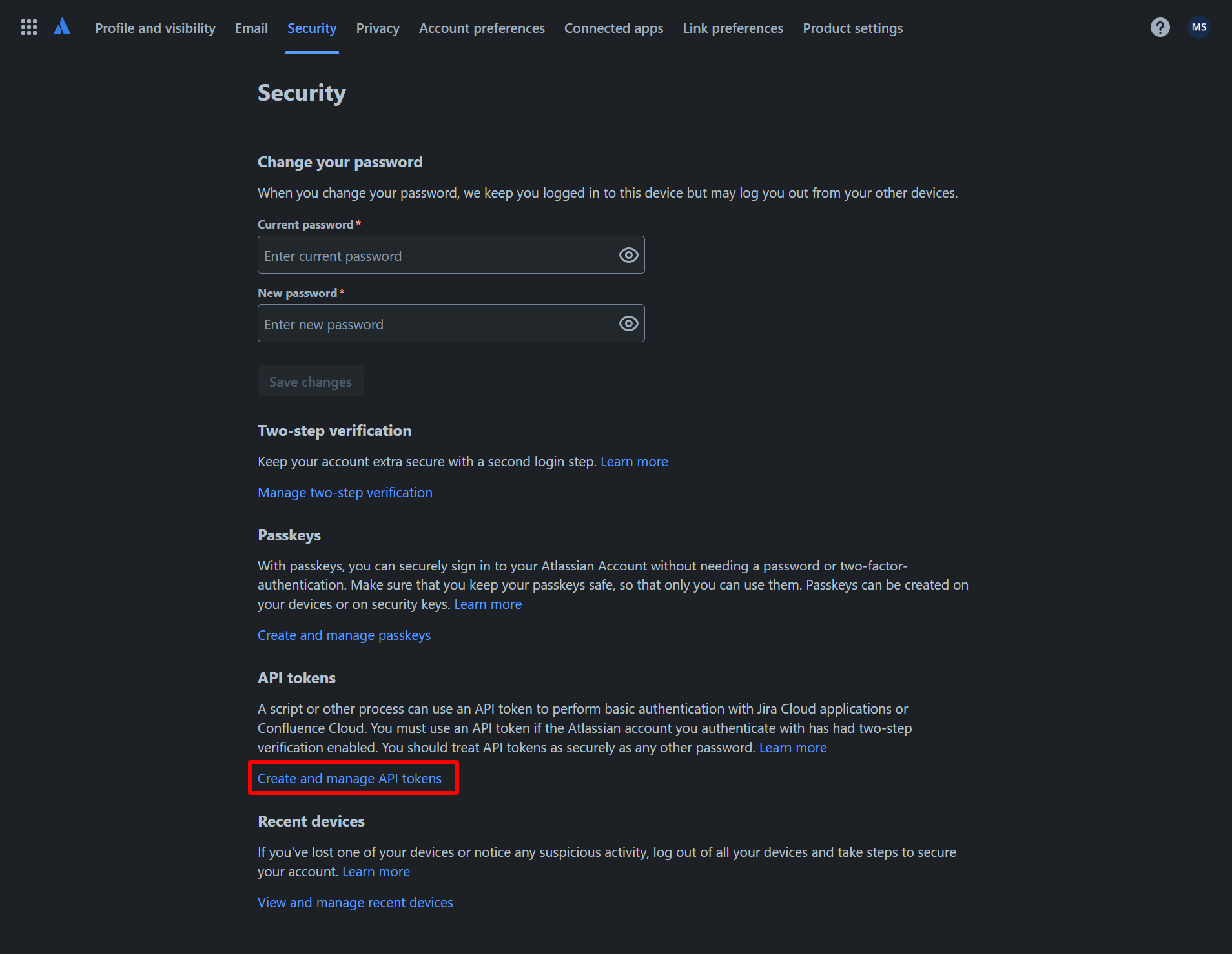
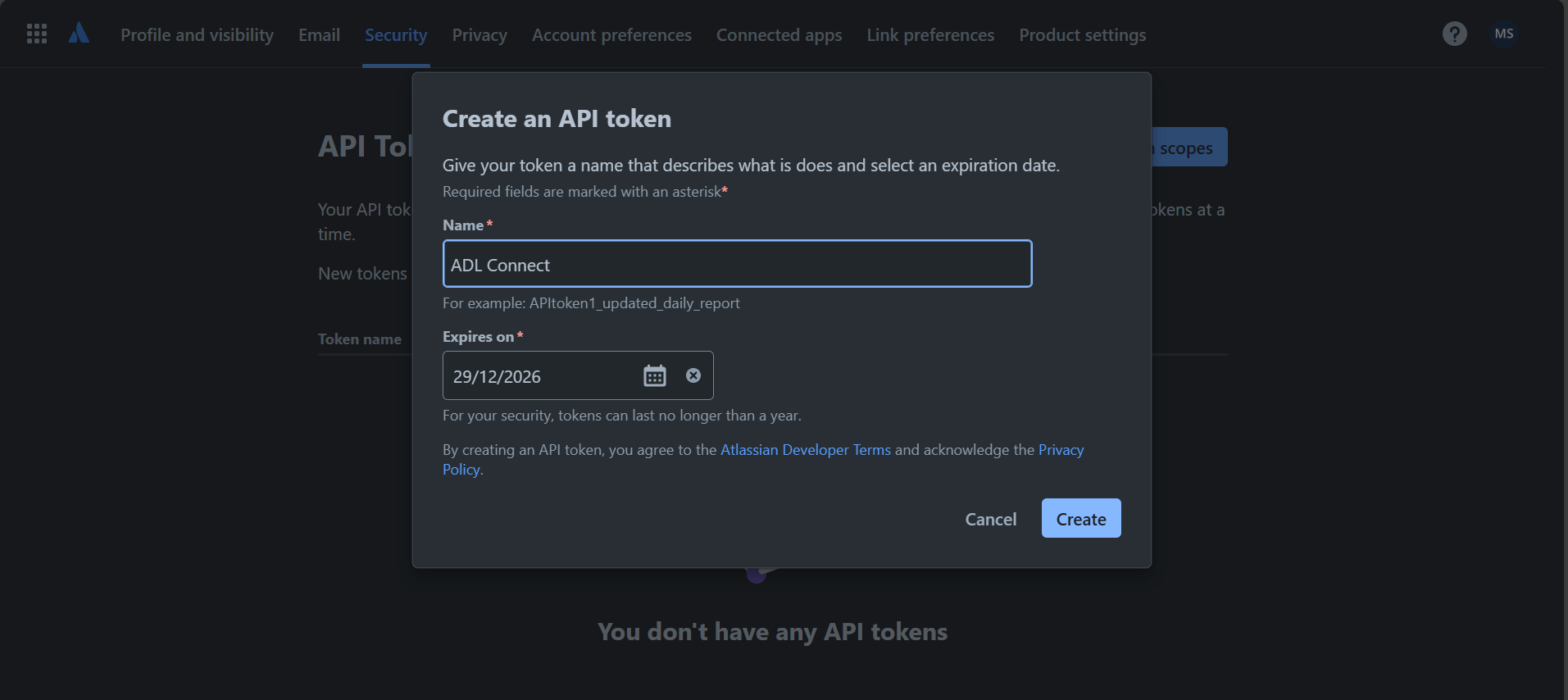
Step 3: Create a New API Token
- Click the Create API token button
- In the dialog window, enter a label for the token.
- Use a descriptive name such as: (Salesforce ADL Connect)
- Click Create to generate the API token
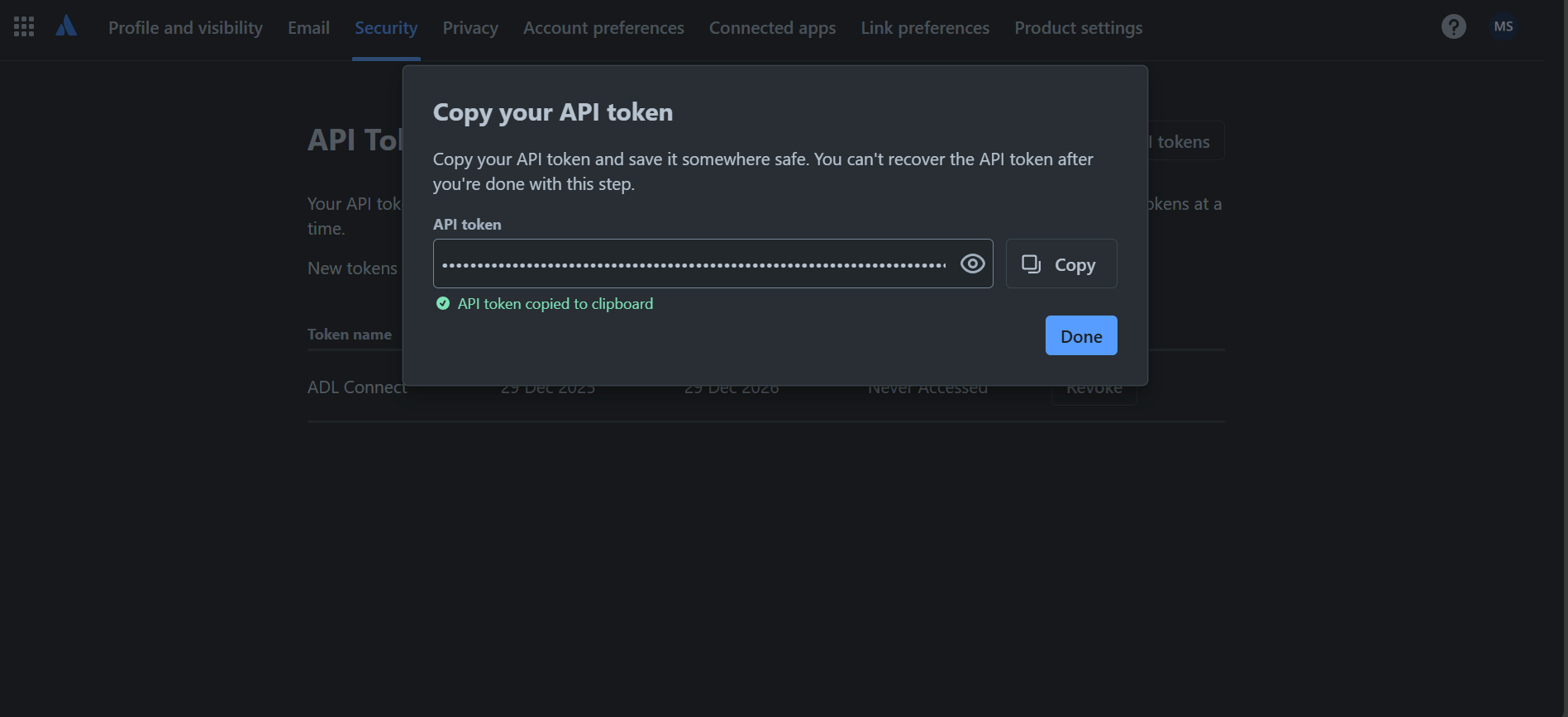
Step 4: Copy and Store the Token Securely
- Once the token is created, click Copy to clipboard.
- Store the token temporarily in a secure location. (Atlassian will not display the token again after you close the dialog)
- Proceed to use this token in the ADL Connect configuration within Salesforce.
Step 5: Connect Salesforce to Jira Using the API Token
A secure connection must be established before synchronization can begin.
To configure the connection in ADL Connect:
- Enter your Jira email address (username).
- Paste the API token into the authentication field.
- Save the credentials to enable secure access to Jira.
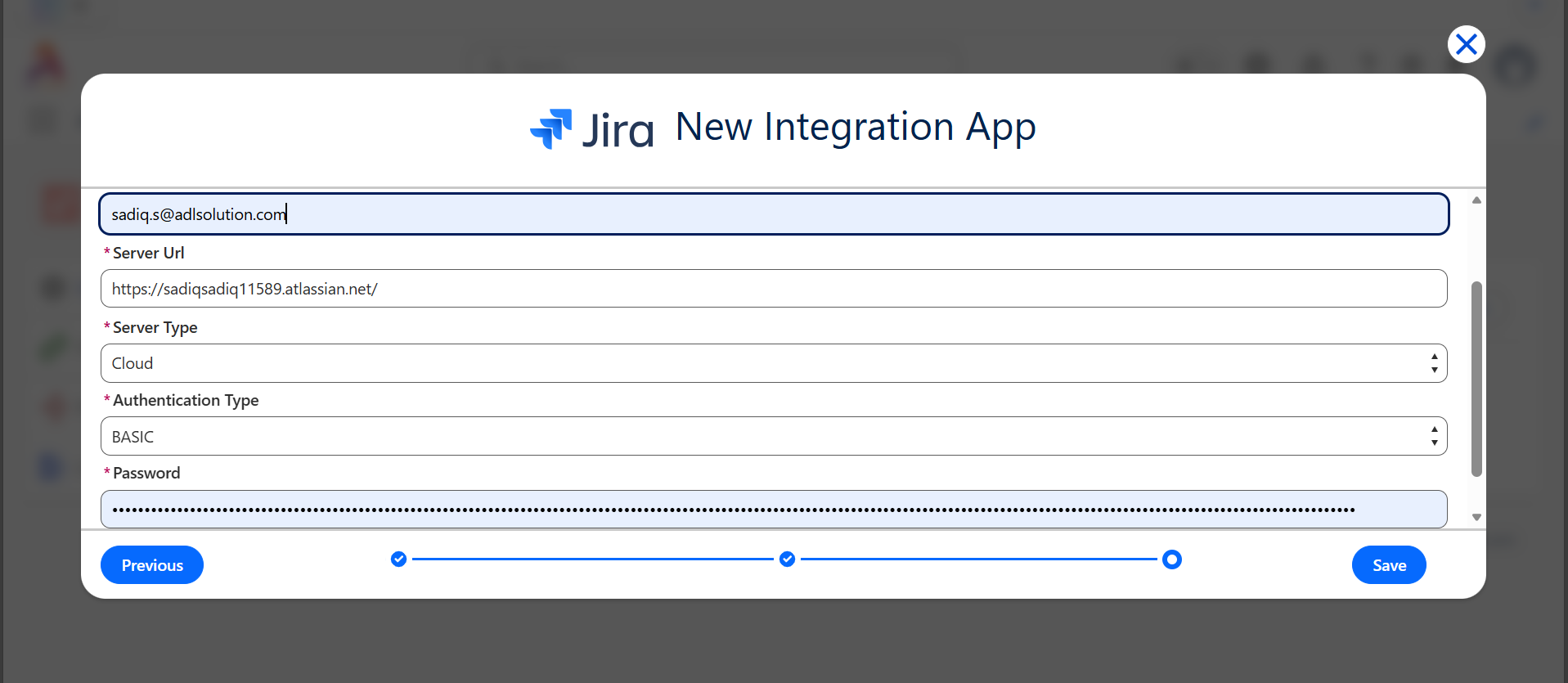
Once saved, ADL Connect can authenticate with Jira and begin synchronization based on your configuration.
Important Notes
- API tokens function as credentials and must be handled securely.
- Do not share tokens publicly or store them in unsecured locations.
- If a token is compromised, revoke it immediately from the Atlassian Security page.
- API tokens must always be used together with your Atlassian email address when configuring ADL Connect.
- Using API tokens ensures compliance with Atlassian’s recommended security standards by eliminating password-based authentication.
Setup OAuth 2.0
This section is password protected
Enter the password to view “Setup OAuth 2.0”.
Incorrect password. Please try again.
Don’t know the password? Contact us and we’ll help you out.
Configure Project Mapping
Project Mapping Configuration (Salesforce ↔ Jira)
Project mapping establishes the relationship between Salesforce objects and Jira projects. This configuration defines which Salesforce records create or link to which Jira issue types and ensures that data flows correctly between both systems.
As part of this setup, a custom Jira field must be configured to store the Salesforce Record ID, enabling reliable cross-system linkage and bidirectional synchronization.
Step 1: Create a New Project Mapping
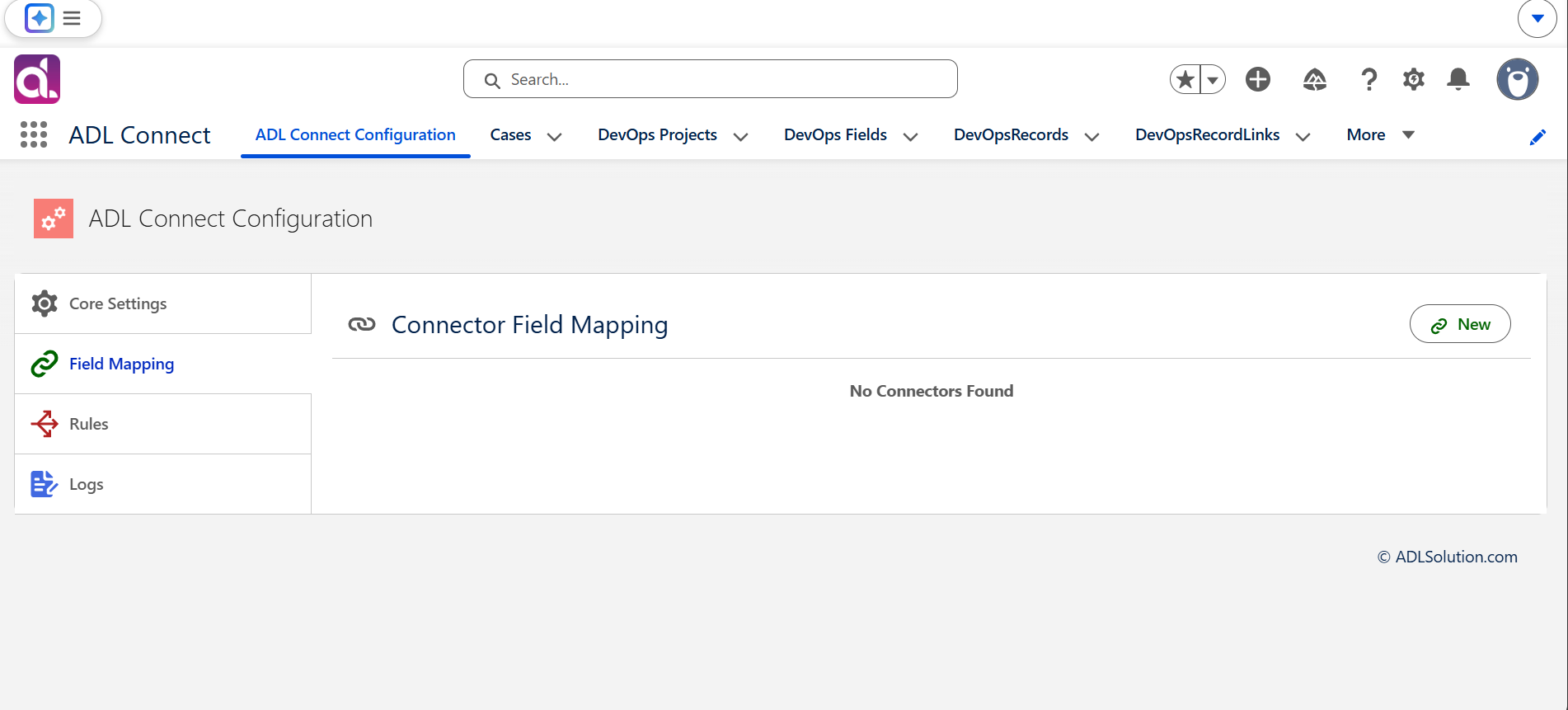
- In ADL Connect, navigate to the Field Mappings section.
- Click New Project Mapping or New Mapping.
- Select the appropriate Integration App from the dropdown. (This identifies the Jira environment associated with the mapping)
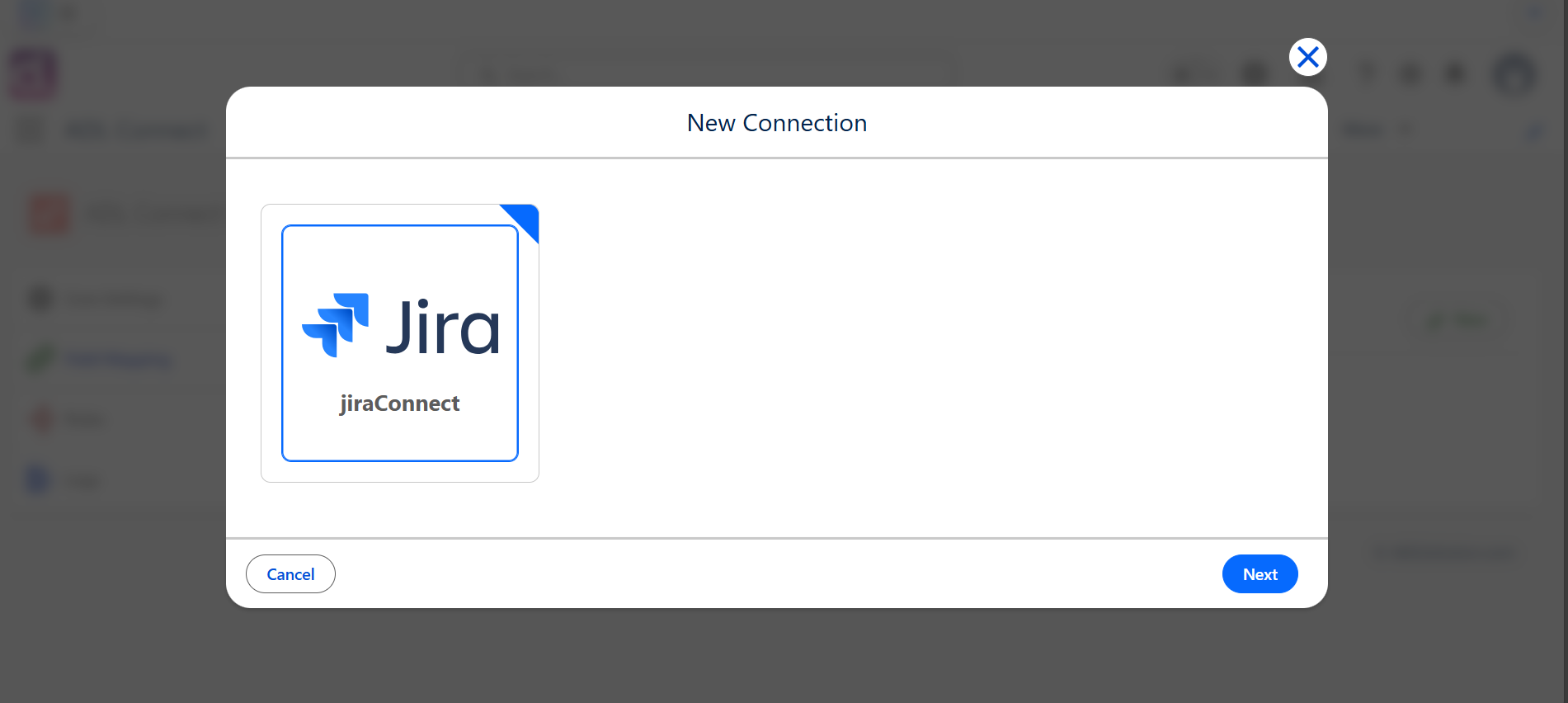
Step 2: Select the Jira Project
- In the Jira Project field, select the Jira project you want to integrate with Salesforce.
- Enter a Project Mapping Name to clearly label the connection.
- Examples:
- Support Cases to Jira Bugs
- Opportunities to Jira Stories
This name becomes the reference point for all synchronization rules and field mappings related to this integration.
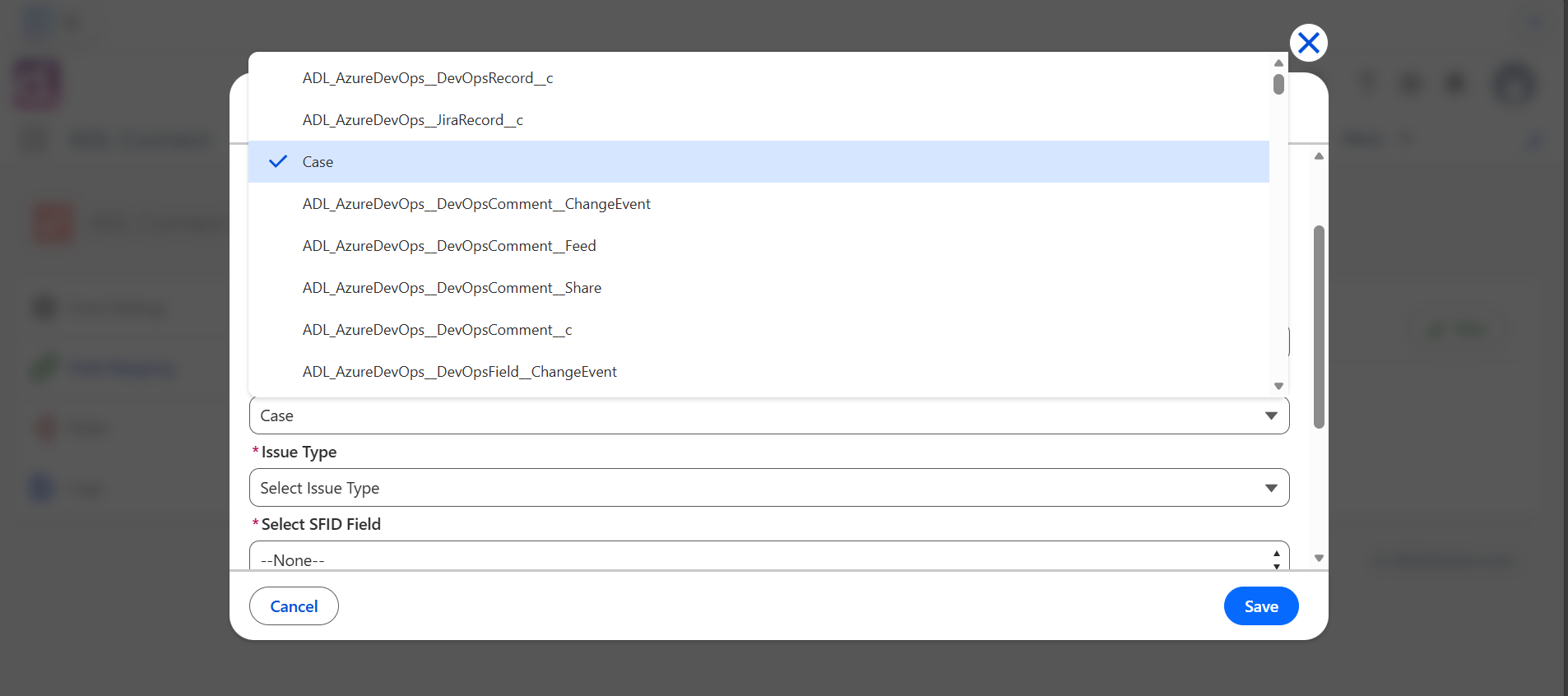
Step 3: Choose the Salesforce Object
- From the Salesforce Object dropdown, select the object whose records should synchronize with Jira.
- This can be a standard object (e.g., Case, Opportunity)
- Or a custom object
- This selection determines:
- Where Jira issues are created from
- Which Salesforce records can be linked to Jira
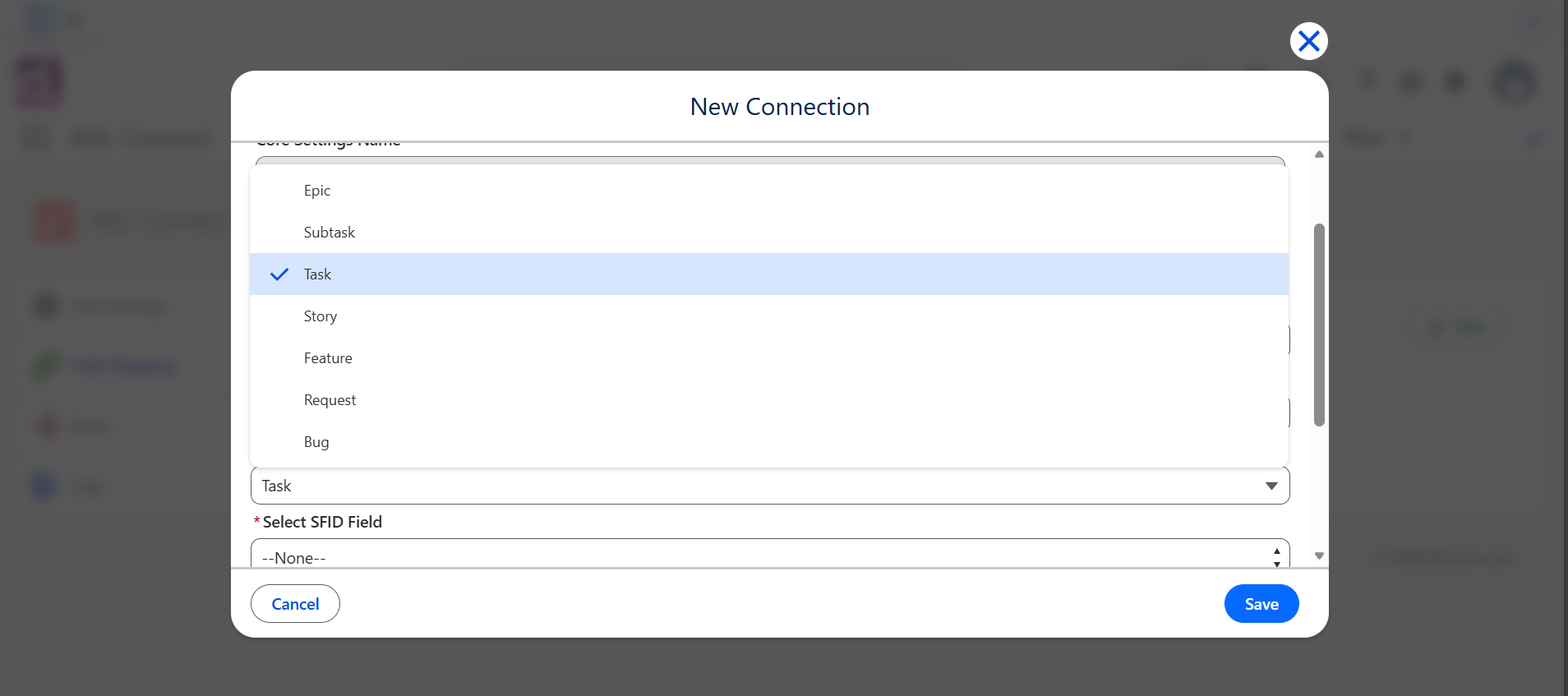
Step 4: Select the Jira Issue Type
- In the Jira Issue Type dropdown, select the issue type to be created in Jira.
- Common examples include:
- Bug
- Task
- Story
- Epic
- Custom Issue Types
- This ensures that Jira issues created from Salesforce follow the correct workflow and structure.
Step 5: Select or Create the Jira Field to Store Salesforce Record ID
To maintain a persistent link between Salesforce records and Jira issues, Jira must store the Salesforce Record ID in a dedicated custom field.
Option A: Select an Existing Custom Field
- Open the Salesforce Record ID Mapping Field dropdown.
- If a suitable Jira custom field already exists, select it.
The existing field must be a global field. Only company-managed (global) custom fields can be shared across projects. A custom field created inside a team-managed project is scoped to that project alone — it will still appear in Jira's field list and in search results, but it cannot be added to another project's screens, so ADL Connect cannot read or write it outside its home project.
To check a field's scope, go to Settings → Issues → Custom fields and look for the field there. Global fields are listed with a context and a screen count; a field that does not appear in that list belongs to a team-managed project and must be recreated using Step 6.
Option B: Create a New Jira Custom Field (Recommended)
If no appropriate field exists, create one using the steps below.
Step 6: Create the Required Jira Custom Field (Short Text)
This procedure creates a global field. Create the field from Settings → Issues → Custom fields, as described below. Do not create it from a team-managed project's own Project settings → Fields page — that produces a project-scoped field that cannot be used by ADL Connect anywhere else.
A. Navigate to Jira Custom Field Settings
- Log in to Jira using an account with administrator permissions.
- Go to Settings → Issues, then select Fields → Custom fields in the left-hand navigation. (Direct URL:
/secure/admin/ViewCustomFields.jspa.)
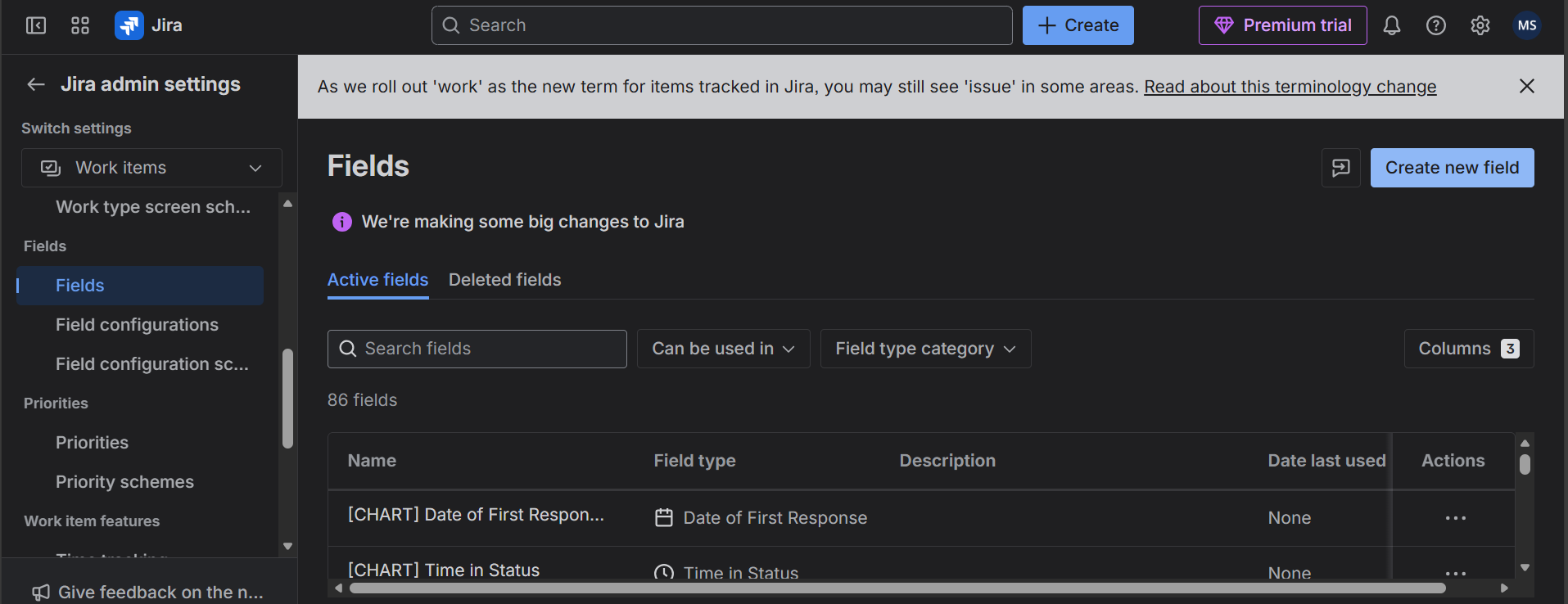
B. Create a New Custom Field
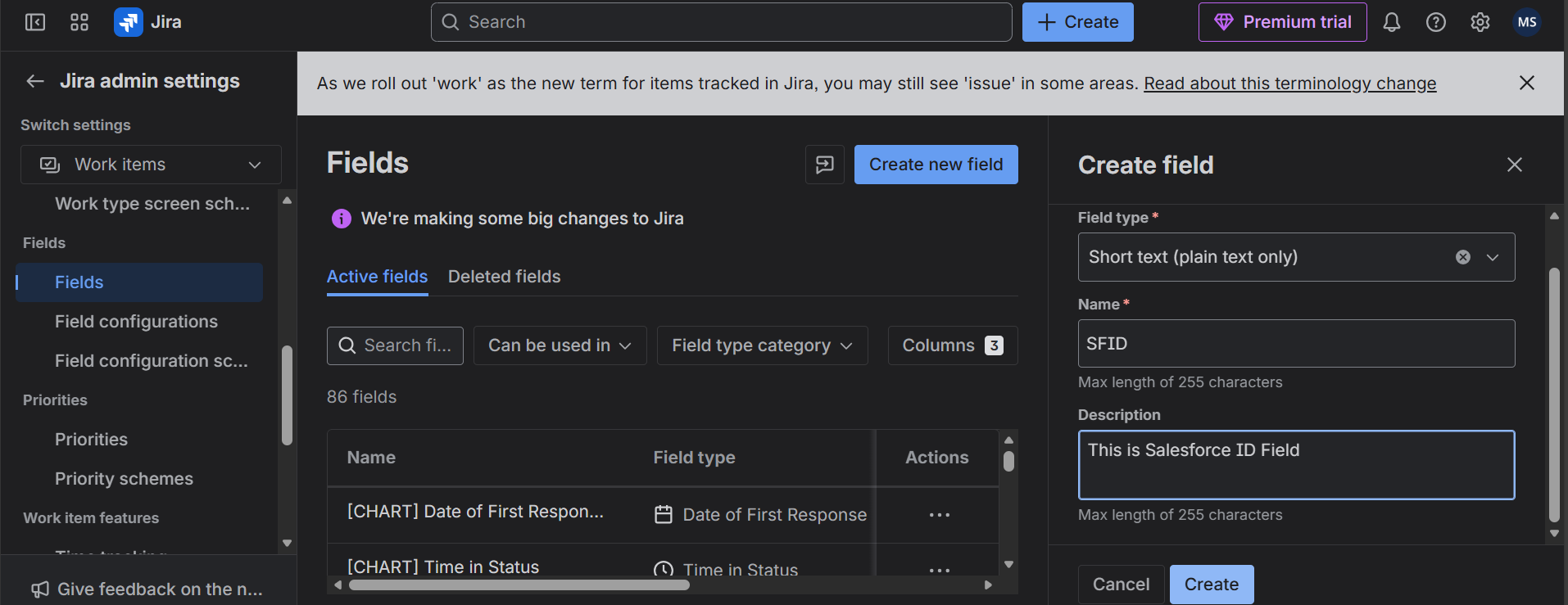
- Click Create custom field.
- Select Short Text (Text Field) as the field type.
- Salesforce Record IDs are stored as strings, making this field type mandatory.
- Enter a Field Name, such as:
- SFID
- Salesforce Record ID
- SF_Link_ID
- (Optional) Add a description, for example:
- Stores the Salesforce record ID for integration purposes.
Avoid reusing a name that already exists. If a team-managed project already has a field with the same name, Jira will allow the duplicate, but JQL queries using the bare name (for example
SFID = "a19...") become ambiguous. Either choose a distinct name such asSalesforce ID (SFID), or reference the field by its ID (cf[10149]) in saved filters and automation rules.
C. Assign the Field to Jira Screens
- Assign the new field to the required Jira screens:
- Create Issue
- Edit Issue
- View Issue
- This ensures ADL Connect can both insert and retrieve the Salesforce Record ID during synchronization.
Step 7: Return to Salesforce and Complete the Mapping
- Navigate back to Salesforce and refresh the ADL Connect configuration page.
- In the Salesforce Record ID Field dropdown, select the newly created Jira custom field.
- Verify that all other mapping details are correct:
- Salesforce Object
- Jira Project
- Jira Issue Type
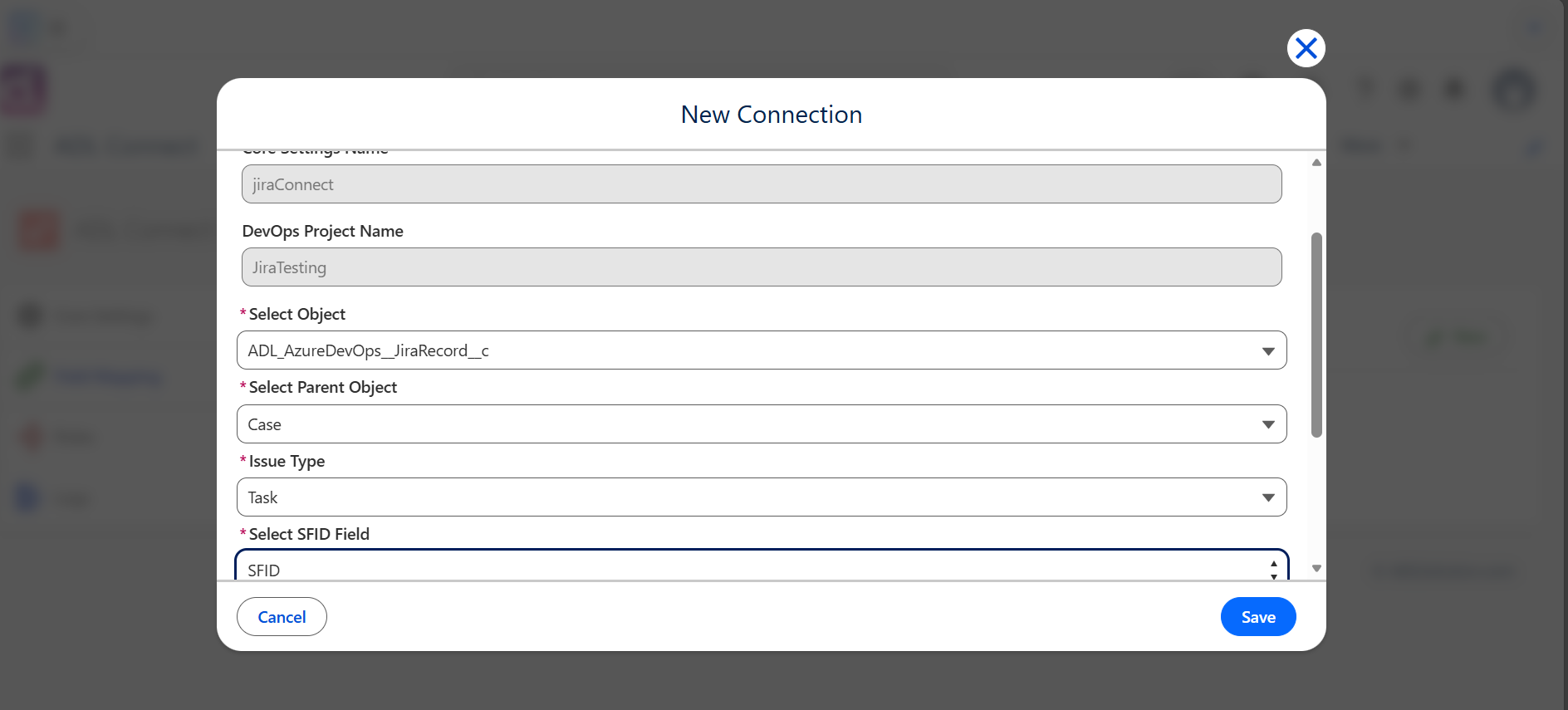
Step 8: Save the Project Mapping
- Click Save to finalize the configuration.
- The project mapping is now active and ready for use.
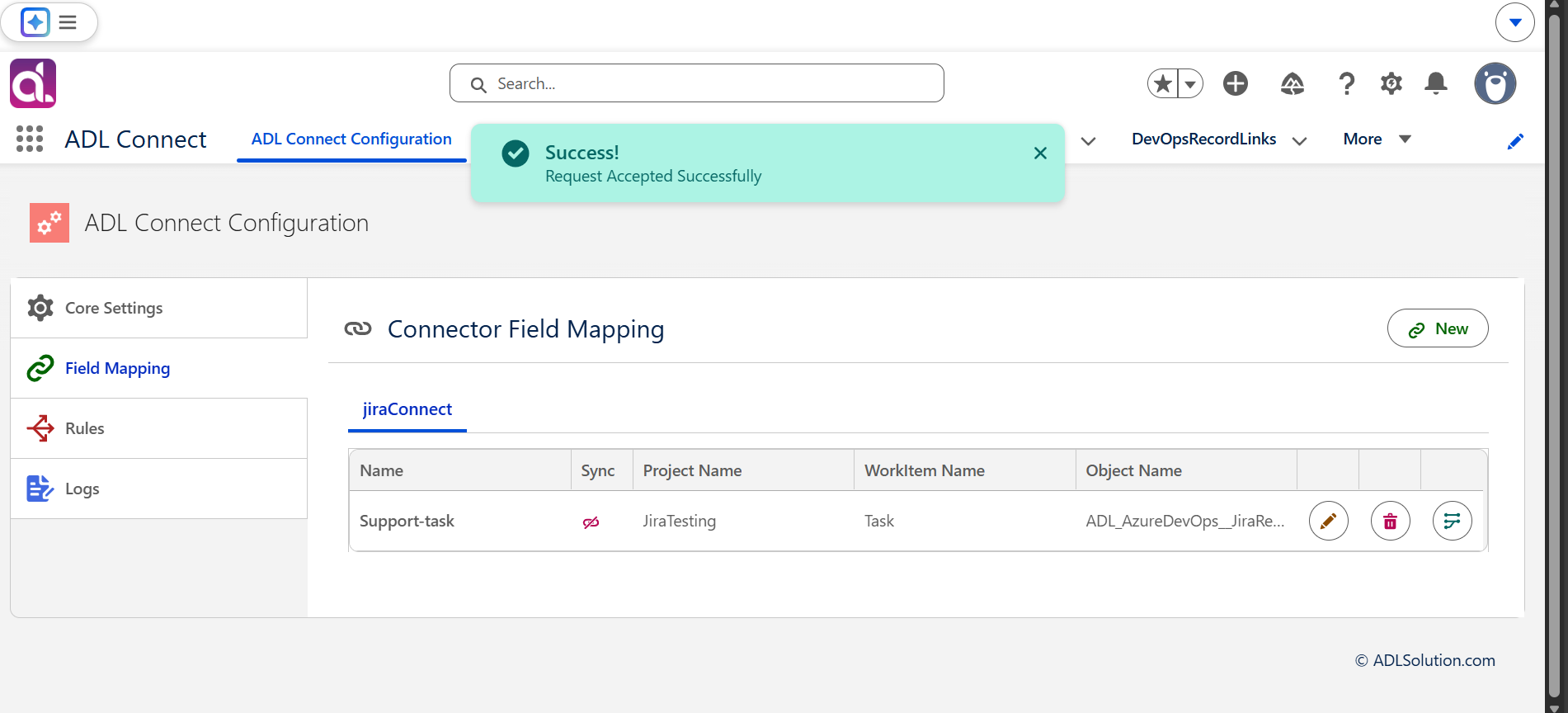
Result
Your project mapping is now successfully established. This configuration:
- Links a Salesforce object to a Jira project and issue type
- Ensures every Jira issue created via ADL Connect maintains a reference to its originating Salesforce record
- Forms the foundation for:
- Field mappings
- Synchronization rules
- Issue creation and update workflows
Configuring Field Mappings
Field Mapping Configuration (Salesforce ↔ Jira)
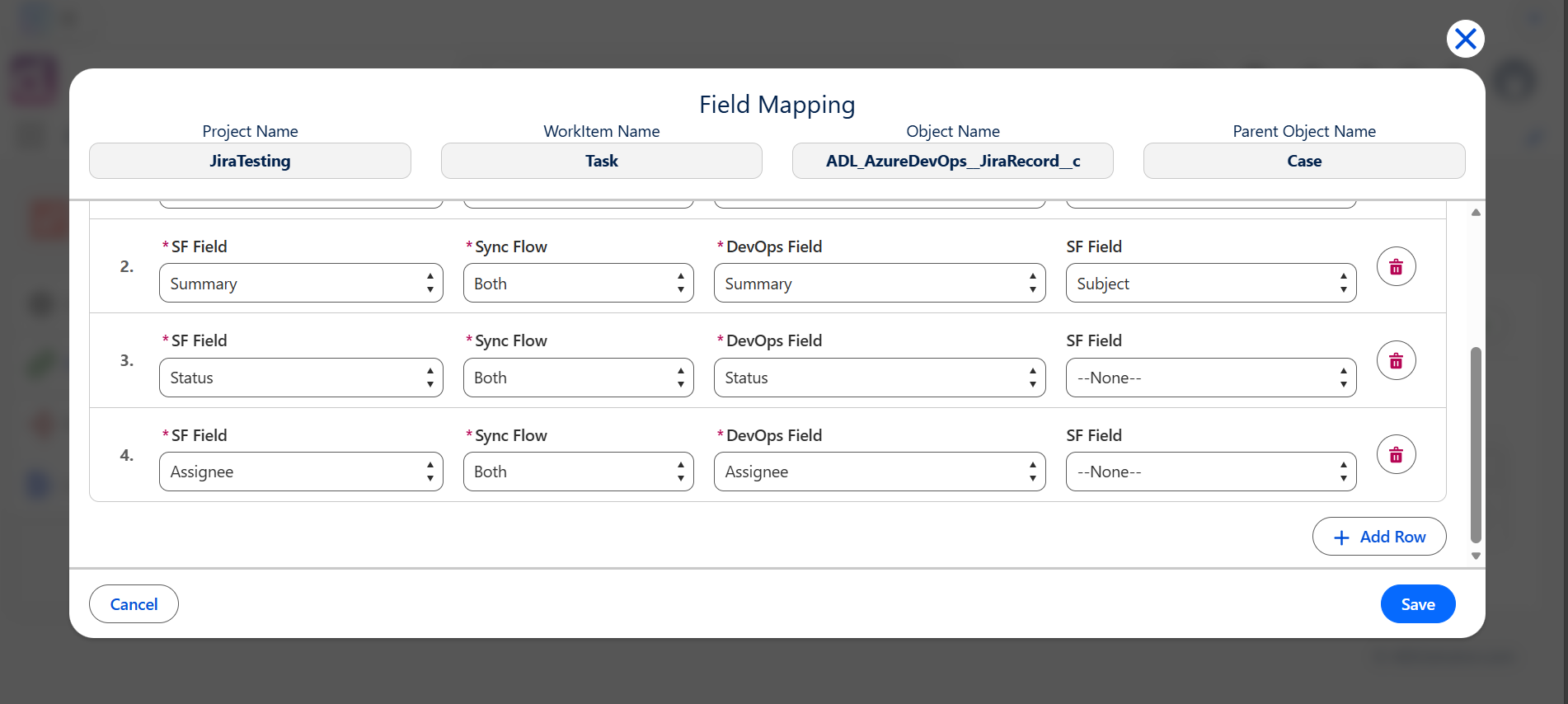
Once the project mapping has been established, the next step is to configure field-level mappings. Field mappings define how individual Salesforce fields correspond to Jira fields and control the direction of data synchronization.
These mappings ensure that updates made in either system are synchronized correctly and in accordance with your business rules.
Follow the steps below to define field mappings for the selected project connection.
Step 1: Open the Field Mapping Section
- Navigate to the Project Connection created in the previous steps.
- Locate and click the Field Mapping action button.
This opens the configuration panel used to define how data flows between Salesforce and Jira.
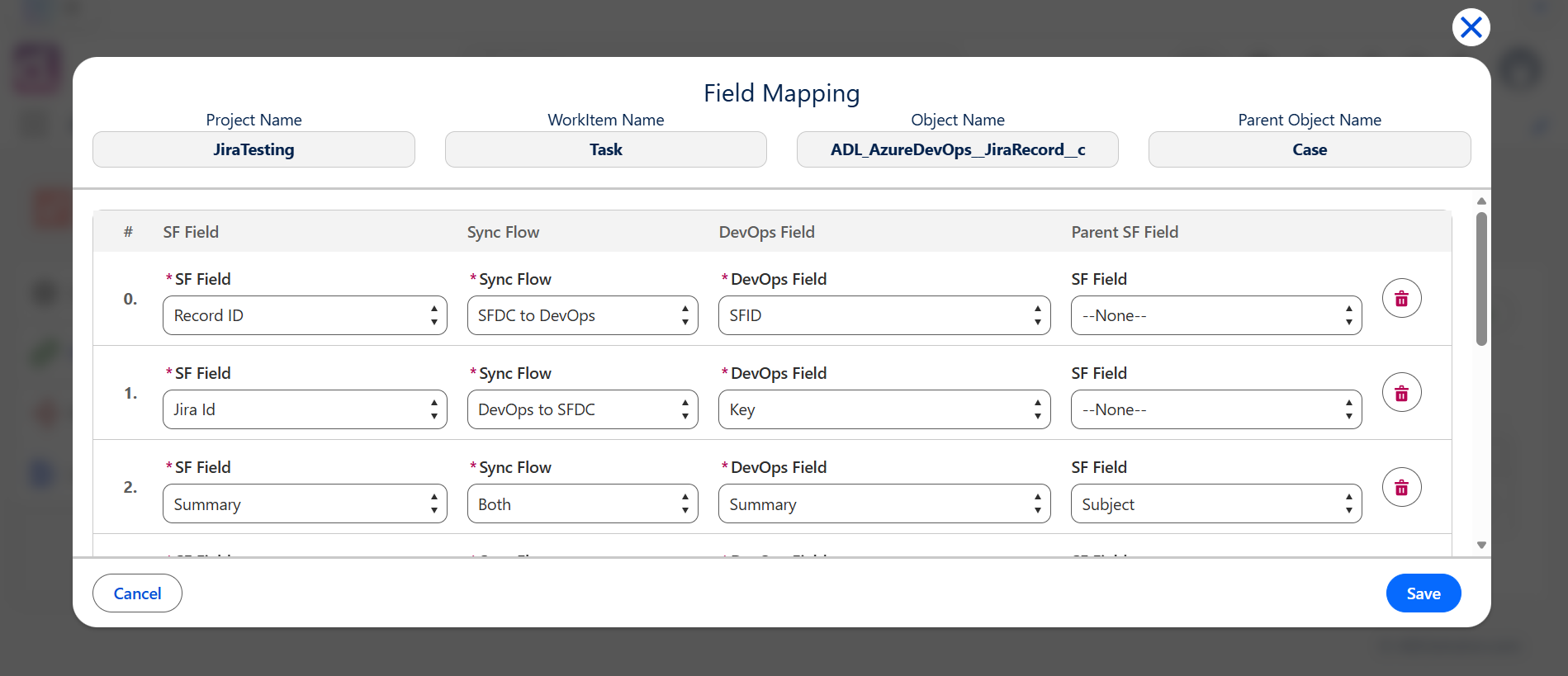
Step 2: Select the Salesforce Field
- In the Salesforce Field dropdown, select the field you want to synchronize.
- The system automatically displays all available fields from the Salesforce object associated with the project connection.
- Choose the appropriate standard or custom field based on your integration requirements.
Common examples include:
- Status
- Priority
- Assignee
- Any custom field created specifically for the integration
Inbound Rules and Site Configuration
Inbound Rule Configuration (Jira → Salesforce)
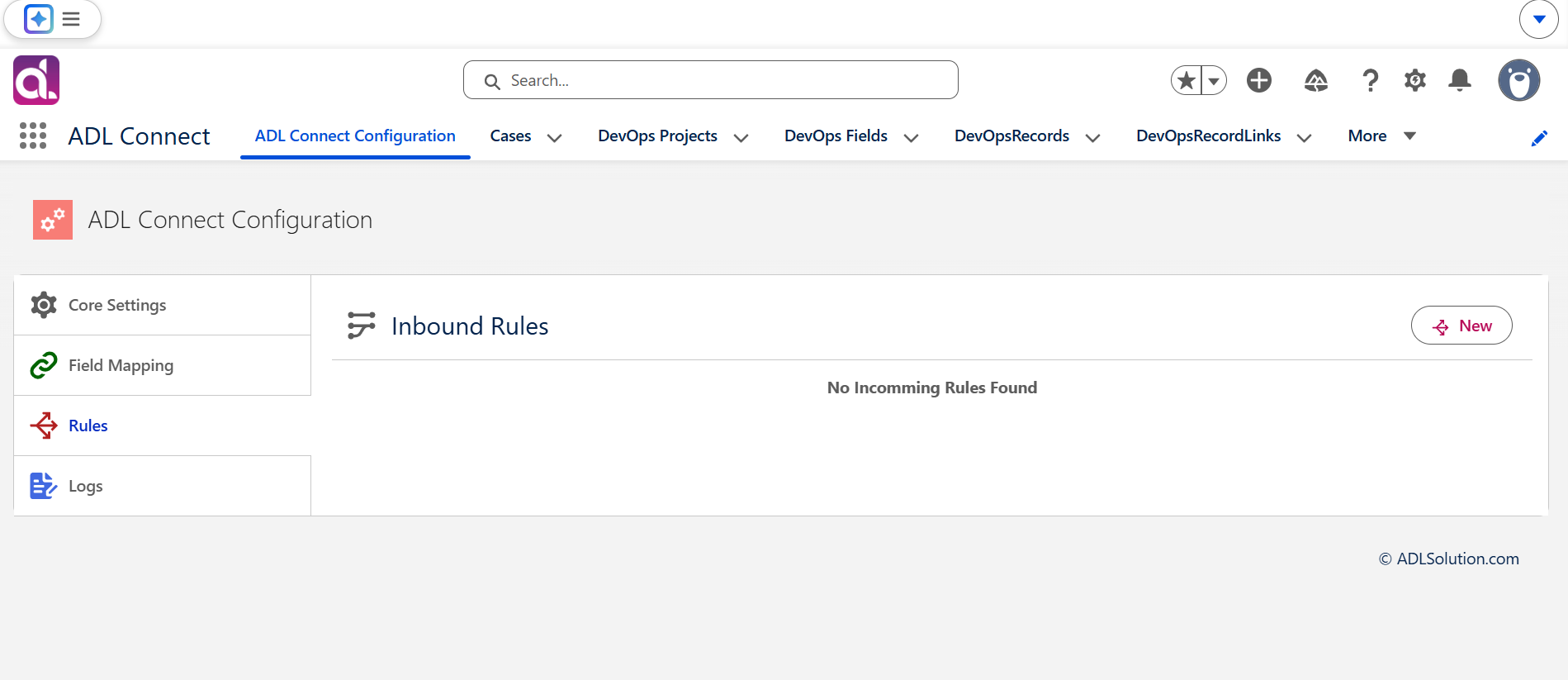
Inbound rules enable Jira to send updates back into Salesforce. These updates may include field changes, status transitions, comments, and assignments. To enable inbound synchronization, an inbound rule must be configured in ADL Connect, along with a Salesforce Site that can receive webhook requests from Jira.
Follow the steps below to complete the inbound configuration.
Step 1: Open the Inbound Rule Configuration
- Navigate to the Project Mapping created earlier.
- Locate the Inbound Rule section associated with the selected project mapping.
- Click New Inbound Rule.
This opens the configuration interface used to define how inbound Jira updates are processed in Salesforce.
Step 2: Select the Integration App
- In the Integration App dropdown, select the Jira integration instance you are configuring.
- This ensures the inbound rule is associated with the correct Jira environment and authentication context.
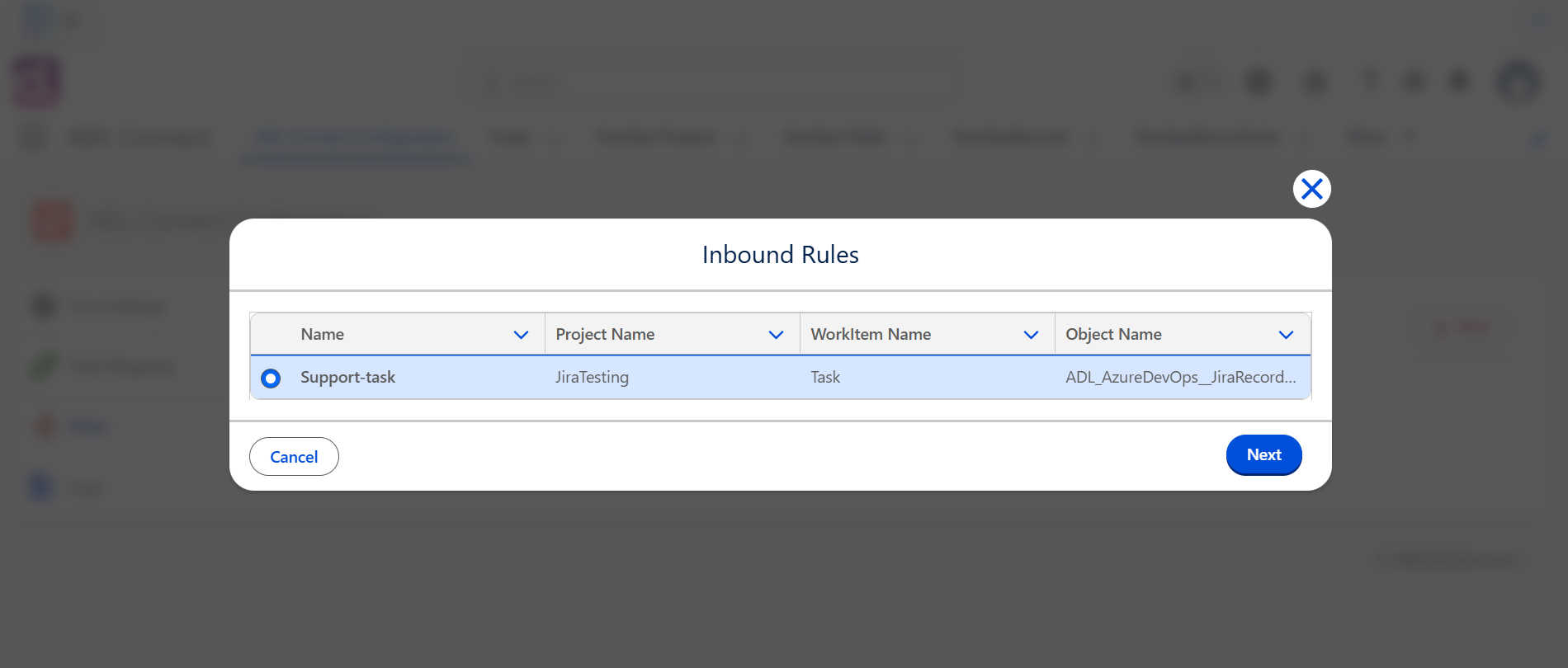
Step 3: Choose the Project Mapping
- In the Project Mapping field, select the mapping created previously.
- This links inbound updates to the correct Salesforce object and Jira project.
- Verify that the selected mapping matches the:
- Salesforce object
- Jira project
- Jira issue type
- for which inbound updates should apply.
Configuring the Salesforce Site for Inbound Access
To allow Jira to call back into Salesforce, a Salesforce Site must be configured. This Site exposes a secure endpoint URL that Jira uses when sending webhook notifications.
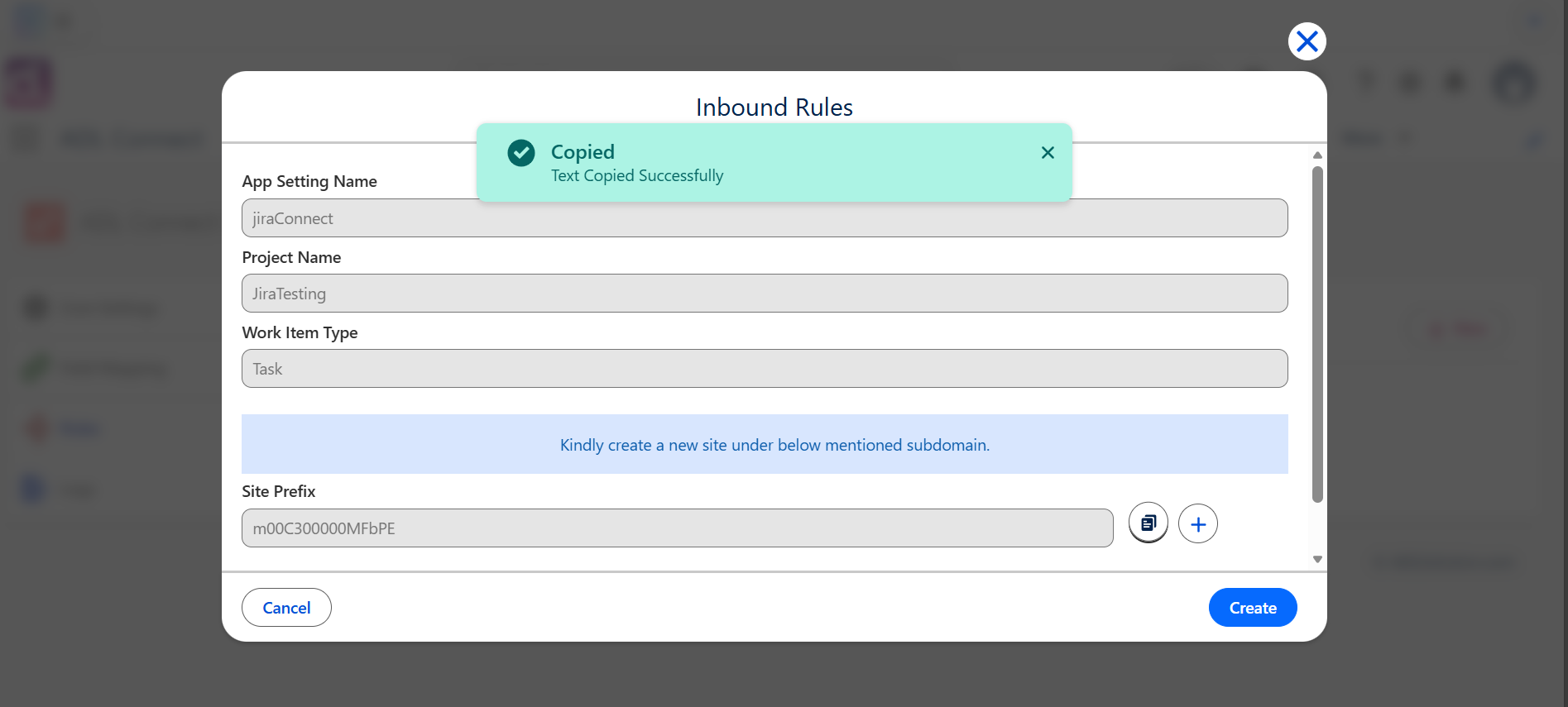
Step 4: Copy the Site Subdomain Prefix ID
- In the inbound rule configuration panel, locate the Site Subdomain Prefix ID displayed on the screen.
- Copy this prefix value.
- Click the Add button next to the Site configuration section.
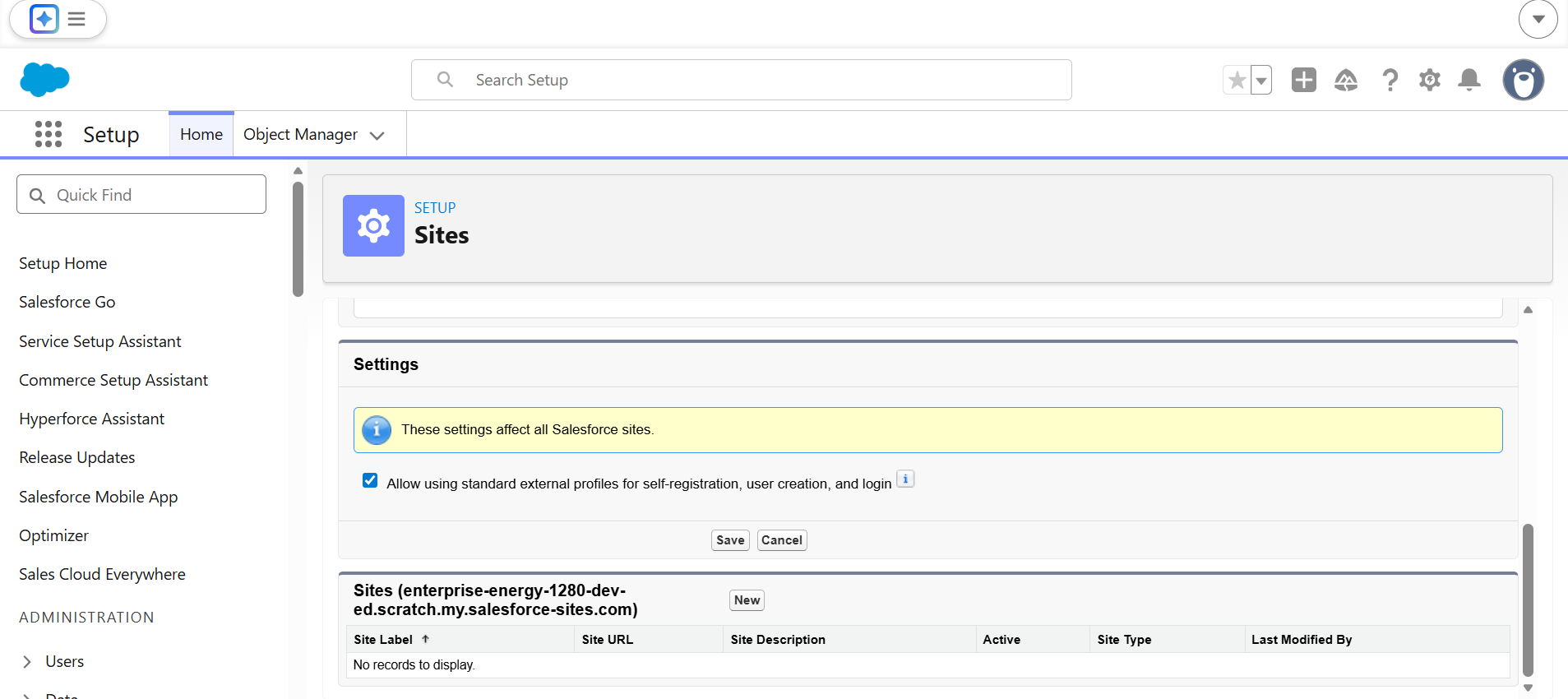
You will be redirected to the Salesforce Sites setup page.
Step 5: Register a Salesforce Site Domain (If Not Already Enabled)
If Salesforce Sites have not been enabled previously:
- You will be prompted to register a Site Domain.
- Enter a unique domain name and save it.
- Once registered, Salesforce allows you to create new Sites under this domain.
Step 6: Create a New Salesforce Site
- On the Sites setup page, click New.
- Enter a Site Label, such as:
- ADL Connect Inbound Site
- Jira Sync Endpoint
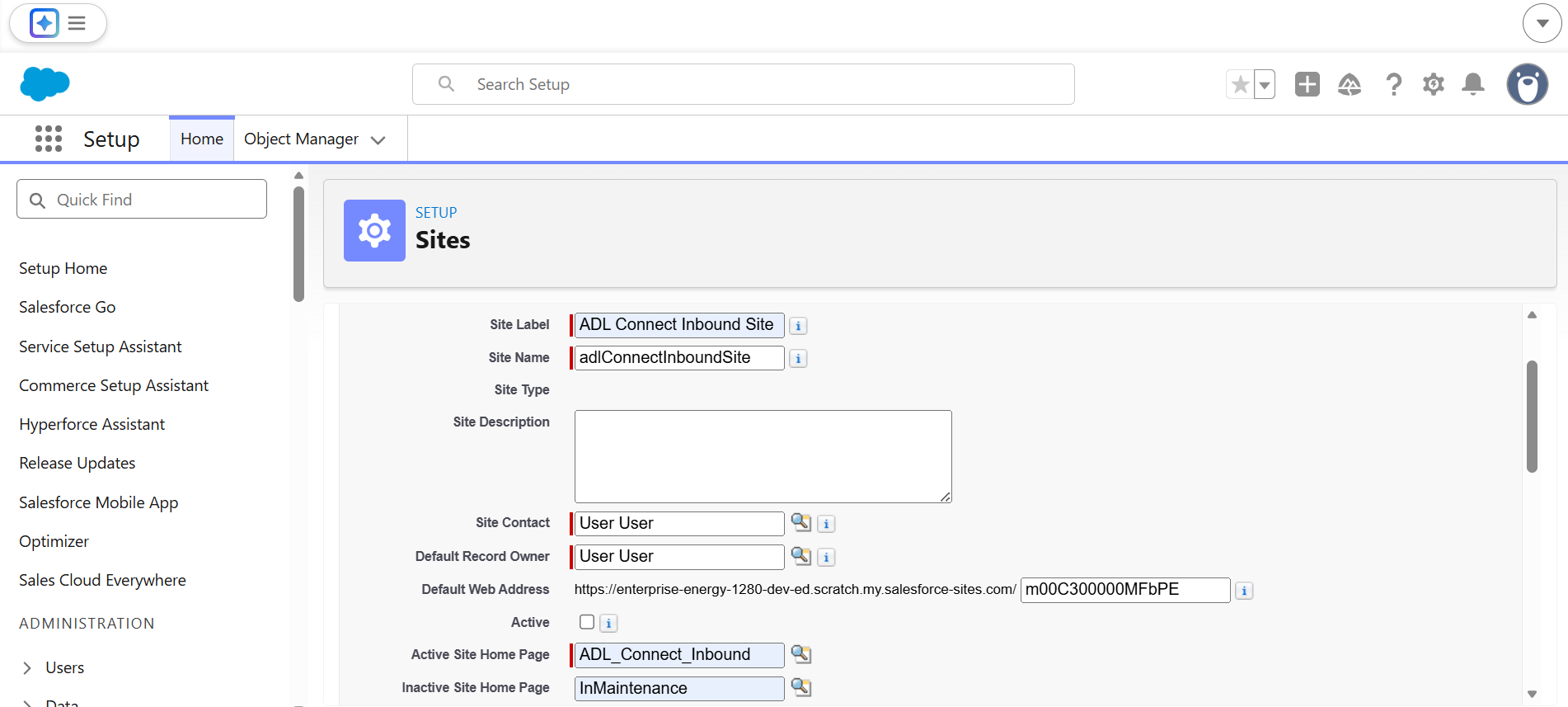
- In the Site Name / Subdomain Prefix field, paste the Site Subdomain Prefix ID copied earlier.
- This ensures the generated Site URL matches what ADL Connect expects.
- Complete the required Site configuration fields, including:
- Active status
- Site contact
- Default web address
- Click Save to create the Site.
Once saved, Salesforce generates a public-facing Site URL that Jira will use for inbound updates.
Step 7: Return to ADL Connect and Save the Inbound Rule
- Return to ADL Connect in Salesforce.
- Ensure the newly created Salesforce Site is selected in the inbound rule configuration.
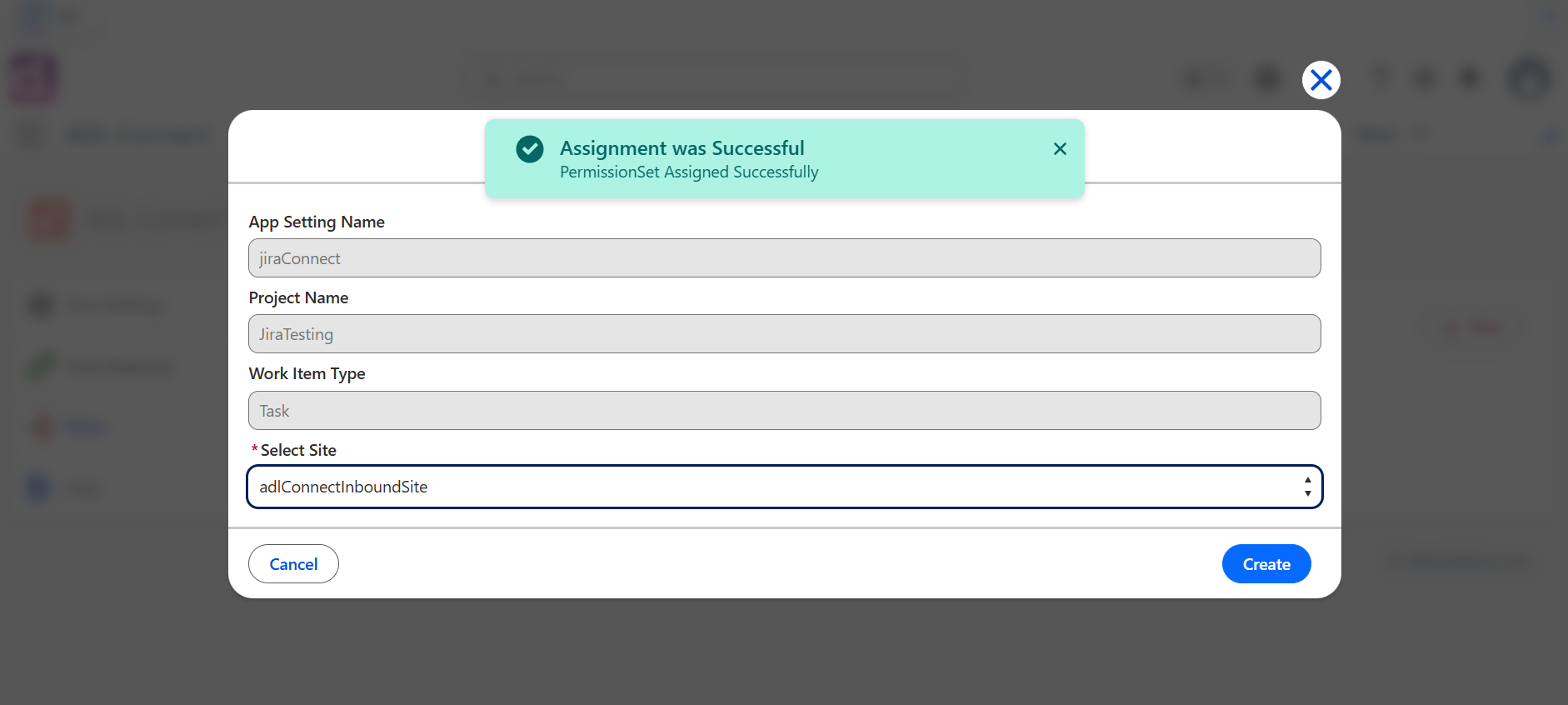
- Click Save to finalize the inbound rule.
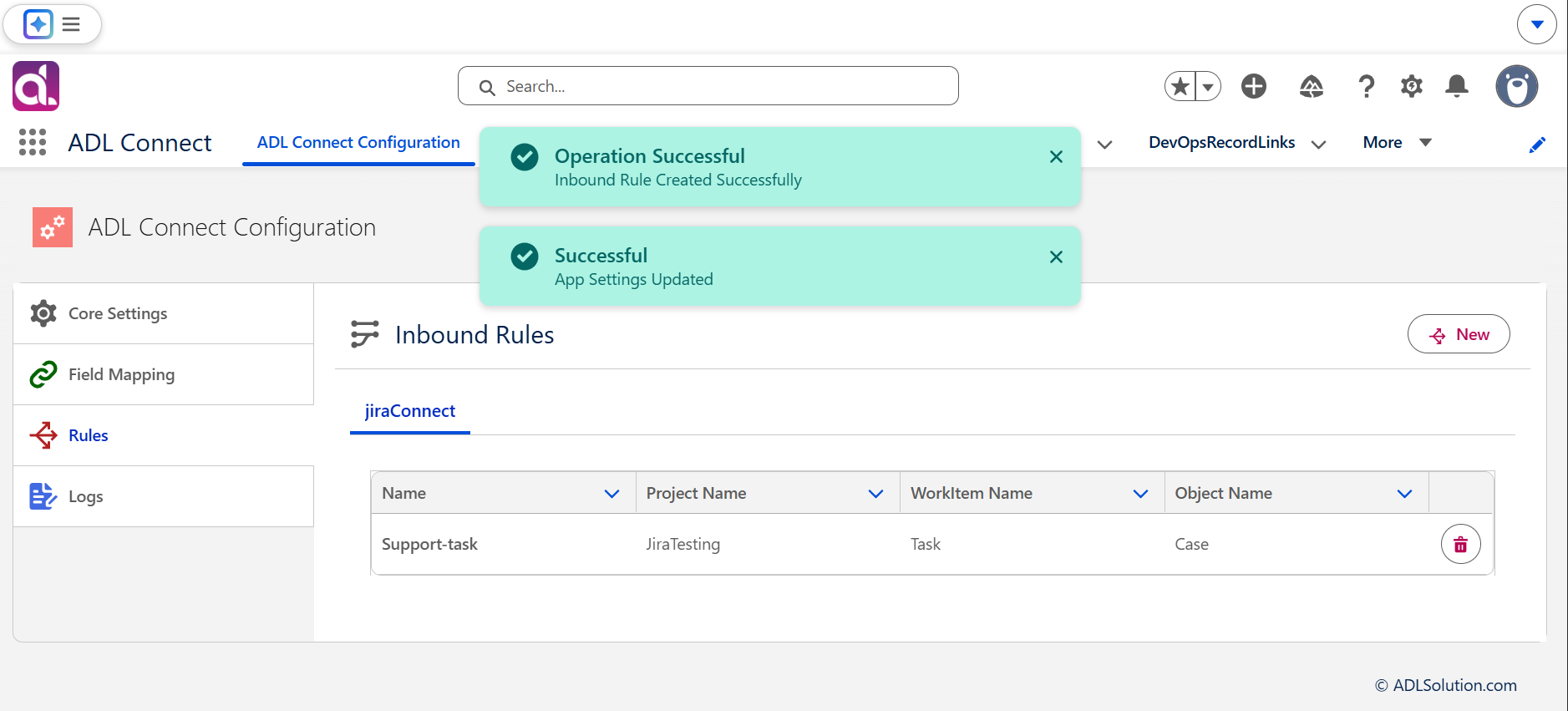
Inbound synchronization is now enabled for the selected project mapping.
Result
After completing these steps:
- Jira can push field updates, status transitions, and assignments into Salesforce.
- The Salesforce Site acts as the secure endpoint for inbound webhook calls.
- ADL Connect is fully prepared to process real-time inbound updates for the configured project.
This completes the Inbound Rule configuration stage.
Configuring Case Page Layout
Enabling Jira Issue Management on Salesforce Case Pages
To allow users to create, view, and manage Jira issues directly from Salesforce Cases, the required ADL Connect Lightning components must be added to the Case record page. This configuration enables seamless collaboration between Support and Engineering teams without leaving Salesforce.
The steps below explain both page configuration and end-to-end Jira issue management from Salesforce.
1. Open and Edit the Case Record Page
- Open any existing Case record in Salesforce.
- Click Edit Page to launch the Lightning App Builder.
- This opens the configurable layout where components can be added to extend Case functionality
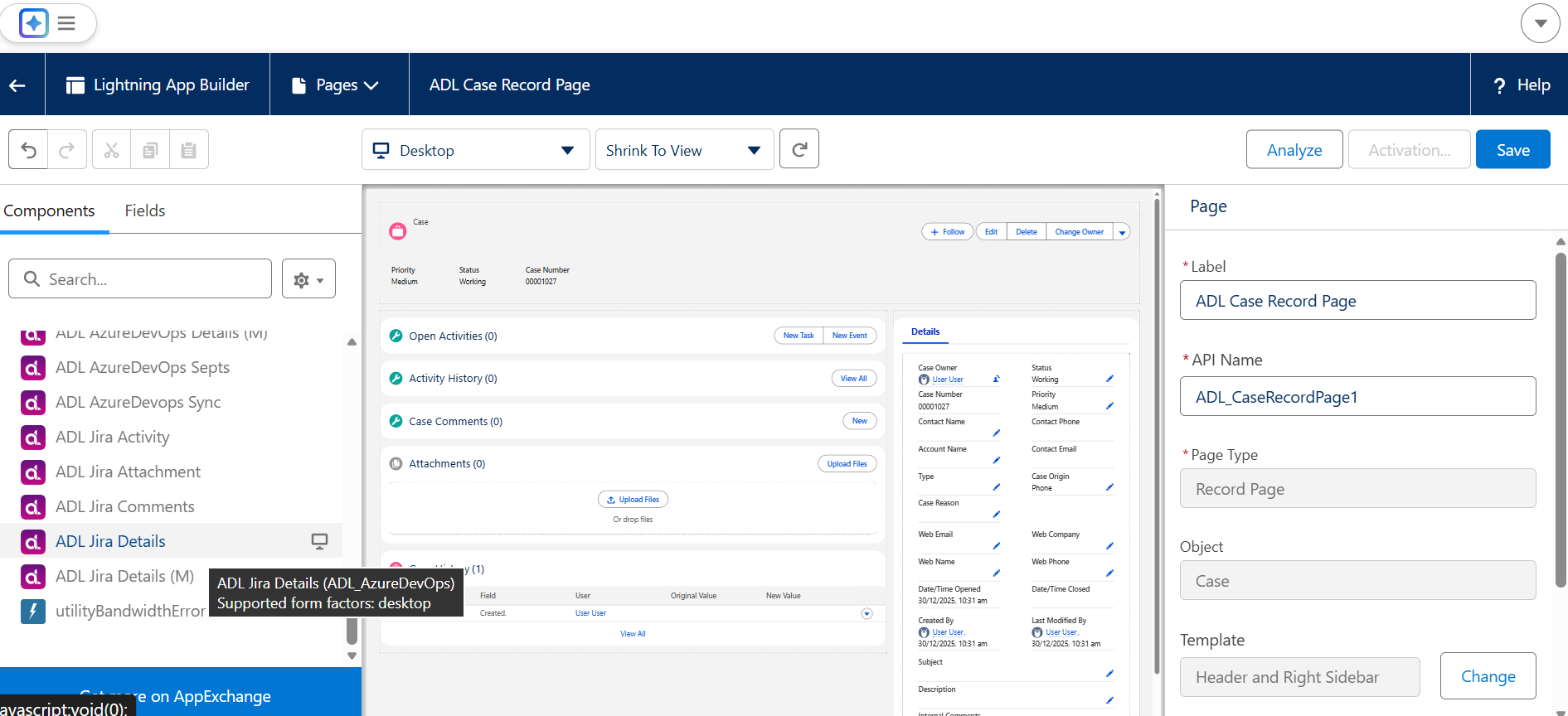
2. Add the ADL Jira Details Component
- In the Lightning App Builder component panel, scroll to Custom – Managed Components.
- Locate the ADL Jira Details component.
- Drag and drop the component into the desired region of the Case page layout.
- This component displays Jira issue details and provides the interface to create new Jira issues from Salesforce.
- Click Save and Activate the page for the required apps or profiles if prompted.
Once added, every Case record will support Jira issue creation and tracking.
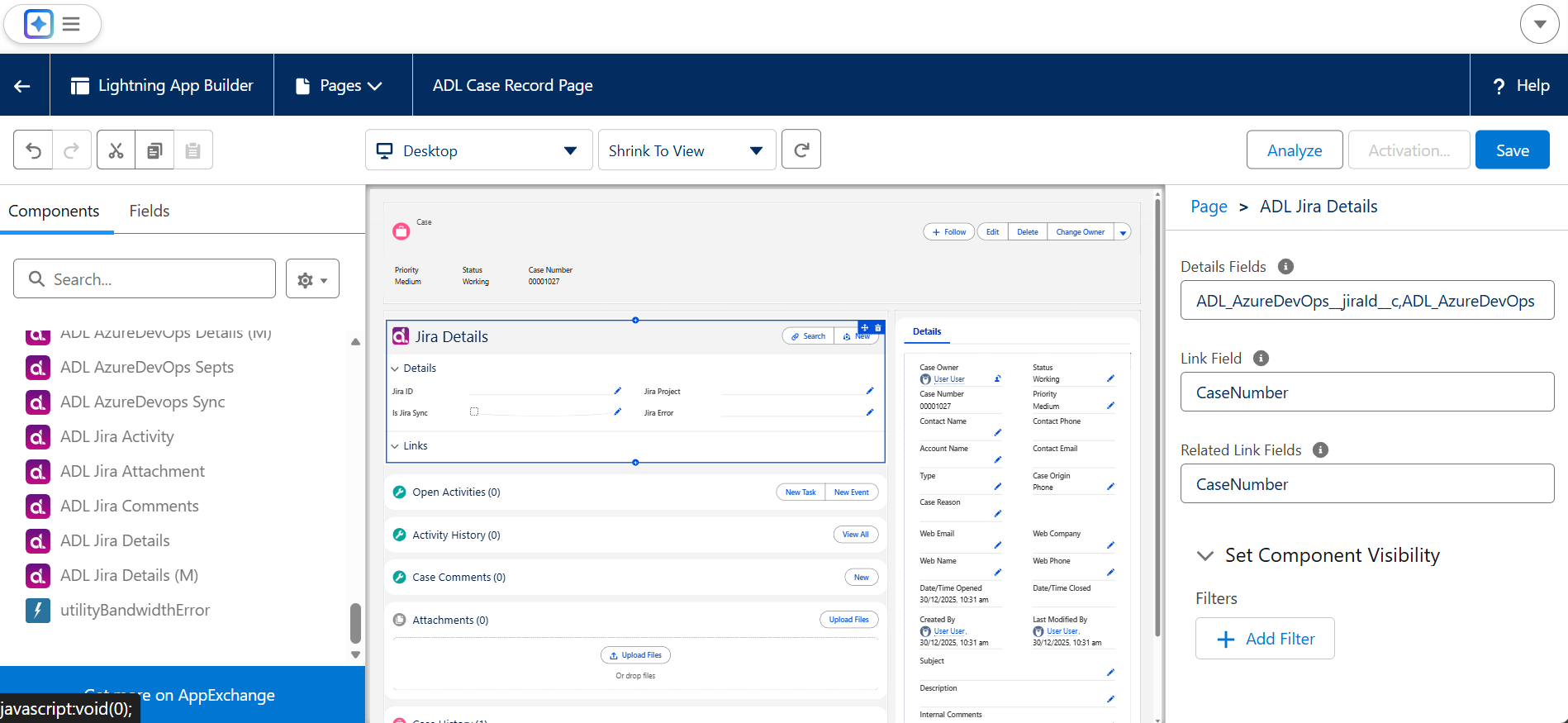
Creating Jira Issues from Salesforce
Creating and Managing Jira Issues from Salesforce
ADL Connect enables Salesforce users to create and manage Jira issues directly from Salesforce records, such as Cases. This capability improves collaboration between Support, Sales, and Development teams by allowing issue creation, assignment, and updates without leaving the Salesforce interface.
This article provides step-by-step guidance on creating Jira issues from Salesforce and verifying bidirectional synchronization between Salesforce and Jira.
Prerequisites
Before creating Jira issues from Salesforce, ensure the following prerequisites are met:
- A Project Mapping is already configured between Salesforce and Jira
- The ADL Jira Details component has been added to the Salesforce record page
- Users have the required Salesforce permissions and Jira project access
Creating Jira Issues from Salesforce
1. Access the Jira Issue Creation Interface
- Open the Salesforce record (typically a Case) from which you want to create a Jira issue.
- Locate the ADL Jira Details component on the record page.
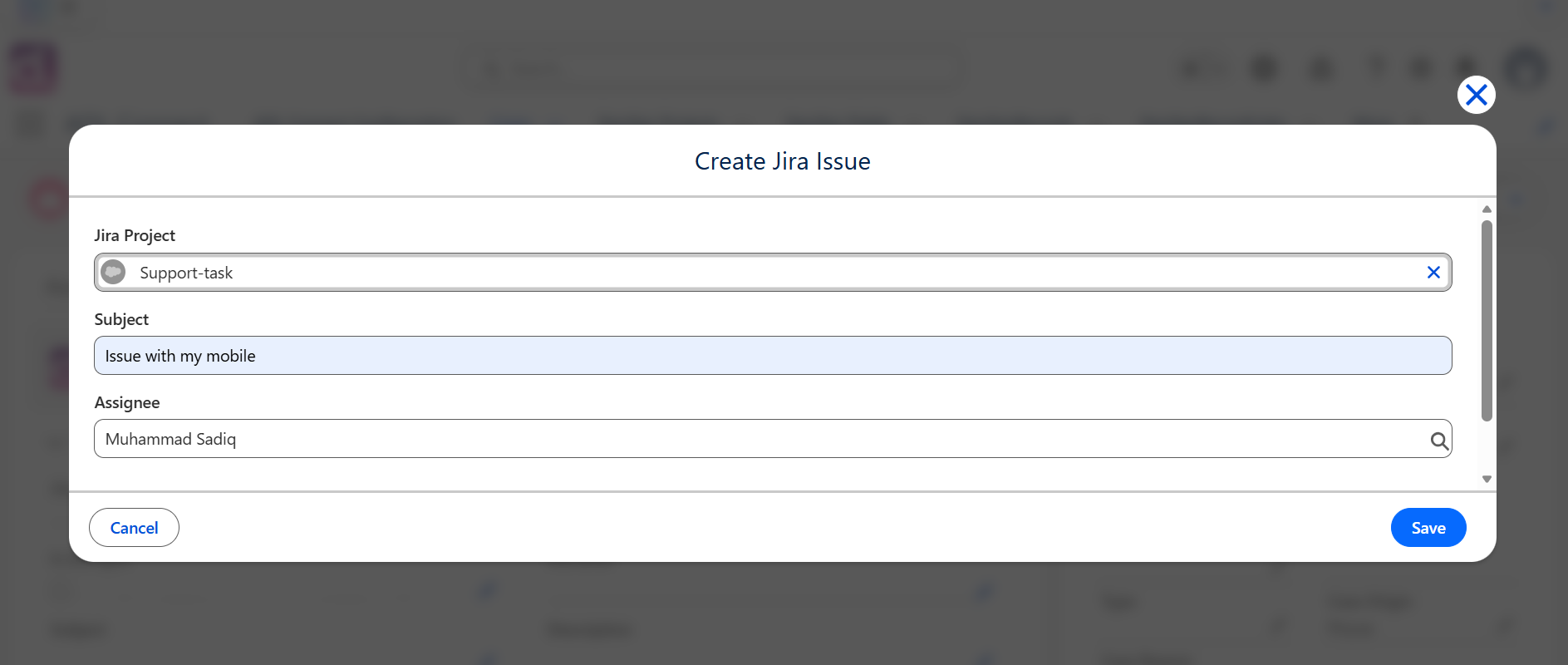
- Click New to begin creating a Jira issue.
This opens the Jira issue creation panel embedded within Salesforce.
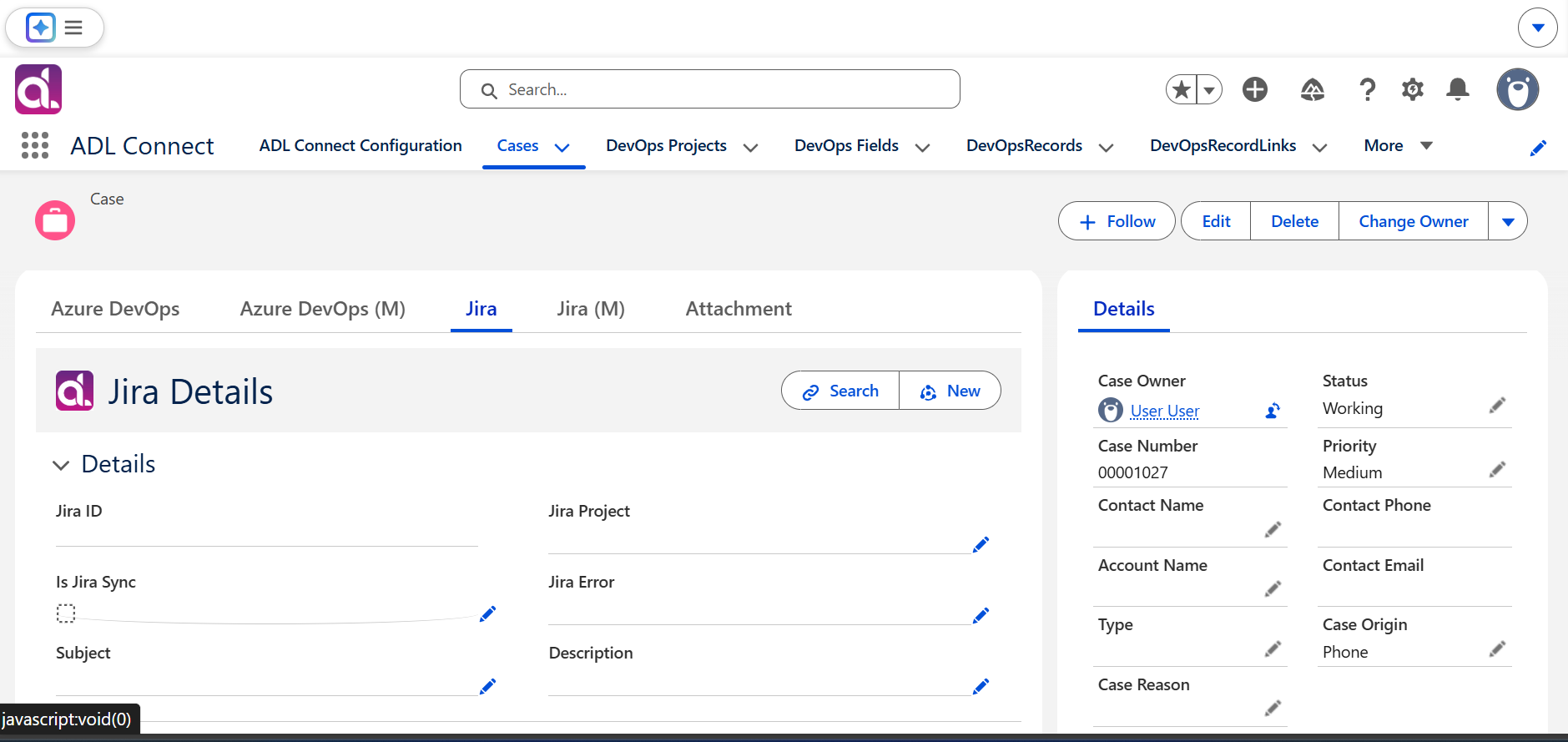
2. Select the Mapped Jira Project
- In the Project selection field, start typing the name of the Jira project.
- Select the project that was configured earlier in the Project Mapping setup.
ADL Connect automatically loads the corresponding:
- Jira issue types
- Field mappings
- Default values
This ensures the issue form aligns with the configured integration rules.
3. Review Pre-Populated Field Values
ADL Connect automatically populates several fields based on the configured field mappings. These may include:
- Salesforce field values mapped to Jira fields
- Summary prefixes or templates
- Priority or classification values
- Custom integration fields
This reduces manual data entry and ensures consistent issue creation across the organization.
4. Assign the Jira Issue
- Use the Assignee dropdown to select the Jira user responsible for the issue.
- Assigning the issue during creation ensures the development team receives it immediately with clear ownership.
5. Save the Jira Issue
- After completing all required fields, click Save.
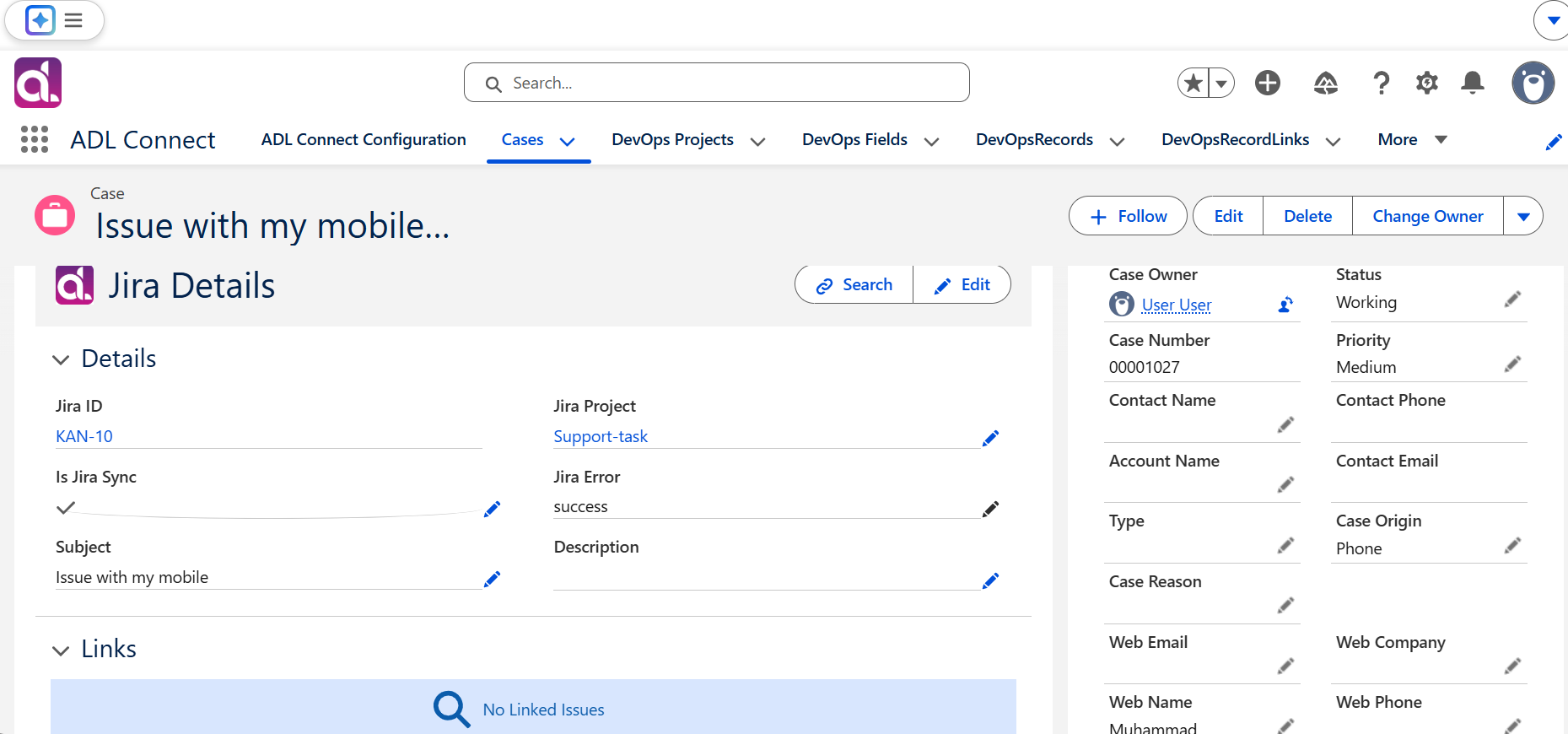
- ADL Connect creates the Jira issue in real time.
- The generated Jira Issue ID is displayed directly within Salesforce.
The Jira Issue ID serves as the permanent reference for synchronization between Salesforce and Jira.
Verifying the Jira Issue
6. Open and Review the Created Issue
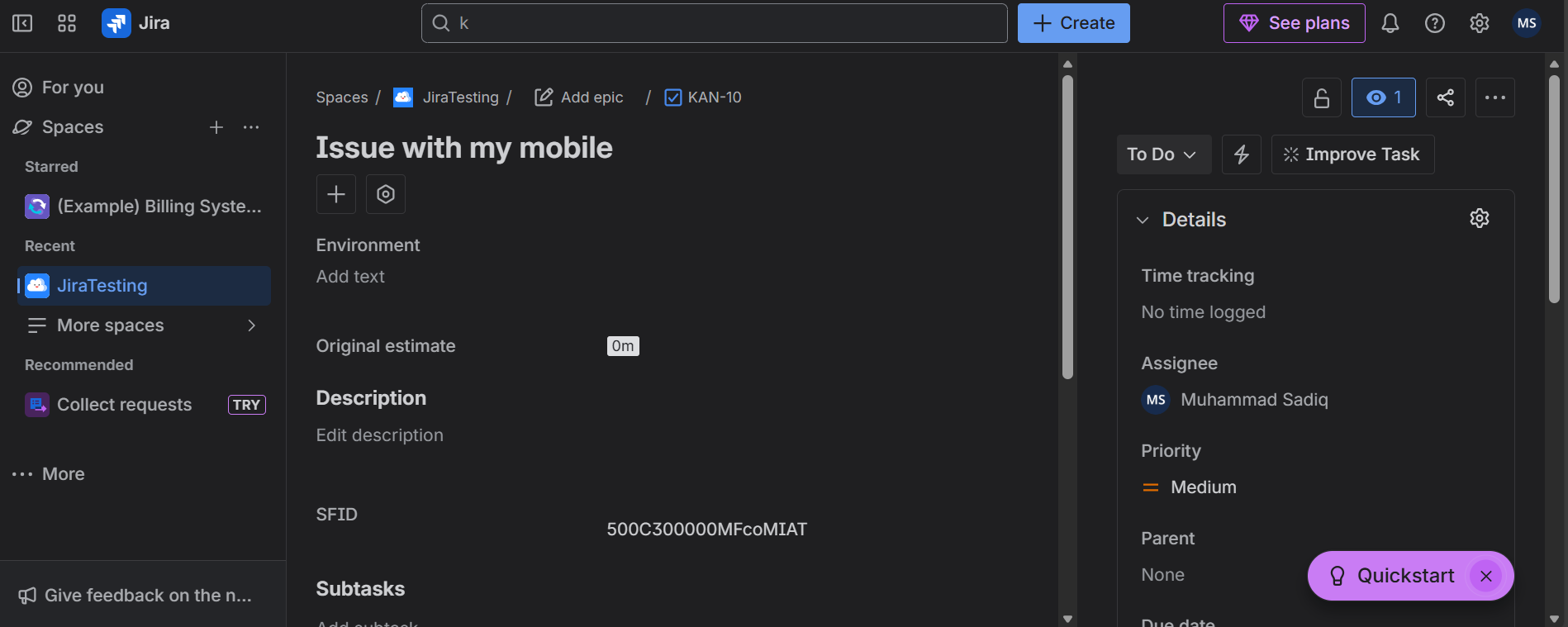
- Click the Jira Issue ID displayed in Salesforce.
- The Jira issue opens in a new browser tab.
Verify that:
- The issue is assigned to the correct Jira user
- The Salesforce Record ID appears in the custom Jira field created for integration
- All mapped fields are populated correctly
This confirms that outbound synchronization from Salesforce to Jira is functioning as expected.
Updating Jira Issues from Salesforce
7. Modify Jira Fields Directly in Salesforce
- In the ADL Jira Details component, update fields such as:
- Issue Status
- Summary prefix
- Priority or other mapped fields
- Click Save to push the updates to Jira.
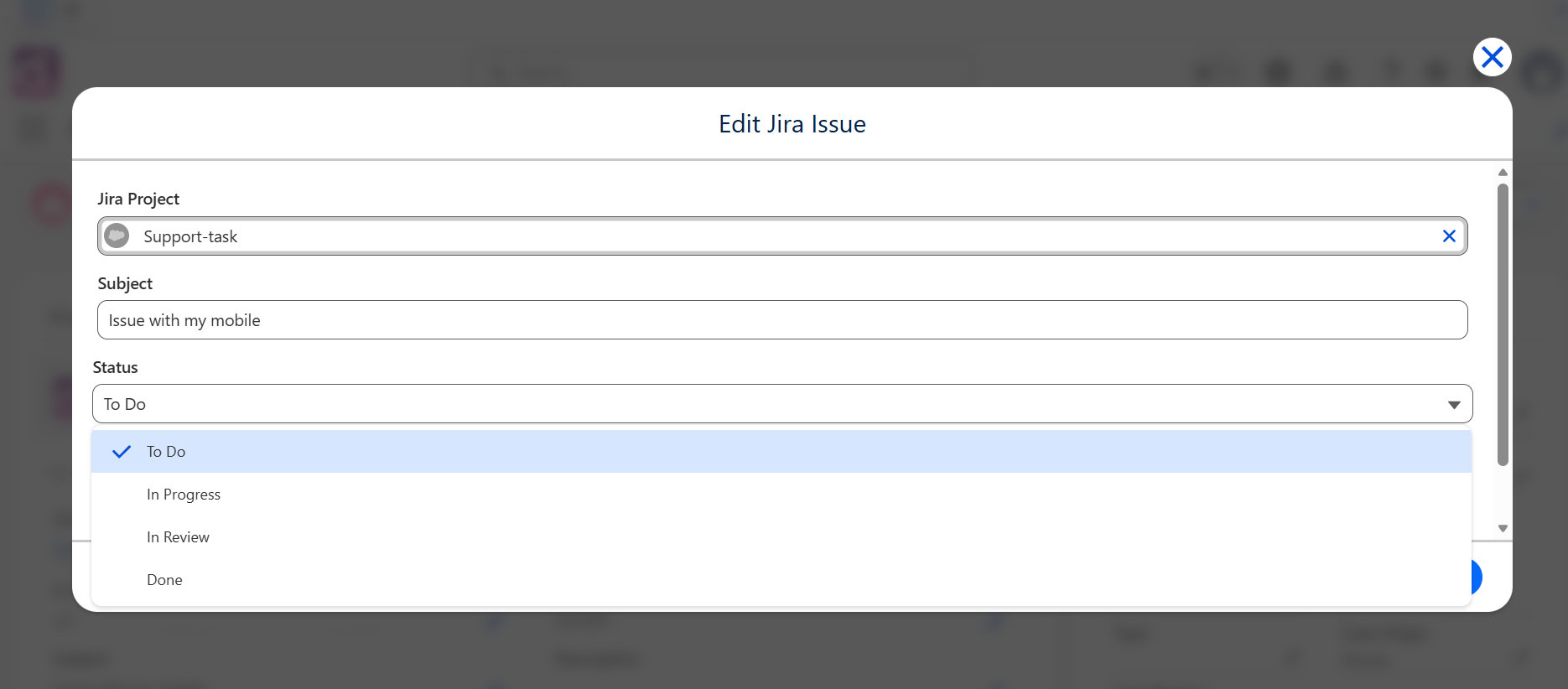
ADL Connect immediately sends these updates based on the configured field mappings and synchronization rules.
8. Validate Changes in Jira
- Open the Jira issue.
- Confirm that updates—such as status or summary changes—are reflected correctly.
This verifies that outbound updates from Salesforce are working as intended.
Receiving Jira Updates in Salesforce
9. Confirm Inbound Synchronization Behaviour
- In Jira, update the issue (for example, change the Status or another mapped field).
- Return to Salesforce and refresh the record.
- Confirm that the updated values appear in the ADL Jira Details component.
This validates that inbound synchronization from Jira to Salesforce is enabled and functioning.
Summary
By using the ADL Jira Details component, Salesforce users can:
- Create Jira issues directly from Salesforce Cases
- Assign issues to Jira team members at creation time
- Update issue details bidirectionally
- Maintain real-time visibility into Jira progress
- Eliminate duplicate data entry across platforms
This functionality significantly streamlines communication and execution between Salesforce teams and Jira development teams, ensuring faster issue resolution and better cross-team alignment.
Creating Jira Attachments In Salesforce
Managing Jira Attachments from Salesforce
ADL Connect enables Salesforce users to view, preview, and upload Jira attachments directly from Salesforce records. This functionality gives customer-facing teams full visibility into Jira issue context and allows them to contribute files without switching systems.
Attachments uploaded from Salesforce synchronize instantly to Jira, and existing Jira attachments are displayed within the Salesforce interface.
Configuring the Salesforce Page Layout for Jira Attachments
Before viewing or uploading attachments, the ADL Jira Attachments component must be added to the Salesforce record page.
1. Add the ADL Jira Attachments Component
- Open the Salesforce record linked to the Jira issue (for example, a Case).
- Click Edit Page to open the Lightning App Builder.
- Scroll to Custom – Managed Components.
- Locate the ADL Jira Attachments component.
- Drag and drop the component into the desired area of the page layout.
- Click Save and Activate the page.
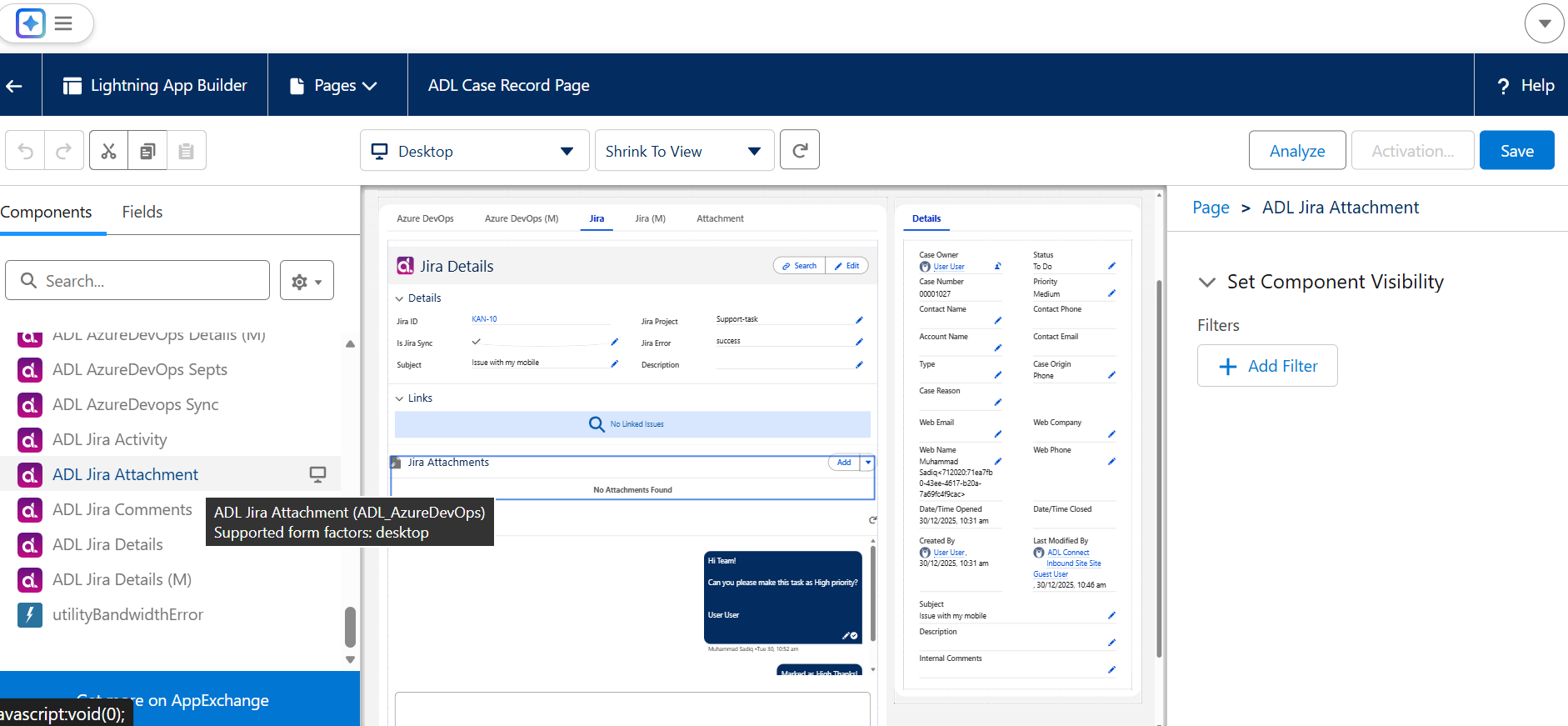
Once added, the component displays all attachments associated with the linked Jira issue.
Viewing Jira Attachments in Salesforce
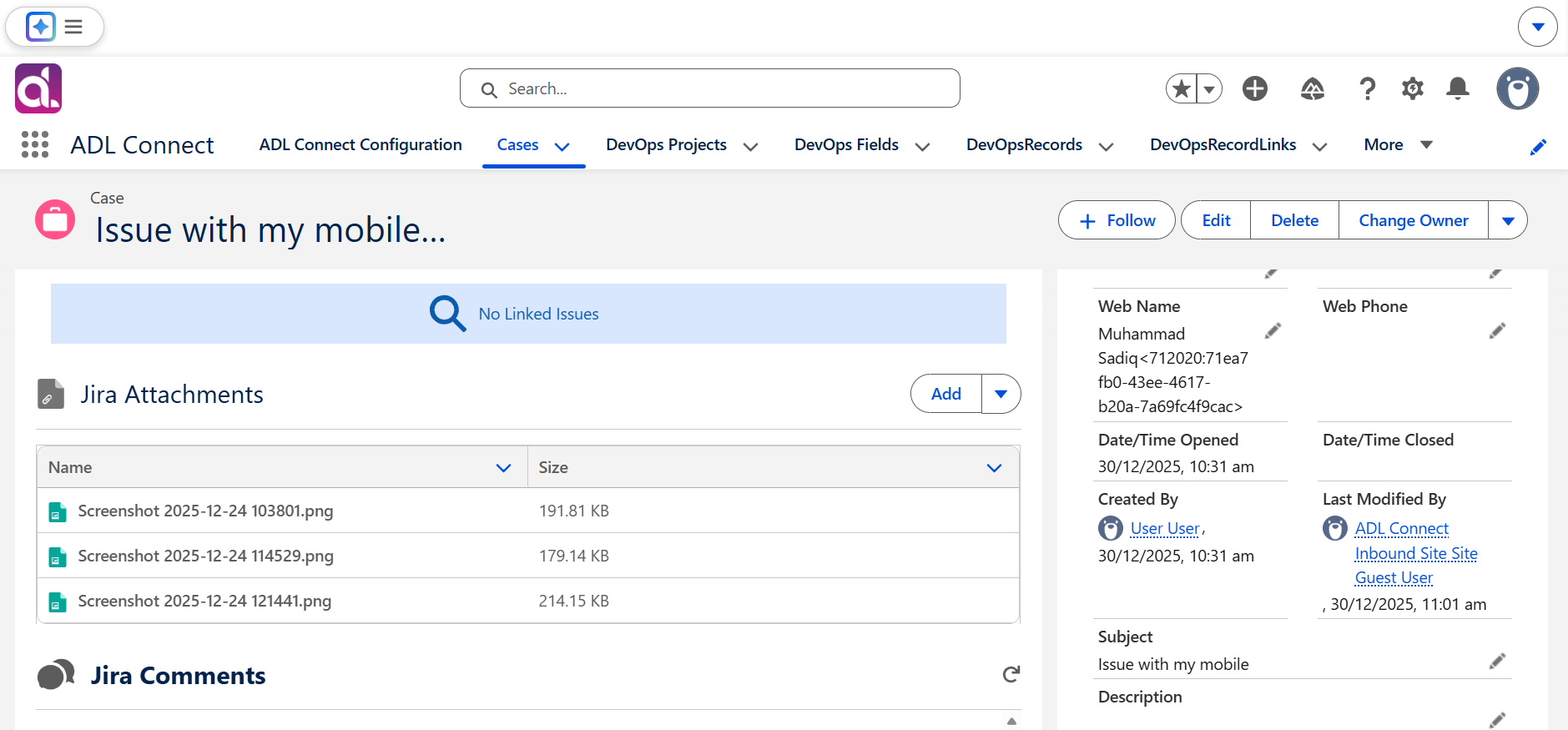
2. View or Preview Existing Jira Attachments
- Navigate to the updated Salesforce record.
- In the ADL Jira Attachments component, review the list of attachments retrieved from Jira.
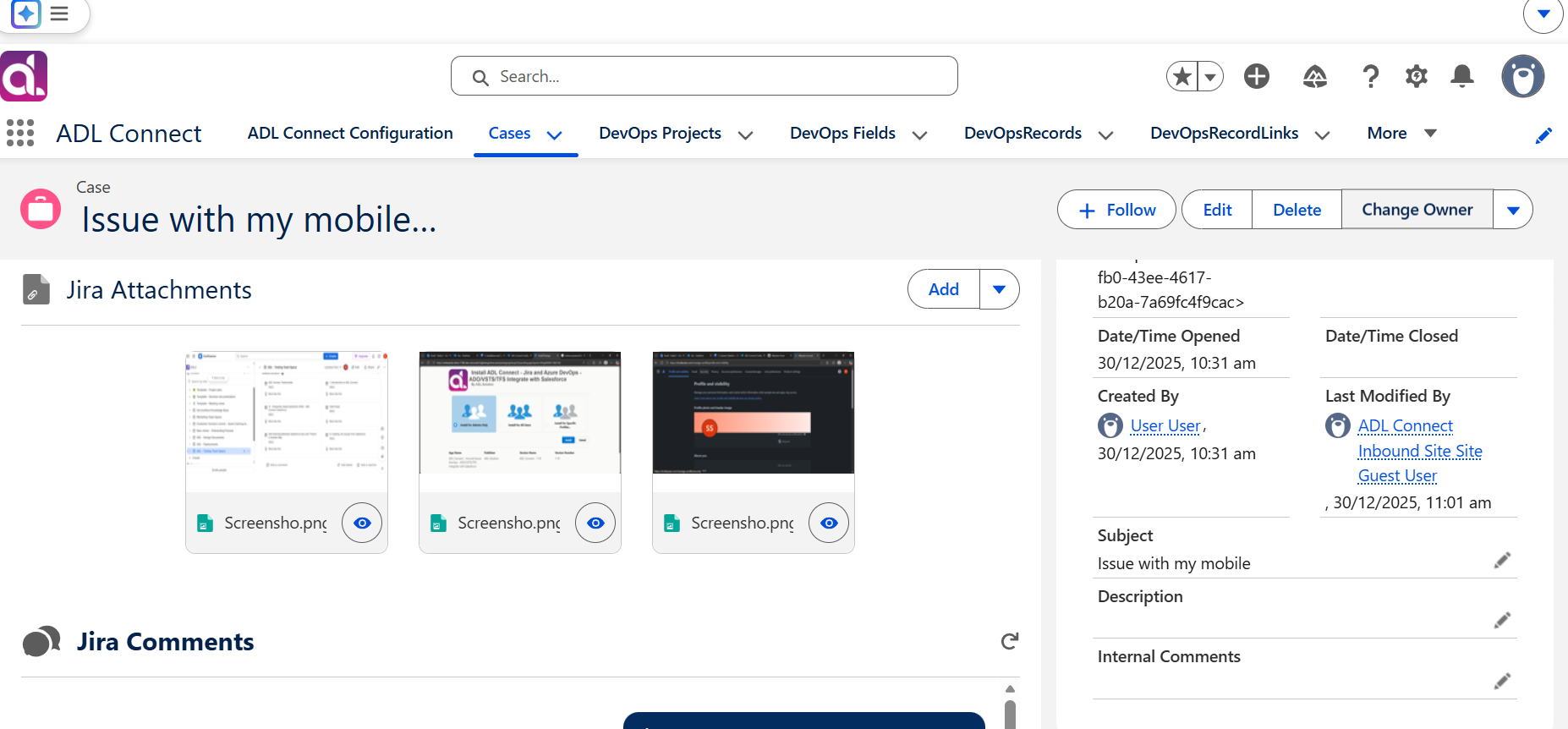
- Optionally switch the display format to Tile View.
- Tile View allows image previews without downloading files.
- Click any attachment to preview it or download it directly from Salesforce.
Tile View is especially useful for image-heavy files such as screenshots, diagrams, and UX mock-up's.
Uploading Attachments to Jira from Salesforce
3. Upload New Attachments from Salesforce
- In the ADL Jira Attachments component, click Add or Upload Attachments.
- Select one or more files from your device.
- Confirm the upload.
The selected files are immediately uploaded to Jira and associated with the linked issue.
4. Verify the Upload in Jira
- Open the corresponding Jira issue.
- Navigate to the Attachments section.
- Confirm that the files uploaded from Salesforce are visible and accessible.
This verifies that Salesforce → Jira attachment synchronization is functioning correctly.
Summary
By using the ADL Jira Attachments component, Salesforce users can:
- View all Jira attachments directly within Salesforce
- Preview images using Tile View without downloading
- Upload new files from Salesforce into Jira
- Maintain complete context for customer cases and development tasks
This capability significantly reduces context switching and improves collaboration between Support and Engineering teams by keeping Salesforce as the central workspace.
Search and Link Existing Jira Issues
Searching and Linking Existing Jira Issues from Salesforce
ADL Connect allows Salesforce users to search for existing Jira issues directly from Salesforce and link them to Salesforce records such as Cases. This capability helps prevent duplicate issue creation, improves traceability, and automatically brings Jira issue context—such as comments, attachments, and status details—into Salesforce.
Searching and Linking an Existing Jira Issue
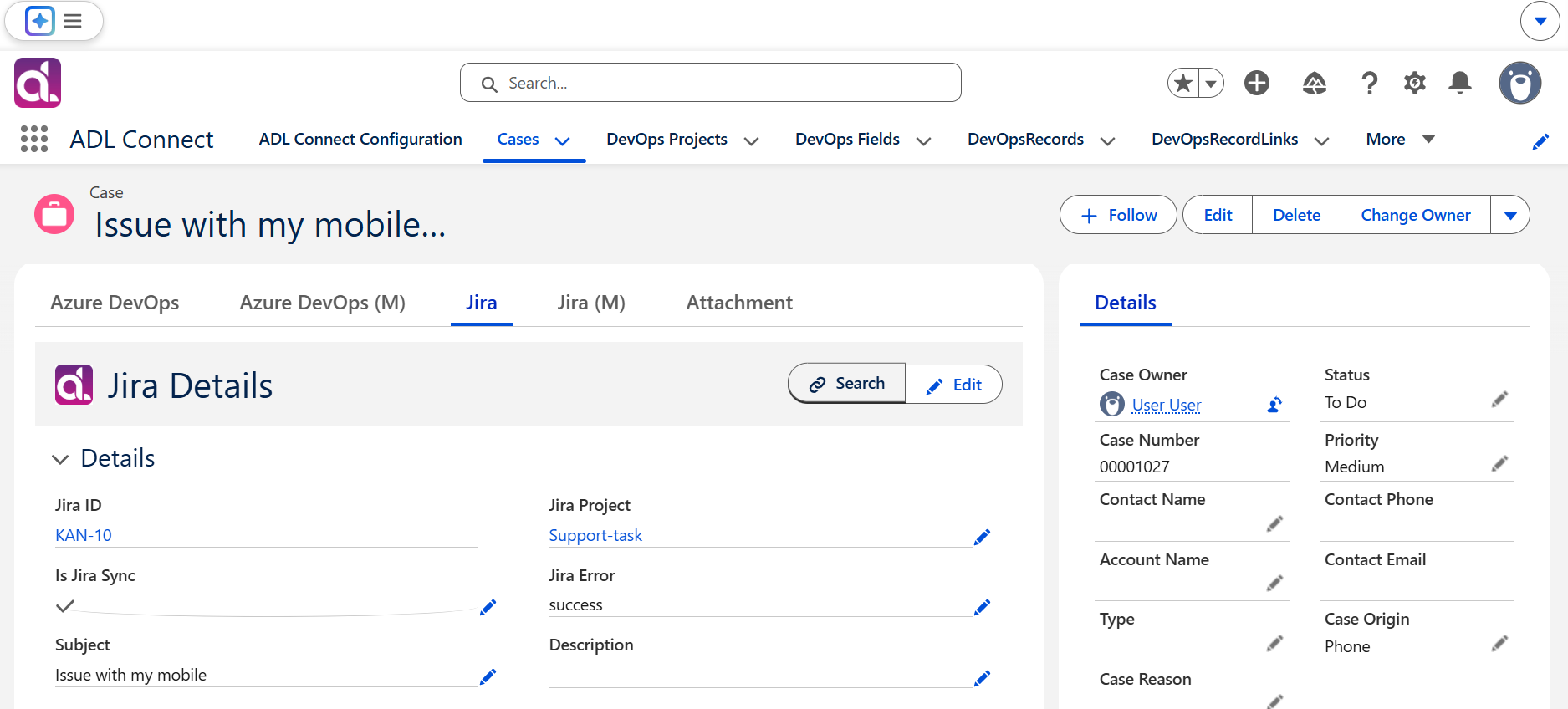
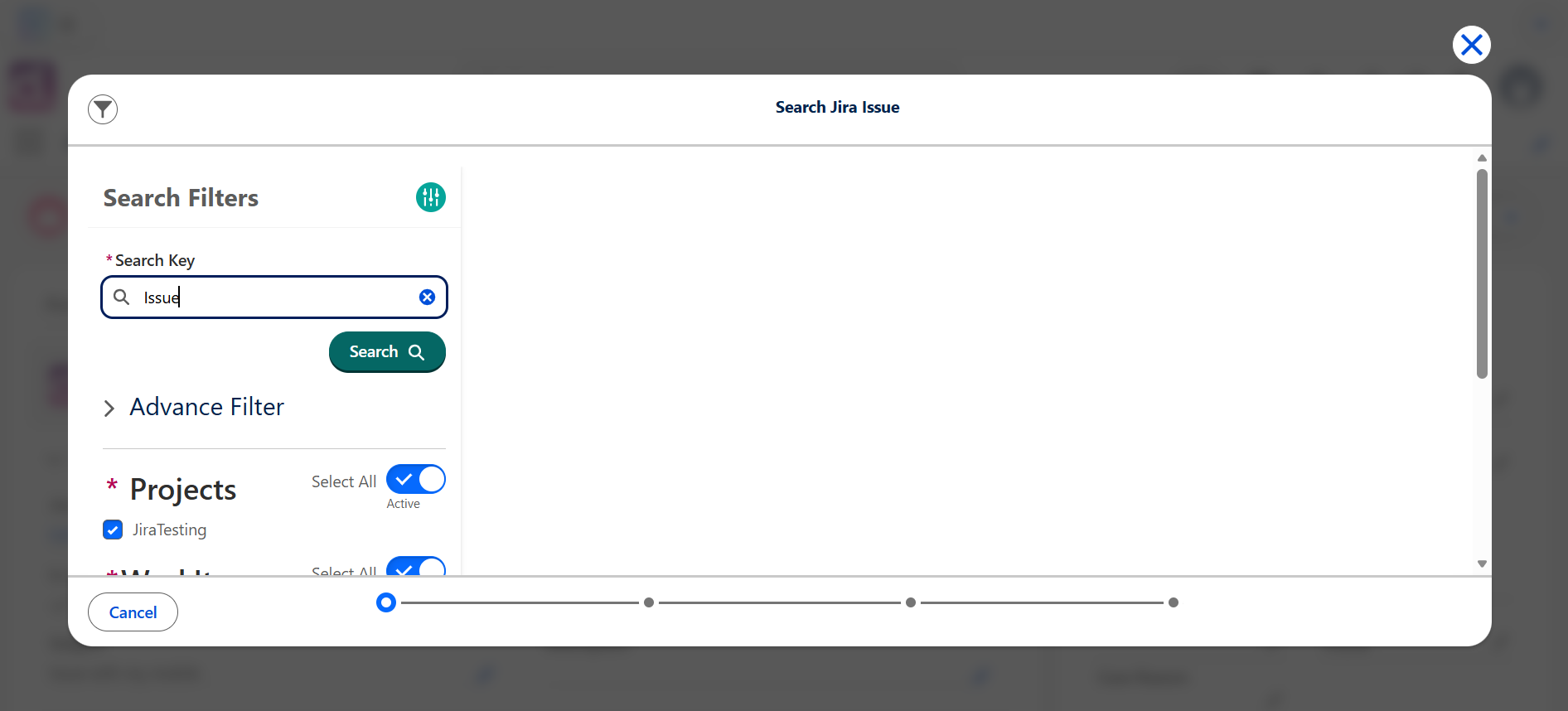
1. Initiate a Jira Issue Search
- Open the Salesforce record where ADL Connect is enabled (for example, a Case).
- In the ADL Jira Details component, click Search.
This opens the Jira issue search interface embedded within Salesforce.
2. Enter a Search Keyword
- In the search field, enter a keyword related to the Jira issue you want to locate.
- Keywords may include:
- Issue summary text
- Description content
- Jira issue ID
- Other searchable fields
- Keywords may include:
- Review the list of Jira issues returned by the search.
Search results are retrieved directly from Jira, ensuring the latest issue data is displayed.
3. Select the Jira Issue to Link
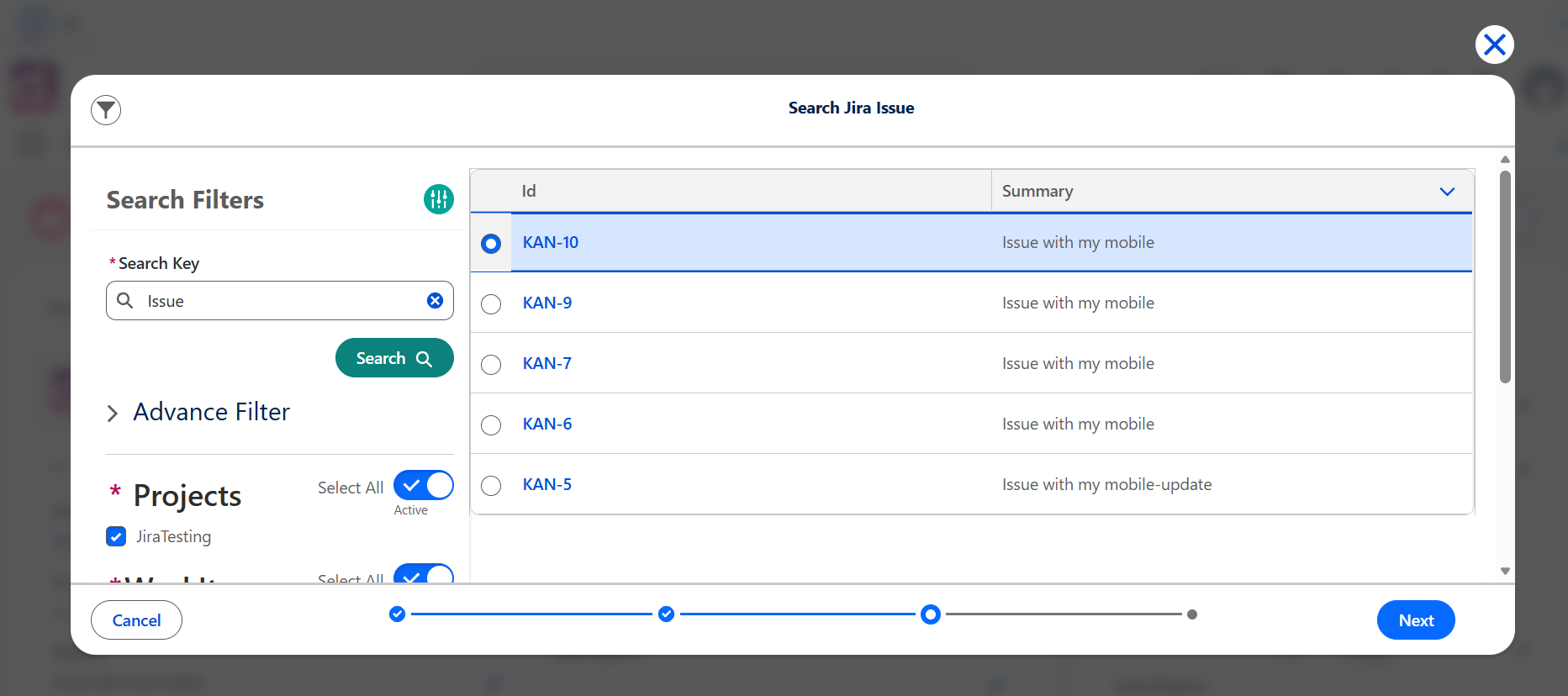
- From the search results, select the Jira issue to associate with the current Salesforce record.
- ADL Connect displays a preview of mapped fields.
- Mapped fields are automatically populated based on the configured Project Mapping.
- The preview allows users to confirm that the correct Jira issue is being linked before saving.
4. Save the Link
- Click Save to complete the linking process.
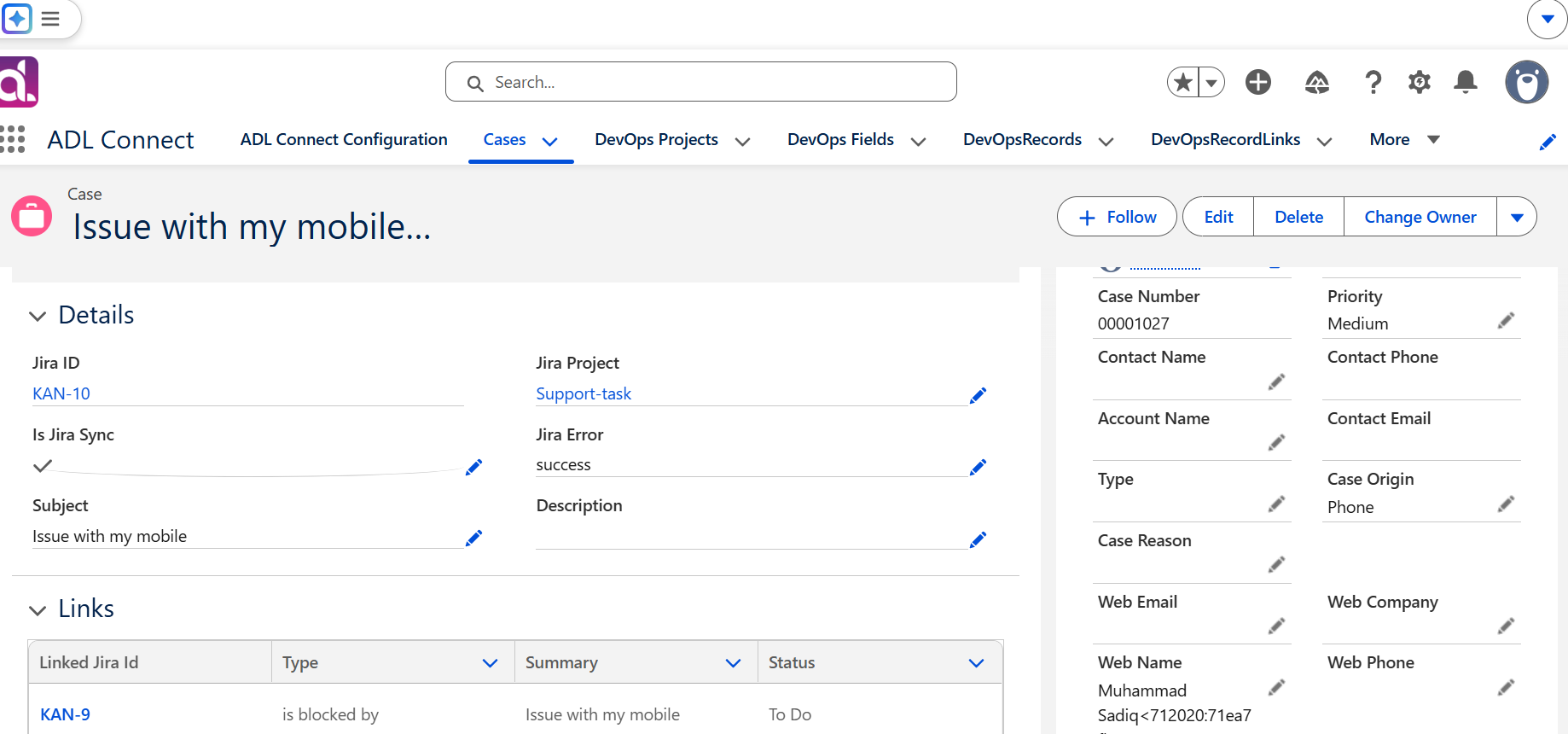
- The selected Jira issue is now associated with the Salesforce record.
This establishes a direct, persistent relationship between the Salesforce record and the existing Jira issue.
Automatic Retrieval of Jira Details
After the Jira issue is linked:
- ADL Connect automatically retrieves:
- Jira comments
- Attachments
- Status and other mapped fields
- These details appear immediately within the ADL Jira components on the Salesforce record page.
- Salesforce users gain full visibility into Jira activity without navigating away from Salesforce.
Summary
Using the Search and Link feature, Salesforce users can:
- Search Jira issues directly from Salesforce
- Avoid creating duplicate Jira tickets
- Link the correct Jira issue to a Case or other Salesforce record
- Automatically retrieve existing comments, attachments, and status details into Salesforce
This functionality delivers a unified workflow and significantly improves collaboration between Support, Engineering, and Product teams by keeping all relevant context in one place.
Frequently Asked Questions (FAQ)
General Overview
Q1: What is ADL Connect and what problem does it solve?
A:
ADL Connect is a bidirectional integration tool that synchronizes Salesforce records with Jira issues. It eliminates duplicate data entry, improves collaboration between support and development teams, and provides real-time visibility into issue progress—without requiring users to switch systems.
Q2: Which Jira versions does ADL Connect support?
A:
ADL Connect supports the following Jira deployments:
- Jira Cloud
- Jira Data Center
- Jira Server (if still active in your environment)
Authentication methods may vary depending on the Jira deployment type.
Q3: Can I try ADL Connect before purchasing a license?
A:
Yes. ADL Connect offers a free 30-day trial via the Salesforce AppExchange, allowing you to evaluate all features before purchasing.
Setup & Configuration
Q4: Do I need admin permissions to configure ADL Connect?
A:
Yes.
- Salesforce: System Administrator permissions are required to install the package, configure Lightning pages, set up Salesforce Sites, and manage field-level security.
- Jira: Administrator permissions are required to create custom fields and generate API tokens.
Q5: Why do I need to create a custom Jira field for Salesforce record IDs?
A:
ADL Connect requires a custom short text field in Jira to store the Salesforce record ID. This enables the connector to:
- Link Jira issues back to Salesforce records
- Maintain reliable bidirectional synchronization
- Prevent duplicate or broken issue relationships
Without this field, linking and synchronization will not function correctly.
Q6: How do I authenticate Salesforce and Jira?
A:
Authentication is performed using:
- Jira email address or username
- Jira API token
The API token is generated in Atlassian security settings and entered into the ADL Connect Authentication Console.
Q7: What Salesforce objects can be synced with Jira issues?
A:
ADL Connect supports:
- Standard objects (e.g., Case, Opportunity, Account)
- Custom objects created in your Salesforce org
Any compatible Salesforce field can be mapped to a Jira field, provided the data types are supported.
Q8: What is a Project Mapping and why is it required?
A:
A Project Mapping defines:
- Which Salesforce object maps to which Jira project
- Which Jira issue type is created
- Which Jira custom field stores the Salesforce record ID
It is the foundation for field mappings and synchronization logic.
Synchronization Behavior
Q9: What sync directions are supported?
A:
ADL Connect supports:
- Salesforce → Jira (Outbound)
- Jira → Salesforce (Inbound)
- Bidirectional synchronization
Sync direction is configurable at the field level.
Q10: How often does data synchronization occur?
A:
Synchronization is near real-time:
- Outbound sync occurs immediately when records are saved in Salesforce
- Inbound sync occurs when Jira sends webhook events to Salesforce via the configured Salesforce Site
Q11: Can I choose which fields sync between Salesforce and Jira?
A:
Yes. Field-level mapping allows you to control:
- Which Salesforce field maps to which Jira field
- The sync direction
- Whether the field is required, optional, or read-only
Q12: Are comments and attachments synchronized?
A:
Yes.
- Comments synchronize bidirectionally (Salesforce ↔ Jira)
- Attachments can be viewed, uploaded, and downloaded directly from Salesforce
Q13: How does ADL Connect prevent accidental data overwrites?
A:
Each field mapping specifies a sync direction. This allows you to define which system is the source of truth for each field, preventing unintended overwrites.
Usage Questions
Q14: Can Salesforce users create Jira issues without Jira licenses?
A:
Yes. Salesforce users do not require Jira licenses to create or update Jira issues through ADL Connect. Jira licensing affects visibility and permissions within Jira only.
Q15: Can I edit Jira issues directly from Salesforce?
A:
Yes. Using the ADL Jira Details component, users can update:
- Status
- Summary
- Assignee
- Any mapped fields
All updates synchronize to Jira in real time.
Q16: Can I link an existing Jira issue instead of creating a new one?
A:
Yes. The Search & Link feature allows users to:
- Search Jira issues by keyword
- Select an existing issue
- Link it to a Salesforce record
- Automatically retrieve comments and attachments
Q17: Can multiple Salesforce records link to the same Jira issue?
A:
This depends on configuration. By default, ADL Connect enforces a one-to-one relationship, but advanced configurations can support one-to-many scenarios.
Troubleshooting
Q18: I can’t see some Salesforce fields in the Jira Details component. What should I check?
A:
Verify that:
- The field is added to the page layout
- The field is included on the Lightning Record Page
- Field-Level Security allows visibility
- The field is included in Project Mapping and Field Mapping
Q19: Inbound synchronization is not working. What should I check first?
A:
Verify the following:
- Salesforce Site domain is registered
- Correct Subdomain Prefix ID is used
- Guest User Profile permissions are configured correctly
- Jira webhook points to the correct Site endpoint
- Inbound Rule is saved and mapped to the correct project
Q20: Why are Jira comments not appearing in Salesforce?
A:
Common causes include:
- Jira webhook not configured
- Missing inbound permissions
- ADL Jira Comments component not added to the page
- Incorrect project or field mapping
Q21: Why does the Jira Issue ID not appear after issue creation?
A:
Check whether:
- API token authentication is valid
- Project Mapping is correctly configured
- The Salesforce record is saved before issue creation
- The Jira custom field for Salesforce ID exists and is mapped
Q22: Attachments are not appearing in Salesforce. What should I do?
A:
Ensure that:
- ADL Jira Attachments component is added to the page
- Salesforce Site Guest User has read access to attachment fields
- Jira permissions allow attachment access via API
Security & Access
Q23: How secure is Salesforce–Jira authentication?
A:
Authentication uses API tokens and HTTPS endpoints. No Jira passwords are stored in Salesforce. Tokens can be revoked at any time from Atlassian.
Q24: Does the Salesforce Site Guest User pose a security risk?
A:
No, when configured correctly. Ensure that:
- Only required permissions are granted
- Object and field access is minimized
- Sharing rules restrict sensitive records
ADL Connect only accesses fields required for inbound synchronization.
Q25: Can I restrict who can create Jira issues from Salesforce?
A:
Yes. Access can be controlled using:
- Profiles
- Permission sets
- Lightning page visibility rules
Licensing & Maintenance
Q26: Do all Salesforce users require a license to use ADL Connect?
A:
Only users who interact with ADL Connect components require licenses. Administrators configuring the integration also require licenses.
Q27: What happens if my license expires?
A:
Synchronization and issue creation are disabled until the license is renewed. Existing configurations and integrated data are preserved.
Q28: How often are updates released?
A:
Updates are delivered periodically through the Salesforce AppExchange. Administrators are notified when new versions are available.
Jira to Salesforce Connector - (MarketPlace)
ADL Connect for Jira is a powerful, bidirectional Forge-based integration that connects Jira Cloud with Salesforce to create a unified workflow across Engineering, Support, and Customer-facing teams. Available on the Atlassian Marketplace, this connector enables seamless management of Salesforce records — Cases, Accounts, Opportunities, Leads, and custom objects — directly from within the Jira issue view.
By bringing Salesforce context into Jira, ADL Connect eliminates the need for developers to leave their work tool to update customer records, reduces context switching, and accelerates the feedback loop between engineering and the business.
Through its native Forge architecture, intuitive admin configuration, and OAuth 2.0-based security model, ADL Connect allows organizations to centralize cross-system collaboration while keeping data secure, auditable, and consistent across both platforms.
Purpose
The primary objective of ADL Connect for Jira is to provide a frictionless bridge between Jira users and Salesforce users, ensuring that customer-impacting issues, escalations, and development work move efficiently through their lifecycle without manual duplication.
This integration is particularly beneficial for:
Jira Administrators
- Require a configurable, scalable, and secure integration to connect engineering workflows with Salesforce data.
Developers and Engineering Teams
- Need direct visibility into the Salesforce Cases, Accounts, or Opportunities tied to the Jira issue they are working on — without needing a Salesforce license.
Support and Customer Success Teams
- Benefit from real-time visibility into engineering progress on issues raised from Salesforce, with bidirectional sync of comments and field updates.
Project Managers and Product Owners
- Gain unified traceability between customer demand (Salesforce) and development execution (Jira).
ADL Connect ensures both engineering and customer-facing teams operate with a single source of truth, ultimately improving collaboration and reducing time-to-resolution.
What This Article Covers
This introductory article provides a high-level understanding of ADL Connect for Jira and what users can expect from the integration. The following topics are covered:
1. Core Features of ADL Connect for Jira
An overview of the essential capabilities, including:
- Many-to-many record linking between Jira issues and Salesforce records — a single Jira issue can be linked to multiple Salesforce parents, and a single Salesforce record can be linked to multiple Jira issues.
- Create Salesforce records directly from Jira with prefilled values from the Jira issue (summary, description, reporter, etc.).
- Search and link existing Salesforce records to the current Jira issue using a built-in lookup search panel.
- Inline edit of linked Salesforce records without leaving the Jira issue view.
- Bidirectional synchronization of:
- Field values
- Comments
- Attachments
- Status changes
- Multi-org support — connect multiple Salesforce orgs (Production and Sandbox) to a single Jira site, each managed independently.
- Secure OAuth 2.0 authentication with encrypted token storage via Forge KVS — no credentials ever leave the Atlassian-hosted environment.
- Configurable field, object, and panel mappings scoped per Jira project and work type.
These features ensure smooth operational workflows and reliable data synchronization across both systems.
2. Installation and Initial Setup
A brief overview of the setup process, including:
- Installing ADL Connect for Jira from the Atlassian Marketplace.
- Preparing each Salesforce org with the required Connected App and the
JiraRecordLink__ccustom object plus parent lookup fields. - Connecting one or more Salesforce orgs through the in-app Salesforce Configuration page using OAuth.
- Configuring project, work-type, and field mappings between Jira and Salesforce objects.
- Defining Panel Fields that determine which Salesforce columns appear on the Jira issue panel.
This establishes the foundation required to successfully activate and use the integration.
3. How Jira and Salesforce Data Sync Works
An explanation of the bidirectional synchronization model, covering:
- How outbound synchronization pushes Jira issue updates into linked Salesforce records.
- How inbound synchronization retrieves Salesforce updates into the Jira issue panel in real time.
- The role of:
- The
JiraRecord__candJiraRecordLink__cjoin objects - Field mappings per (Jira project, work type, parent object)
- The configurable
parentLinkFieldonJiraRecordLink__c - Sync rules, conditions, and conflict handling
- The
- Handling of comments, attachments, and rich-text (ADF) content across both platforms.
This section helps users understand the expected behavior of the connector once configured.
4. Key Benefits for Operational Teams
A summary of the practical advantages organizations gain by using ADL Connect for Jira:
- Reduced manual data entry and administrative overhead by eliminating duplicate work across Jira and Salesforce.
- Improved visibility into customer impact for engineering teams working in Jira.
- Faster issue resolution through centralized communication and a shared system of record.
- Enhanced collaboration between Engineering, Support, Sales, and Customer Success teams.
- Stronger data integrity with admin-validated mappings and per-org isolation.
- Atlassian-native security posture — runs entirely on Forge, with encrypted per-org credential storage and admin-gated configuration.
These benefits lead to stronger cross-functional alignment, improved customer outcomes, and a more efficient engineering-to-business feedback loop.
Installation and Connection Setup
To begin using ADL Connect for Jira, the first step is to install the app from the Atlassian Marketplace and complete the initial connection configuration. This setup establishes a secure communication channel between Jira and Salesforce, enabling all subsequent synchronization activities.
1. Install the ADL Connect for Jira App
Navigate to the Atlassian Marketplace and locate the ADL Connect for Jira listing.
During installation, choose the target environment:
- Get it now / Install → Install on your Production Jira Cloud site
- Try it free → Install on a Sandbox or development Jira Cloud site
Review and approve the required permissions requested by the app:
- Read Jira user data (
read:jira-user) — used to display reporter / assignee context on the issue panel. - Read Jira work data (
read:jira-work) — used to read issue fields for prefill and mapping. - App storage access (
storage:app) — used to store connection settings and encrypted Salesforce credentials per org. - External fetch to Salesforce domains (
*.salesforce.com,*.my.salesforce.com,login.salesforce.com,test.salesforce.com) — used to call Salesforce REST APIs for record sync.
Select the installation scope:
- Install for the whole site, or
- Install for a specific project (where supported), based on organizational requirements.
Note: Only Jira Site Administrators can install the app and access the Salesforce Configuration page. Standard Jira users can view and interact with linked Salesforce records on the issue panel, but cannot connect orgs or modify mappings. If you want only specific users to create or update Salesforce records from Jira, restrict access to the relevant Jira projects using standard Jira permission schemes — the app respects Jira's project-level permissions.
Once the installation is complete, ADL Connect will appear in:
- The Apps menu of every Jira project (issue panel + project-level access)
- Jira Administration → Apps → Manage apps (admin configuration)
The app is then ready for configuration. (Forge apps install in seconds — no confirmation email is required, unlike Salesforce managed packages.)
2. Launch the Configuration Console
After installation, open the ADL Connect admin page from Jira Settings (⚙️) → Apps → ADL Connect → Salesforce Configuration.
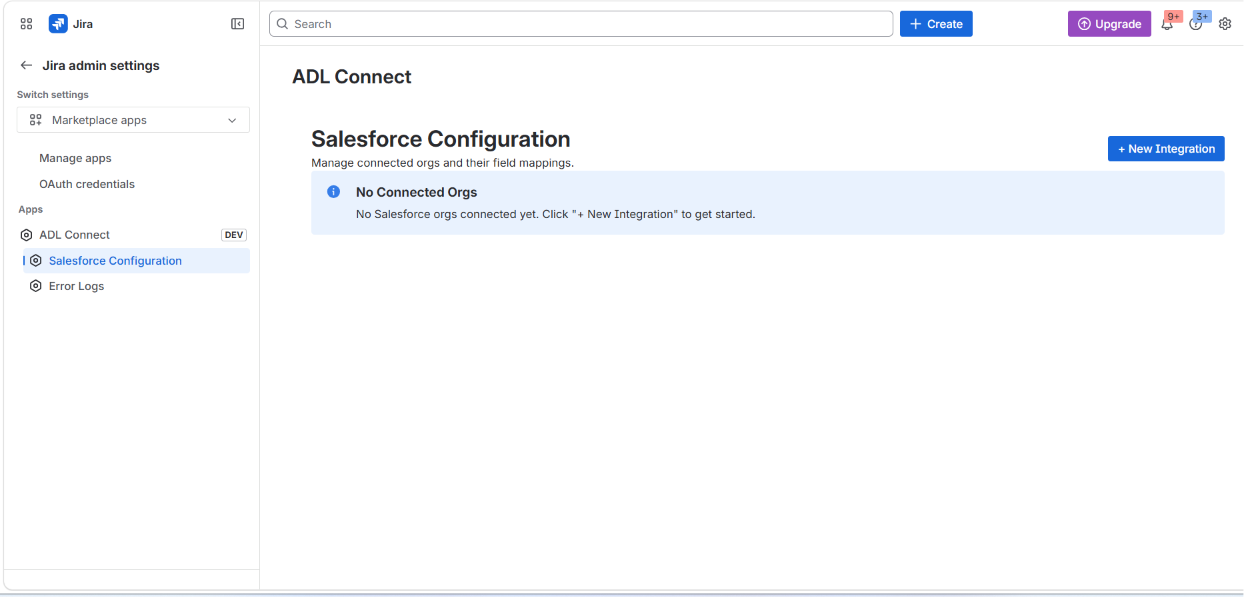
The configuration console serves as the central workspace for managing the integration, including:
- Connecting one or more Salesforce orgs (Production and Sandbox) via OAuth 2.0
- Configuring Jira project and Salesforce object mappings per work type
- Defining field mapping rules between Jira fields and Salesforce fields (including parent-record mappings)
- Configuring Panel Fields — the columns shown on the Jira issue panel for each linked Salesforce parent object
- Managing inbound and outbound synchronization settings
- Reviewing Error Logs for diagnostics and audit (available as a separate admin page)
The console is designed to simplify both initial setup and ongoing maintenance, ensuring consistent and reliable synchronization between Jira and Salesforce — all while keeping Salesforce credentials encrypted and isolated per connected org within Atlassian's Forge runtime.
Creating the Salesforce External Client App (OAuth Credentials)
Before connecting a Salesforce org to ADL Connect for Jira, you must create an External Client App in Salesforce. This produces the Consumer Key and Consumer Secret that the Jira-side admin page uses to establish the OAuth 2.0 connection between Jira and Salesforce.
Note: Salesforce now recommends External Client Apps over the legacy Connected Apps for new integrations. The steps below use the External Client App Manager. If your org still relies on Connected Apps, the configuration values (Callback URL, OAuth scopes, flow settings) are identical.
1. Open the External Client App Manager
In Salesforce, click the gear icon → Setup.
In the Quick Find box on the left, type external and select External Client Apps → External Client App Manager.
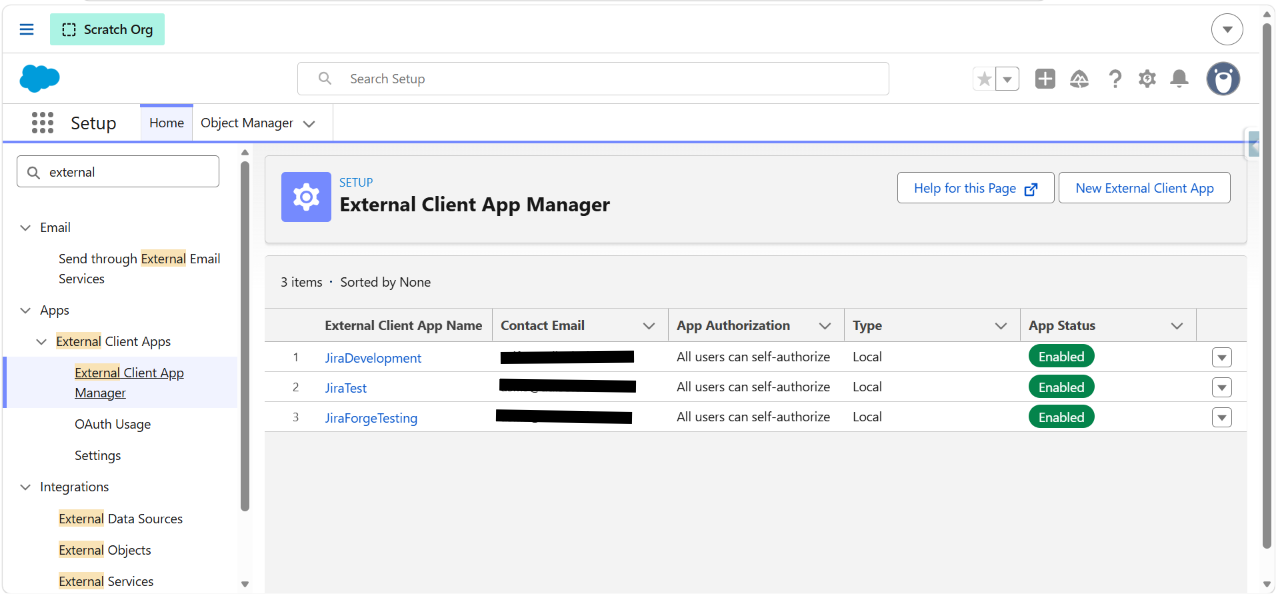
This page lists all External Client Apps already created in the org. Click New External Client App in the top-right to create a new one for the Jira integration.
2. Enter Basic Information
Fill in the Basic Information section:
- External Client App Name — e.g.,
JiraDevelopment(any descriptive name). - API Name — auto-populated from the app name; leave as-is.
- Contact Email — a valid administrator email (e.g.,
asif.s@adlsolution.com). - Distribution State — leave as Local.
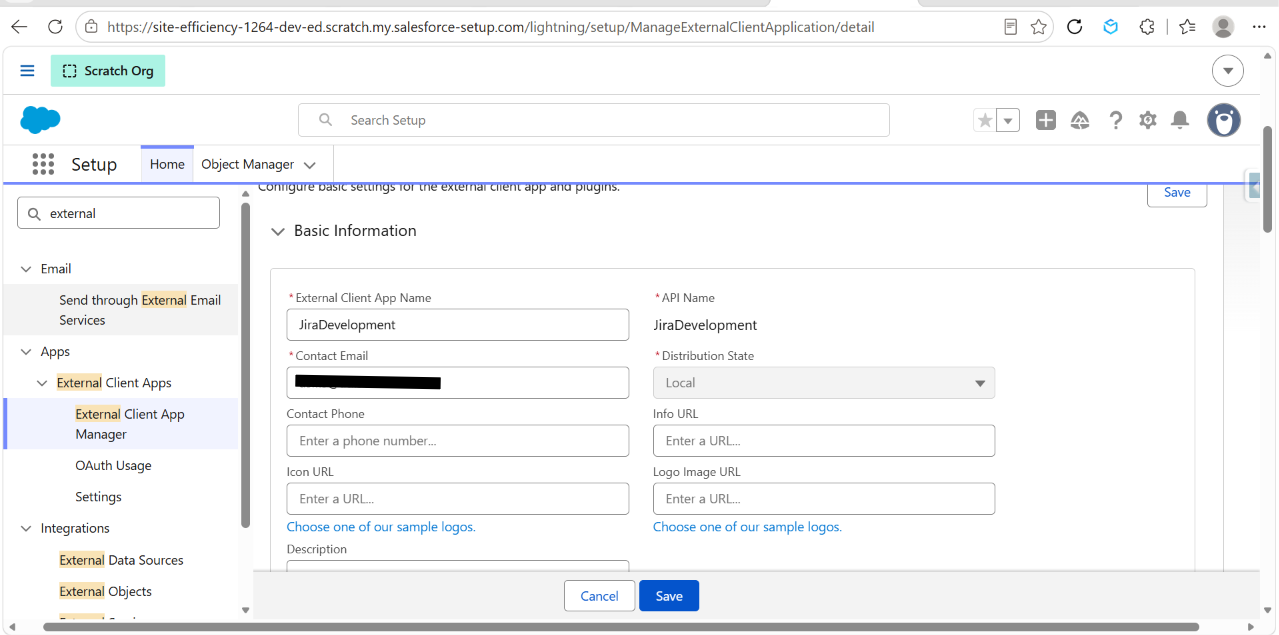
Leave Contact Phone, Info URL, Icon URL, Logo Image URL, and Description blank (optional).
3. Enable OAuth and Configure the Callback URL
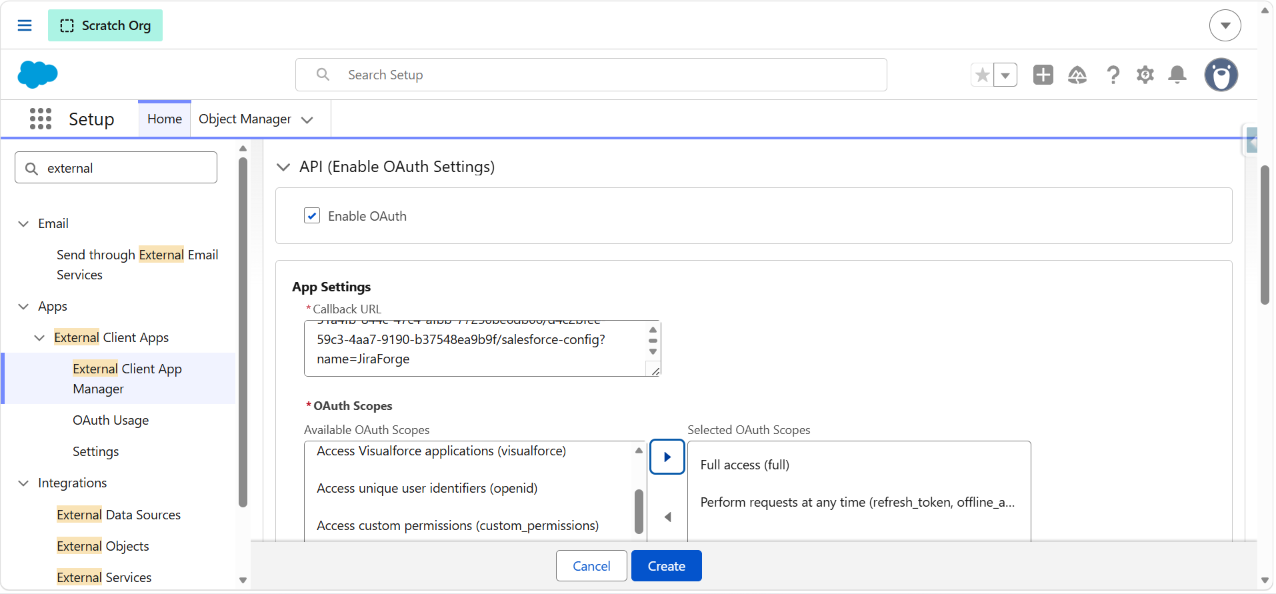
Scroll to the API (Enable OAuth Settings) section and tick Enable OAuth.
In App Settings → Callback URL, paste the Redirect URI copied from the Jira admin page.
The Callback URL is shown inside the Connect Org modal in ADL Connect for Jira (Jira Settings → Apps → ADL Connect → Salesforce Configuration → + Connect Org). It looks like:
https://<your-site>.atlassian.net/jira/settings/apps/forge-app-id/.../salesforce-config?name=<TabName>Copy it exactly — Salesforce rejects the OAuth flow if the redirect URI doesn't match character-for-character.
4. Select OAuth Scopes
Under OAuth Scopes, from the Available OAuth Scopes list, move the following two scopes into Selected OAuth Scopes using the right-arrow (▶) button:
- Full access (
full) - Perform requests at any time (
refresh_token, offline_access)
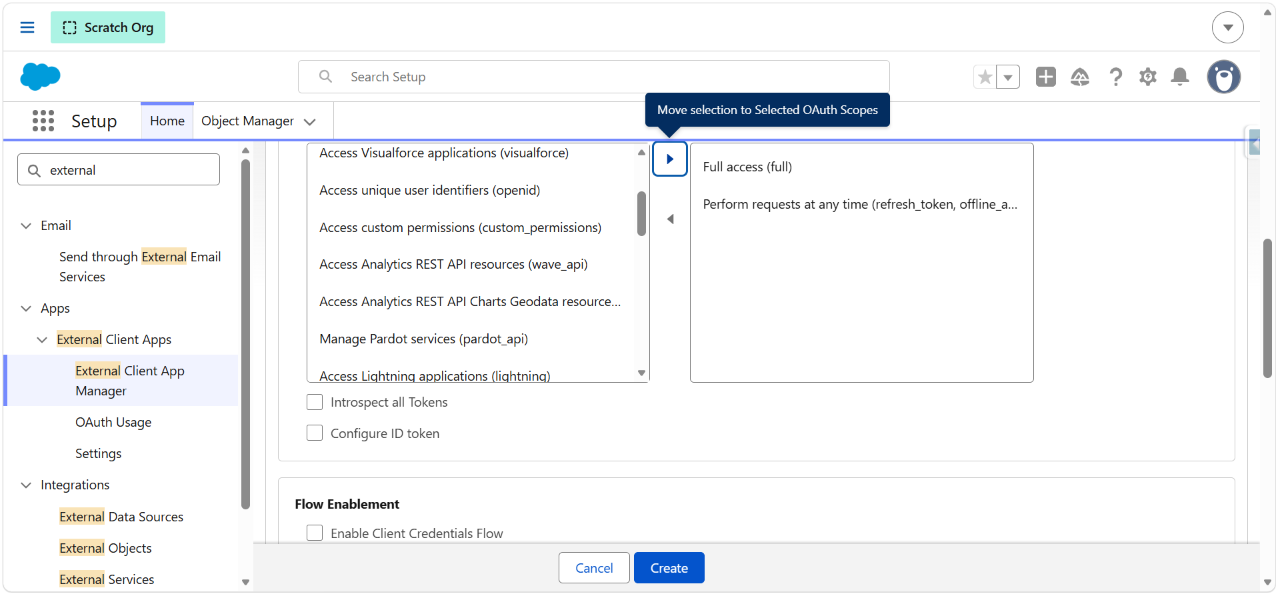
These two scopes are the minimum required for ADL Connect for Jira to read, write, and refresh tokens silently in the background.
Leave Introspect all Tokens and Configure ID token unchecked.
5. Enable the Required OAuth Flow
Scroll down to Flow Enablement and configure as follows:
- ☐ Enable Client Credentials Flow
- ☑ Enable Authorization Code and Credentials Flow
- ☑ Require user credentials in the POST body for Authorization Code and Credentials Flow
- ☐ Enable Device Flow
- ☐ Enable JWT Bearer Flow
- ☐ Enable Token Exchange Flow
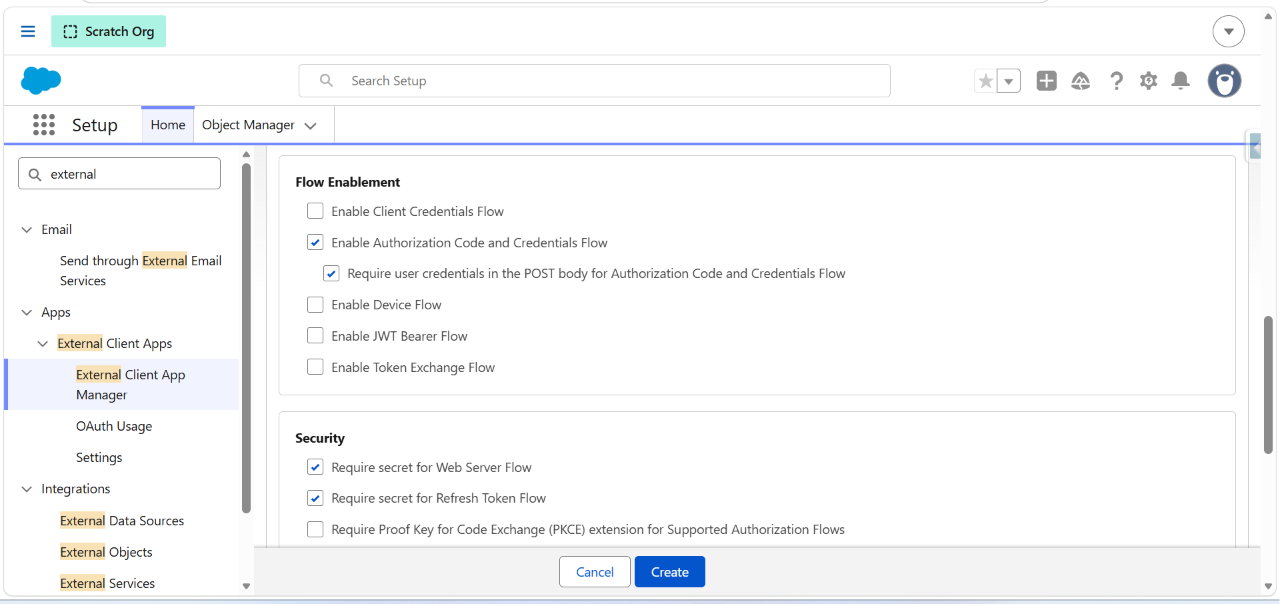
6. Configure Security Settings
In the Security section:
- ☑ Require secret for Web Server Flow
- ☑ Require secret for Refresh Token Flow
- ☐ Require Proof Key for Code Exchange (PKCE) extension for Supported Authorization Flows — deselect this option.
Important: PKCE must be disabled for ADL Connect for Jira. The Forge backend uses the standard Web Server OAuth flow with
client_secret, and enabling PKCE will cause the OAuth handshake to fail during the Connect Org step.
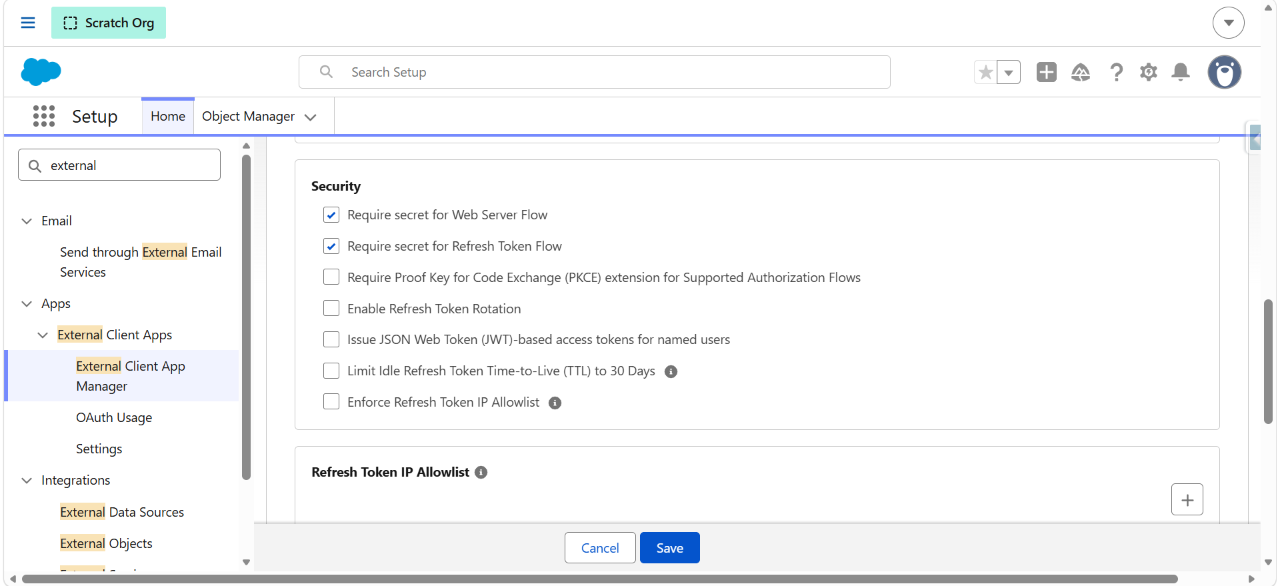
Click Create at the bottom of the page to save the External Client App.
7. Retrieve the Consumer Key and Consumer Secret
After creation, open the newly created External Client App and locate the OAuth Settings section.
Click Consumer Key and Secret → credentials (tooltip: Manage Consumer Details).
You may be prompted to Verify Your Identity — Salesforce will email a verification code to the admin's email address. Enter the code and click Verify.
Once verified, the Consumer Details page displays:
- Consumer Key — the OAuth
client_id. - Consumer Secret — the OAuth
client_secret.
Click Copy next to each value.
Configure Core Settings — Connect a Salesforce Org
Once the External Client App has been created in Salesforce and you have the Consumer Key and Consumer Secret in hand, return to Jira to complete the connection. The Core Settings step links your Salesforce org to ADL Connect for Jira using OAuth 2.0, with all tokens stored encrypted in Forge KVS scoped to this org.
1. Open Salesforce Configuration
In Jira, click the gear icon (⚙️) → Apps → under Apps in the left sidebar, select ADL Connect → Salesforce Configuration.
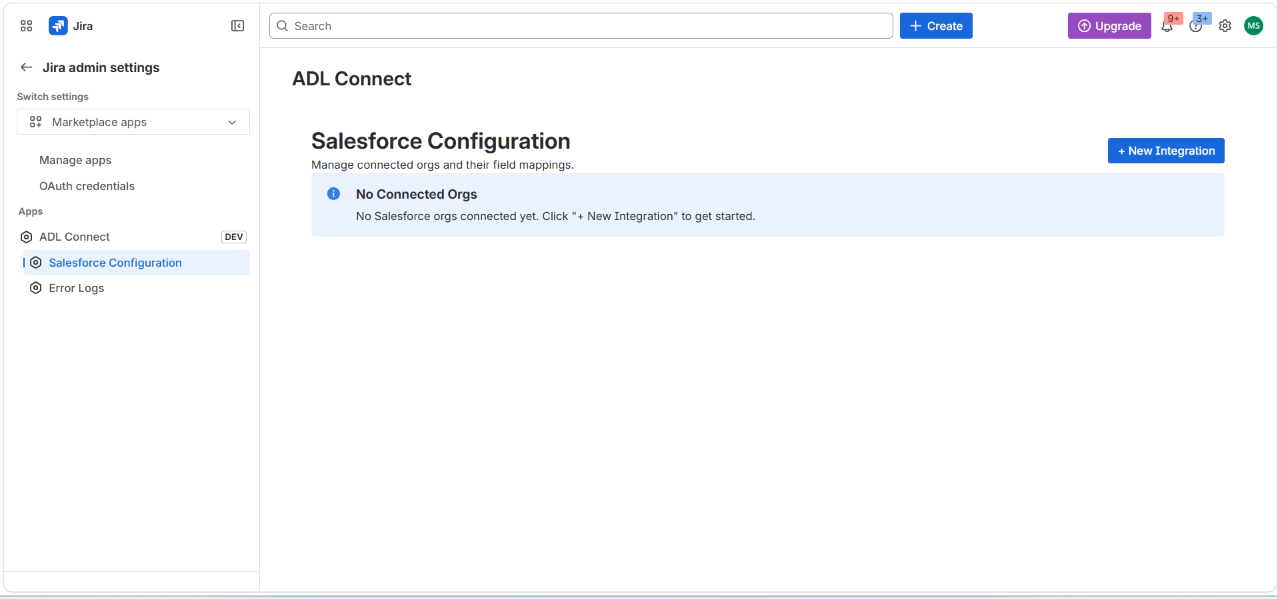
The page opens with a No Connected Orgs banner if no orgs have been linked yet.
Click + New Integration in the top-right to start the connection flow.
2. Enter the Org Name and Choose the Environment
The New Salesforce Connection modal opens.
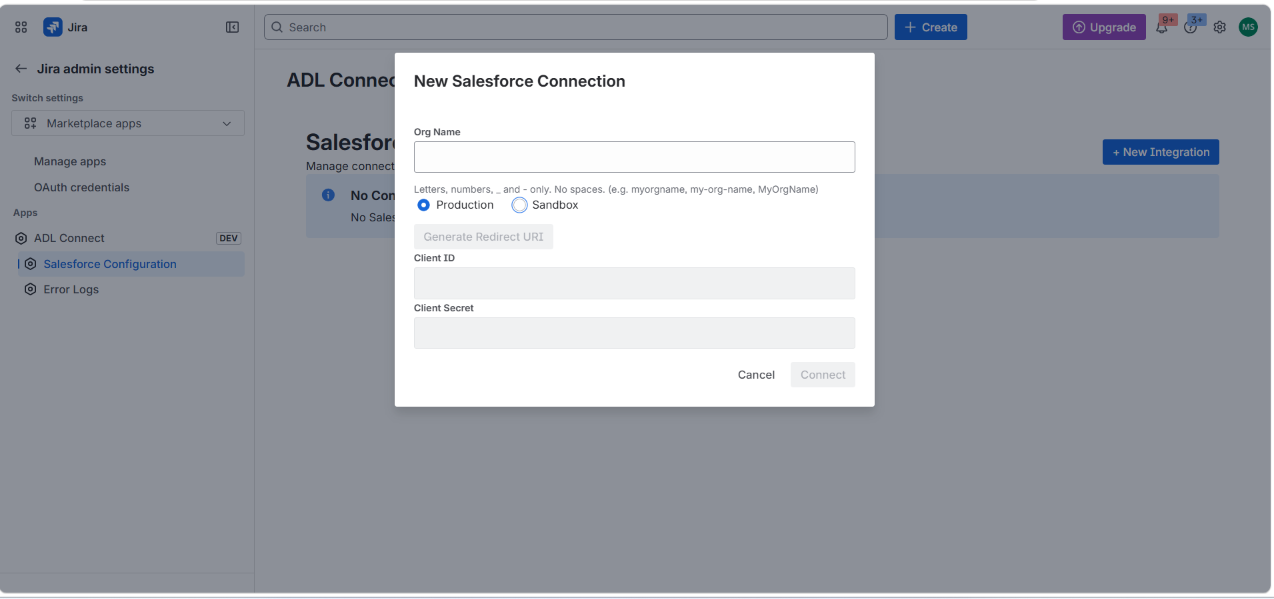
Fill in:
- Org Name — a friendly identifier for this connection (e.g.,
JiraForge,Production-EMEA,Sandbox-QA).- Allowed characters: letters, numbers, underscore (_), and hyphen (-). No spaces.
- This name appears as the tab label on the Salesforce Configuration page and is used to scope mappings and stored credentials.
- Environment — select either:
- Production — for live Salesforce orgs (login domain
login.salesforce.com). - Sandbox — for sandbox or scratch orgs (login domain
test.salesforce.com).
- Production — for live Salesforce orgs (login domain
Note: The Client ID, Client Secret, and Generate Redirect URI fields are disabled until you enter an Org Name and choose an environment.
3. Generate and Copy the Redirect URI
Click Generate Redirect URI. The modal expands to show the Redirect URI specific to this org connection.
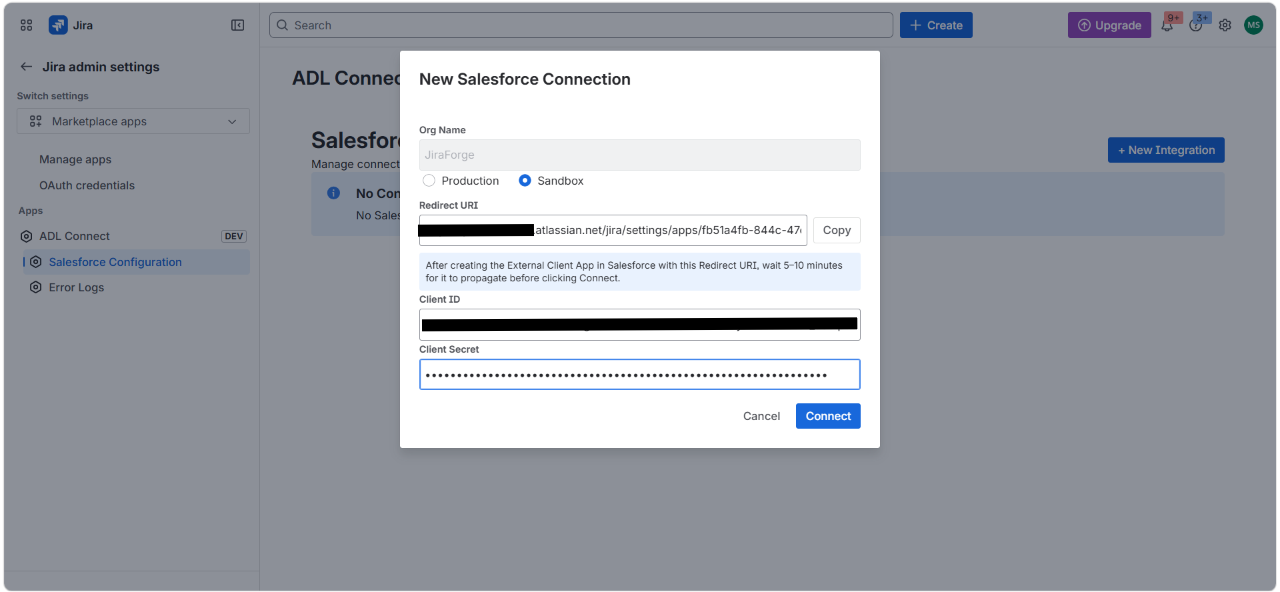
Click Copy next to the Redirect URI field.
Important: This Redirect URI is the value you must paste into the Callback URL field of the Salesforce External Client App (see the Creating the Salesforce External Client App section). The URI is unique per org connection — it embeds the Forge app ID and the Org Name you entered.
A blue info banner reminds you:
After creating the External Client App in Salesforce with this Redirect URI, wait 5–10 minutes for it to propagate before clicking Connect.
Salesforce can take a few minutes to fully provision the OAuth endpoints for a newly created External Client App. Clicking Connect too early may result in an invalid_client_id or redirect_uri_mismatch error.
4. Paste the Client ID and Client Secret
Switch to the Salesforce tab, copy the Consumer Key and Consumer Secret from the External Client App's Consumer Details page (see previous section), then return to Jira and paste them into the modal:
- Client ID → paste the Consumer Key.
- Client Secret → paste the Consumer Secret (the value is masked as dots once entered).
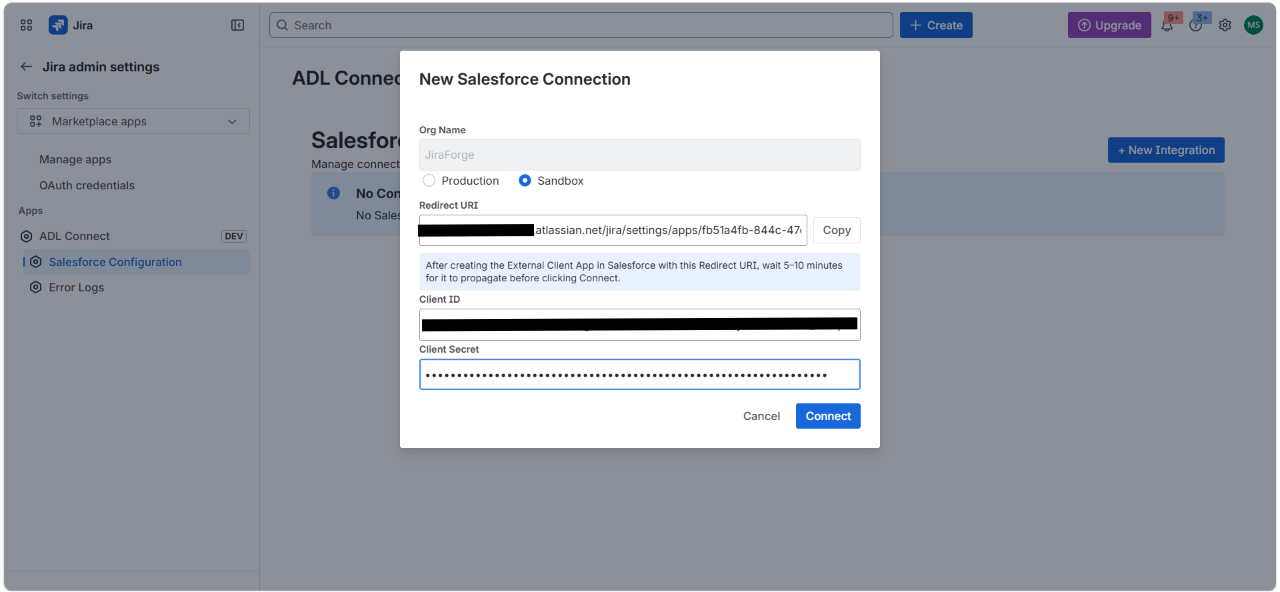
Verify:
- The selected environment (Production / Sandbox) matches the Salesforce org you created the External Client App in.
- The Redirect URI shown in this modal matches the Callback URL saved in the Salesforce External Client App exactly.
Click Connect.
5. Approve the External Page Warning
Jira displays a confirmation dialog before redirecting to Salesforce:
Opening external page on test.salesforce.com
ADL Connect is sending you to an external page. Ensure you trust that page before you continue.
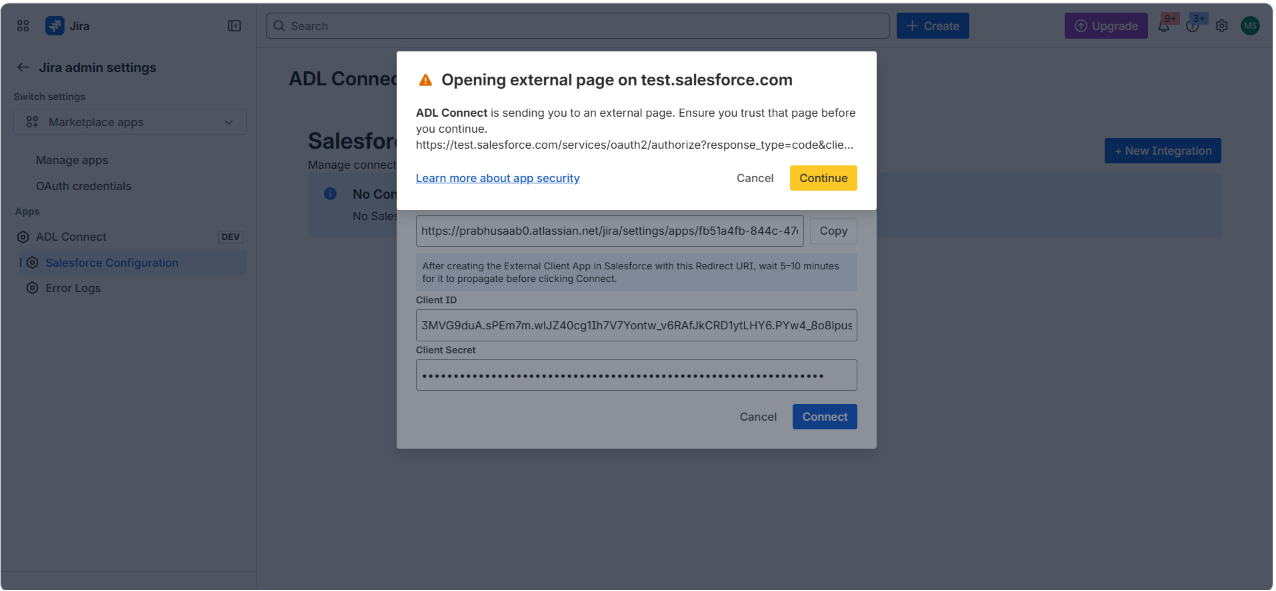
This is a standard Forge security prompt — it confirms the OAuth handshake is leaving the Atlassian-hosted environment to authenticate with Salesforce. The URL begins with https://test.salesforce.com/services/oauth2/authorize (Sandbox) or https://login.salesforce.com/services/oauth2/authorize (Production).
Click Continue.
6. Log In to Salesforce
The Salesforce login page opens.
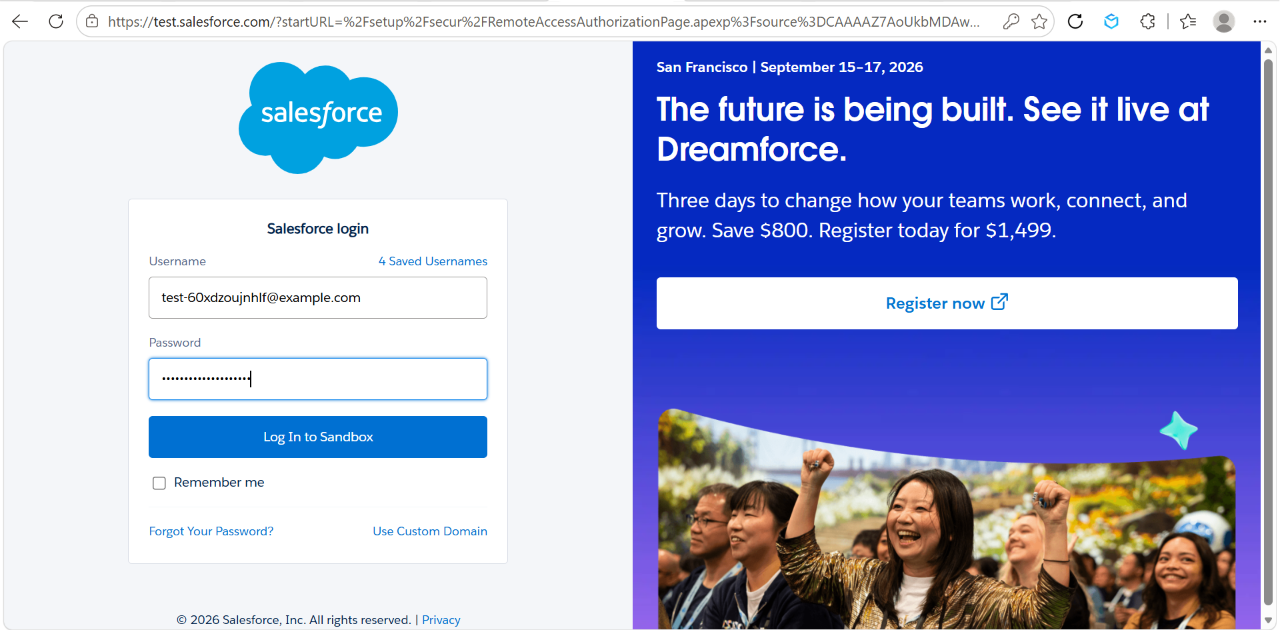
Enter the username and password of the Salesforce integration user — the account whose permissions ADL Connect will use to read and write data in this org.
Recommendation: Use a dedicated Integration User rather than a personal admin account. The integration user should have:
- API Enabled
- Read/Create/Edit/Delete on
JiraRecord__c,JiraRecordLink__c, and all parent objects you plan to link (Case, Account, Opportunity, Lead, custom objects). - Field-level access to every field included in your field mappings.
Click Log In to Sandbox (or Log In for Production).
If multi-factor authentication is enabled on the org, complete the MFA prompt.
7. Allow Access
Salesforce presents the Allow Access? consent screen for the External Client App.
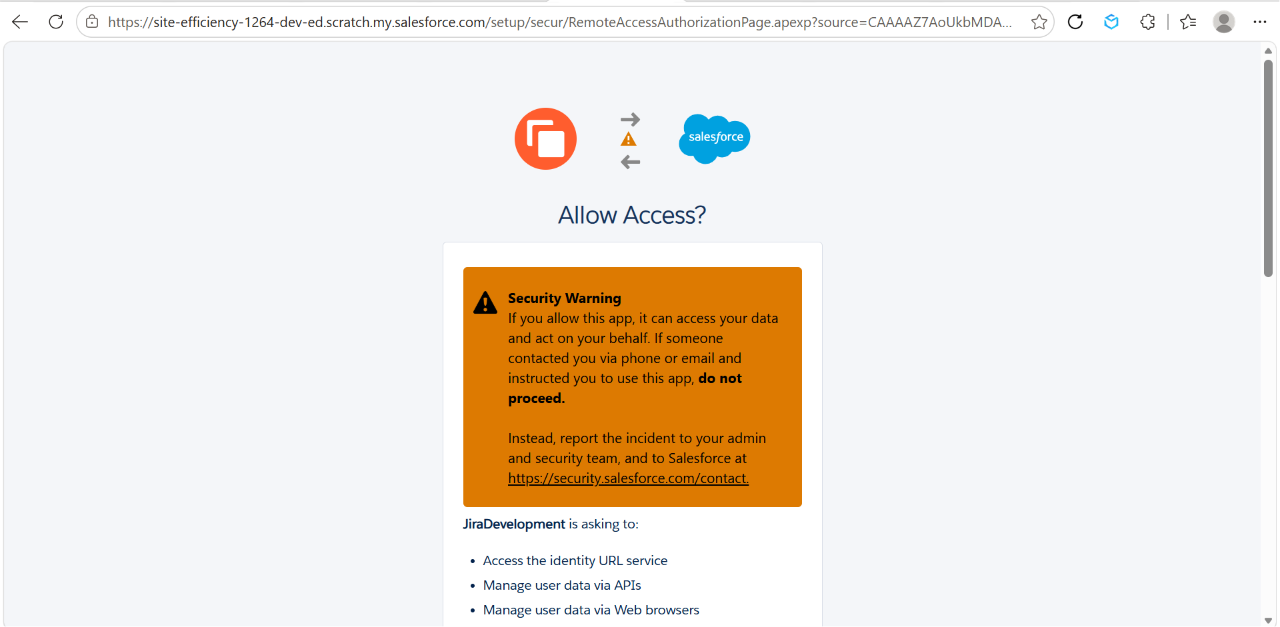
The screen lists every scope the app is requesting (Access identity URL, Manage user data via APIs, Perform requests at any time, etc.) — these correspond to the full and refresh_token scopes selected during External Client App creation.
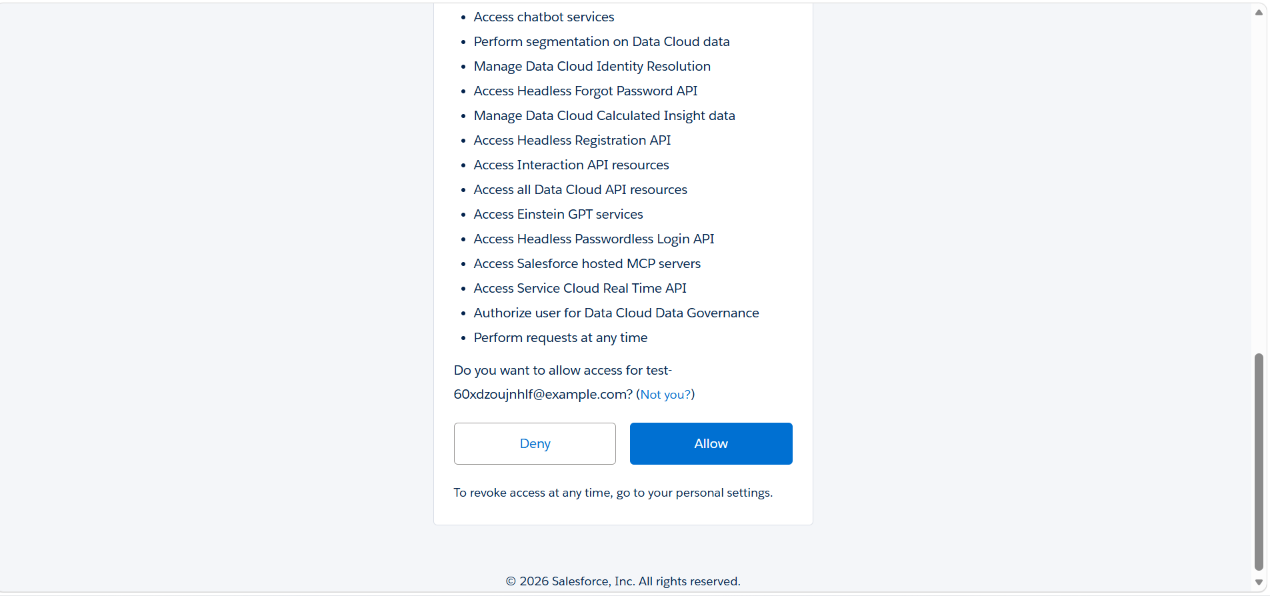
Review the permissions and click Allow to authorize the connection.
Salesforce displays a security warning advising not to proceed if someone asked you to do this over the phone or via email — this is a standard prompt for any third-party OAuth grant.
8. Confirm the Connection
Salesforce exchanges the authorization code for an access token and refresh token, both stored encrypted in Forge KVS keyed under this org's name. The browser redirects back to Jira, and the Salesforce Configuration page now shows the Core Settings tab for the new org:
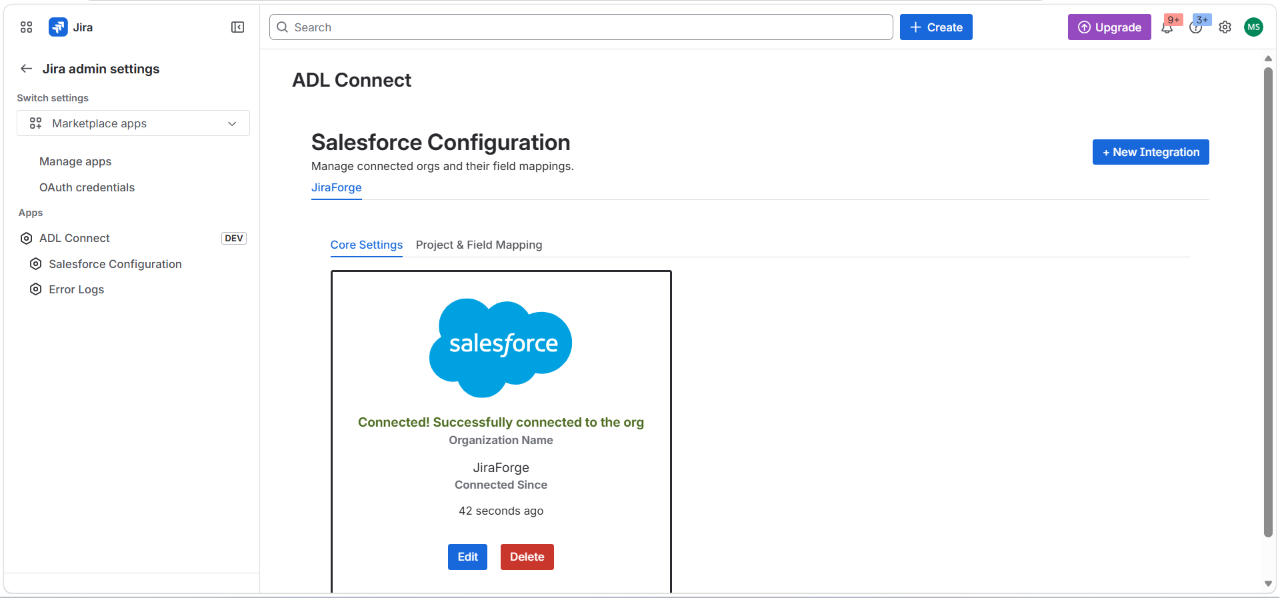
- Connected! Successfully connected to the org
- Organization Name — the Org Name you entered (e.g.,
JiraForge) - Connected Since — the elapsed time since the OAuth handshake completed
The org tab (e.g., JiraForge) is now visible at the top of the Salesforce Configuration page. Two action buttons are available:
- Edit — update the Client ID / Client Secret if they are rotated in Salesforce.
- Delete — disconnect the org. This revokes the stored tokens and removes all mappings tied to this org.
9. Next Steps
With the org connected, switch to the Project & Field Mapping tab to configure:
- Which Jira projects and work types are eligible for Salesforce linking
- Which Salesforce parent objects (Case, Account, Opportunity, Lead, custom objects) can be linked from those issues
- Field-level mappings between Jira and Salesforce
- Panel Fields — the columns shown on the Jira issue panel for linked records
Repeat this Core Settings flow for each additional Salesforce org (e.g., a separate Sandbox for QA, or multiple Production orgs across business units) — each connection is fully isolated, with its own encrypted credentials and its own set of mappings.
Configure Project & Field Mapping — Create a New Mapping
After connecting a Salesforce org under Core Settings, the next step is to define which Jira projects can link to which Salesforce parent objects, and for which work types. Each row in the Project & Field Mapping table represents one combination of (Jira Project + Jira Work Type + Salesforce Parent Object) that ADL Connect for Jira will enable on the issue panel.
You can create multiple mappings per connected org — for example, link Tasks in the Support project to Cases, and Bugs in the Engineering project to Opportunities.
1. Open the Project & Field Mapping Tab
From the Salesforce Configuration page, click the org tab (e.g., JiraForge) and switch from Core Settings to Project & Field Mapping.
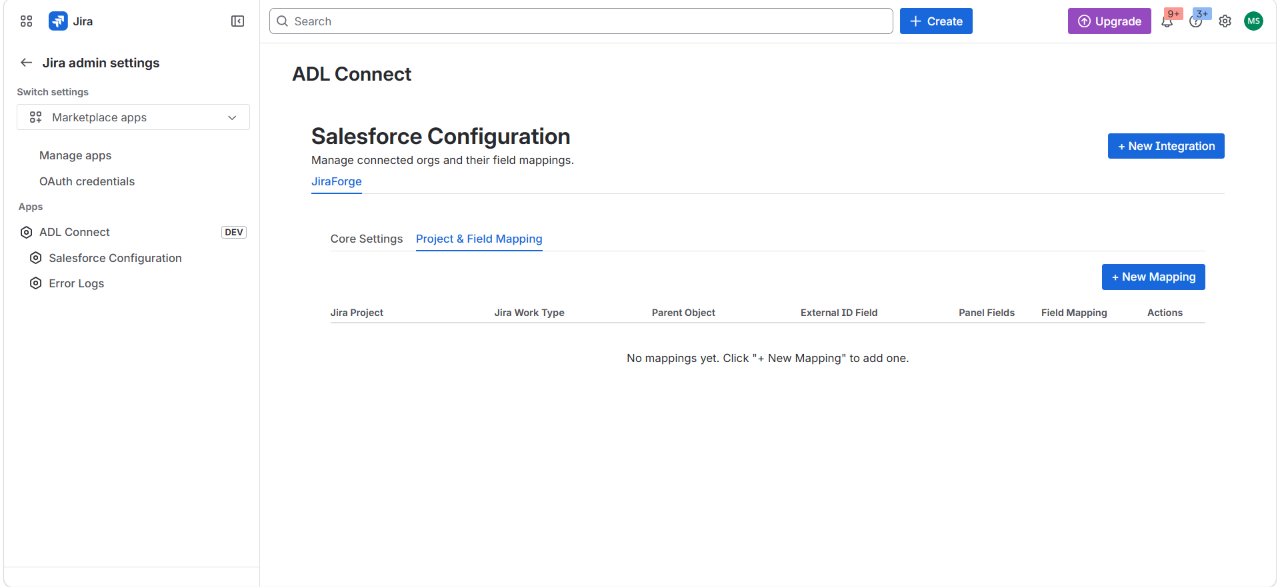
If no mappings exist yet, the table shows:
No mappings yet. Click "+ New Mapping" to add one.
Click + New Mapping in the top-right.
2. Enter the Mapping Details
The New Mapping Configuration modal opens.
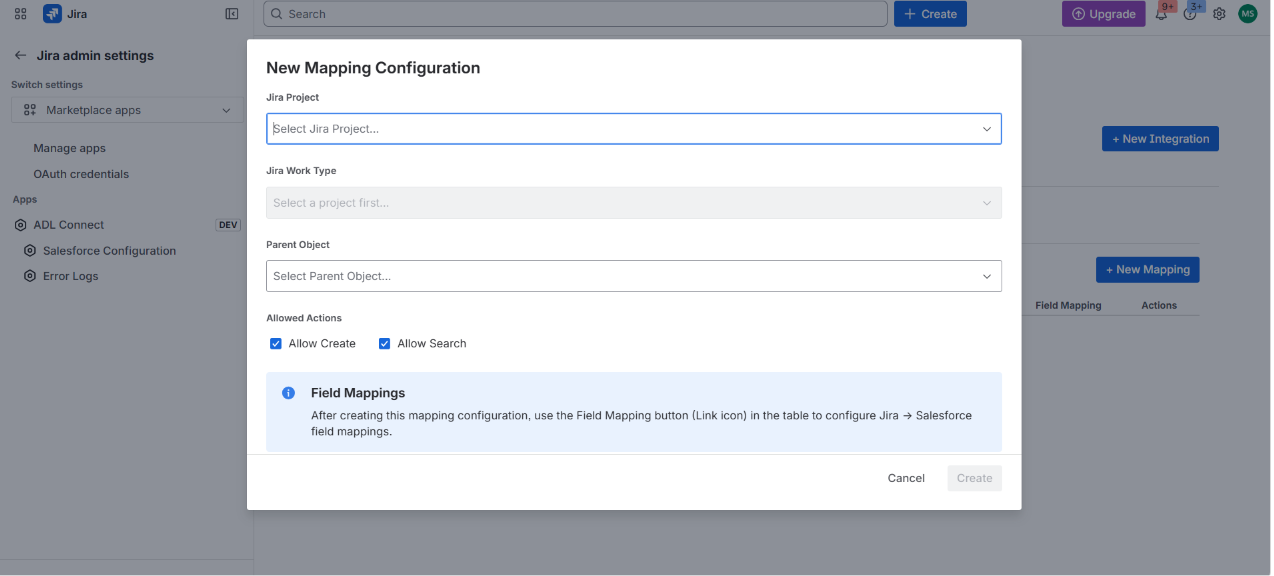
Fill in the dropdowns in order — each one populates the next:
Jira Project
Select the Jira project this mapping applies to (e.g., My Software Team). The dropdown lists every Jira project accessible to ADL Connect on this site.
The Jira Work Type dropdown remains disabled until a project is selected, because work types are project-scoped.
Jira Work Type
Once a project is chosen, the Jira Work Type dropdown loads the work types available in that project (e.g., Task, Bug, Story, Epic). Select the work type that should trigger Salesforce linking on the issue panel.
Note: Only issues matching both the selected Project and Work Type will show the Salesforce Details panel with linking actions for this parent object. Issues outside this combination are unaffected.
Parent Object
Select the Salesforce parent sObject that issues of this type can be linked to — for example, Case (Case), Account (Account),Lead (Lead) or any custom object available in the connected org.
Important: The selected parent object must have a corresponding lookup field on
JiraRecordLink__cfollowing the convention<ObjectName>RecordLink__c(e.g.,CaseRecordLink__c,AccountRecordLink__c). If the field is missing or itsreferenceTodoesn't match, the modal will surface a clear error and block save. This guarantees mappings can never silently fail at runtime.
Allowed Actions
Choose which actions users can perform on the issue panel for this parent:
- ☑ Allow Create — display the + New button to create a new Salesforce record from the Jira issue (prefilled with mapped Jira values).
- ☑ Allow Search — display the Search button to search and link an existing Salesforce record.
Both are enabled by default. Disable one if you want, for example, to permit linking existing Cases without allowing new Case creation from Jira.
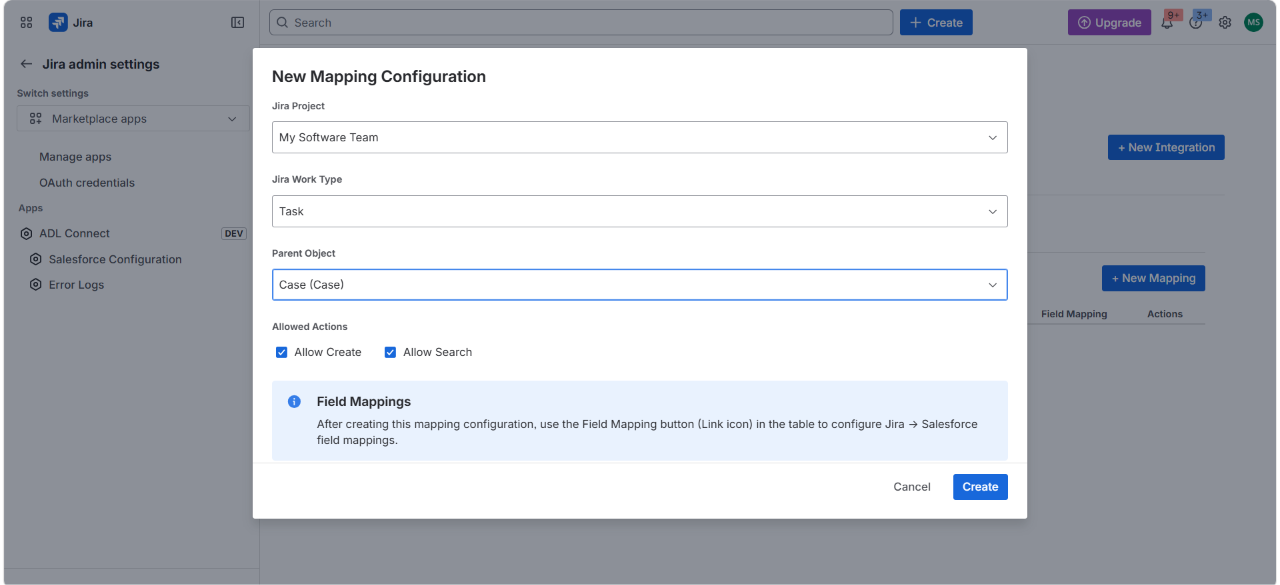
3. Save the Mapping Configuration
An info banner reminds you that field mappings are configured separately:
Field Mappings — After creating this mapping configuration, use the Field Mapping button (Link icon) in the table to configure Jira → Salesforce field mappings.
Click Create to save.
4. Review the Created Mapping
The new mapping appears as a row in the Project & Field Mapping table.
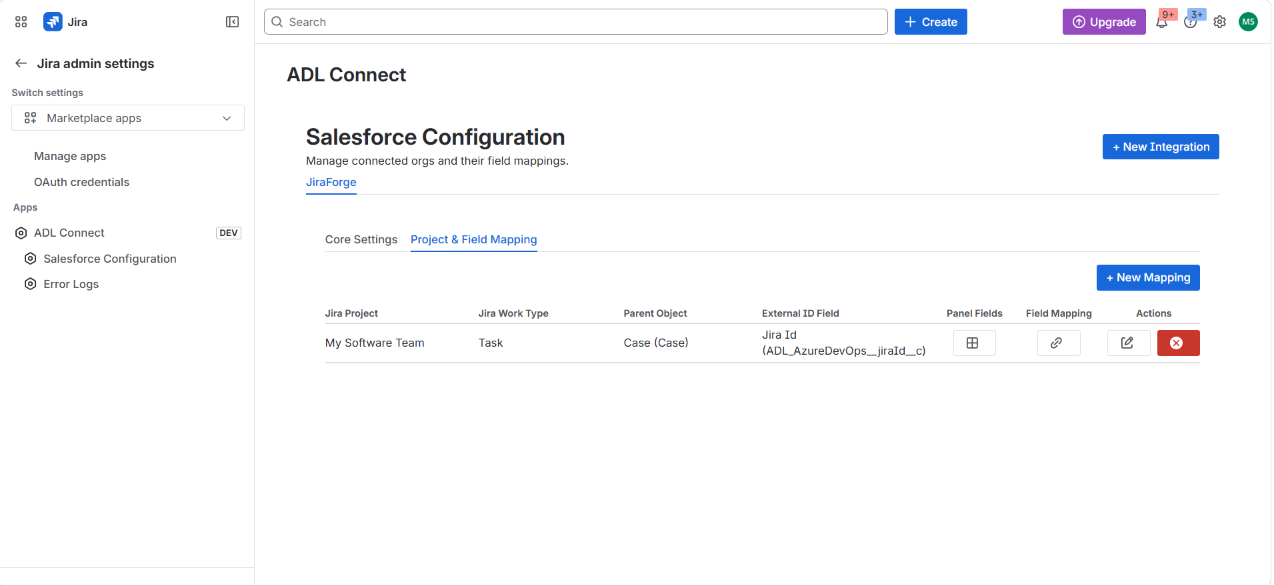
In this example:
- Jira Project:
My Software Team - Jira Work Type:
Task - Parent Object:
Case (Case) - External ID Field:
Jira Id (ADL_AzureDevOps__jiraId__c)— the field that stores the unique Jira issue key. This field is detected automatically from the installed package and surfaced here for visibility.
The row exposes four action controls:
- Panel Fields (grid icon) — define which columns appear on the Jira issue panel for records of this parent (required for the panel to render rows).
- Field Mapping (link icon) — open the Field Mapping editor to map Jira fields to parent record fields, in both directions.
- Edit (pencil icon) — modify the project, work type, parent object, or allowed actions.
- Delete (red X) — remove the mapping. Existing linked records remain in Salesforce; only the configuration is removed.
5. Next Steps
The mapping row is now active but not yet usable on Jira issues — two more configuration steps are recommended before opening a Jira issue:
- Configure Panel Fields (grid icon) — required for the Salesforce Details panel to display any rows for this parent on Jira issues.
- Configure Field Mapping (link icon) — define which Jira fields populate which Salesforce fields when creating or syncing records.
Repeat the + New Mapping flow for every (Project + Work Type + Parent Object) combination you want to enable. For example, to allow Tasks in the same project to link to both Cases and Accounts, create two separate mappings — one per parent object.
Configure Field Mapping — Map Jira Fields to Salesforce Fields
After creating a mapping row under Project & Field Mapping, the next step is to define how individual Jira fields map to fields on the JiraRecord__c object and (optionally) to fields on the parent Salesforce object (e.g., Case, Account, Opportunity, Lead). These mappings determine what data is carried into Salesforce when a record is created from Jira, and what flows back when records are synced.
Each Field Mapping editor is scoped to a single Project + Work Type + Parent Object combination, so you can map the same Jira field to different Salesforce fields per parent if needed.
1. Open the Field Mapping Editor
From the Project & Field Mapping table, locate the mapping row you want to configure and click the Field Mapping icon (link icon) in that row.
The Field Mapping modal opens.
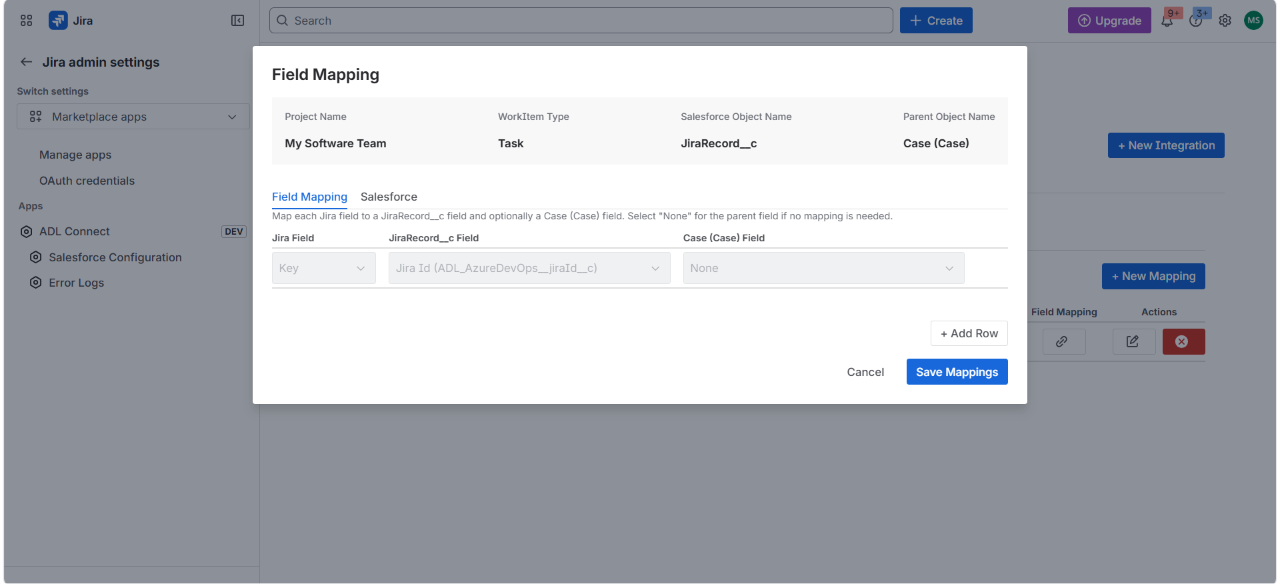
The modal header confirms the scope of the mapping:
- Project Name — e.g., My Software Team
- WorkItem Type — e.g., Task
- Salesforce Object Name — JiraRecord__c (fixed — this is the canonical Jira mirror object)
- Parent Object Name — e.g., Case (Case)
Two tabs are available:
- Field Mapping — the editor where you define the Jira → JiraRecord__c → Parent Object mapping rows.
- Salesforce — a read-only reference view of all JiraRecord__c fields exposed by the installed package and their data types.
The default tab is Field Mapping.
An instructional line beneath the tabs reads:
Map each Jira field to a JiraRecord__c field and optionally a Case (Case) field. Select "None" for the parent field if no mapping is needed.
2. Understand the Three Columns
Each row in the Field Mapping editor has three columns:
| Column | Description |
|---|---|
| Jira Field | The source field on the Jira issue (e.g., Key, Summary, Description, Status, Reporter, Assignee, or any custom field). |
| JiraRecord__c Field | The field on the Salesforce JiraRecord__c mirror object where the value is written. Required for sync to function. |
| Case (Case) Field (or selected parent) | An optional additional field on the parent Salesforce record (Case, Account, etc.) the value should also be written to. Select None if the value should only land on JiraRecord__c. |
The first row is locked and pre-configured:
- Jira Field = Key
- JiraRecord__c Field = Jira_Id (ADL__AzureDevOps__Jira_Id__c)
- Parent Field = None
This is the external ID mapping — it ties every Jira issue to its JiraRecord__c row via the unique Jira key. It cannot be edited or deleted because all sync logic relies on it.
3. Add Field Mapping Rows
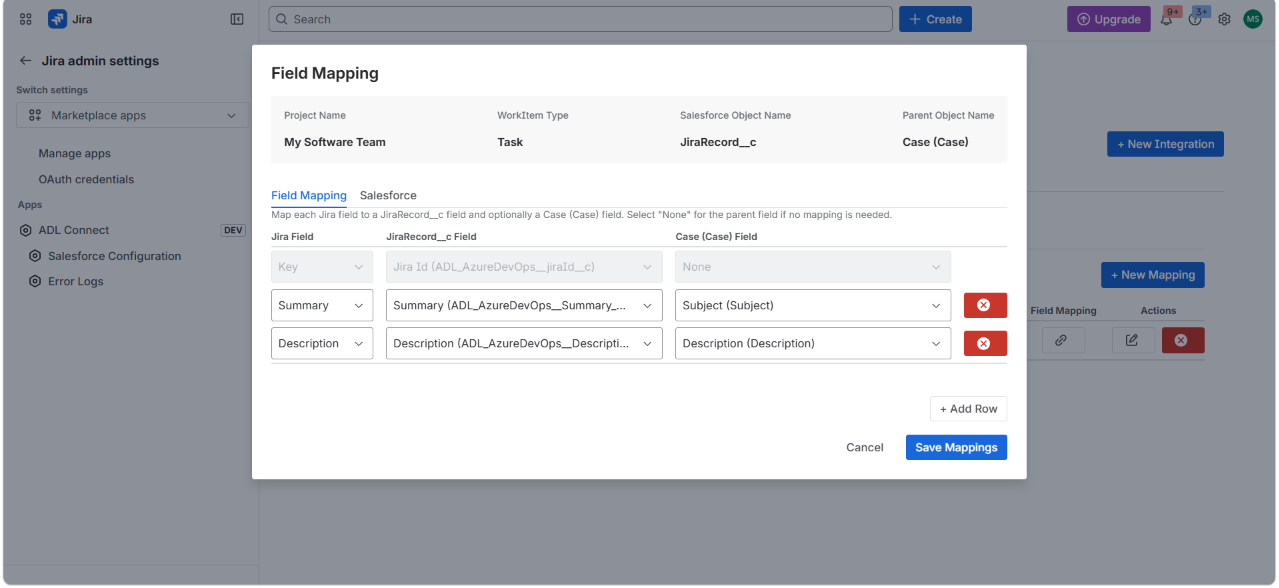
Click + Add Row to add a new mapping. Repeat for every Jira field you want to map.
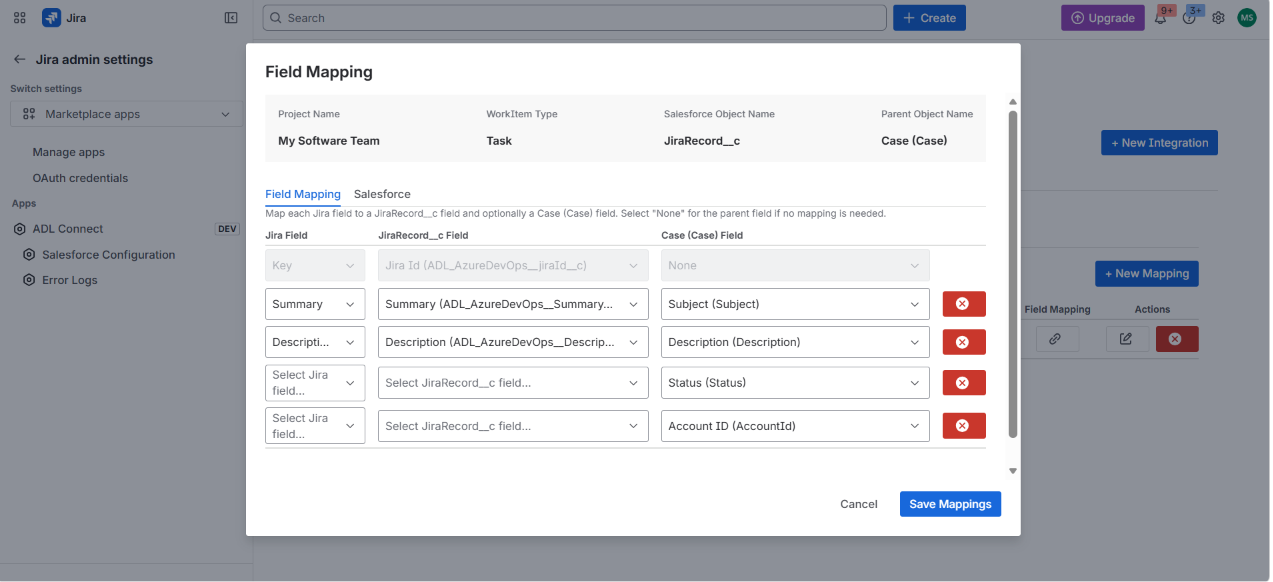
For each new row:
- Jira Field — select from the dropdown (e.g.,
Summary,Description,Status,Reporter,Assignee, custom fields). The dropdown is populated from the live field list of the selected Jira project + work type. - JiraRecord__c Field — select the corresponding mirror field on JiraRecord__c (e.g.,
Summary (ADL_AzureDevOps__Summary__c),Description (ADL_AzureDevOps__Description__c)). - Case (Case) Field — optionally also write the value to a field on the parent Case, e.g.:
Summary→Subject (Subject)Description→Description (Description)- (Jira Field left blank) →
Status (Status)— for rows that should only populate the parent and not pull from Jira - (Jira Field left blank) →
Account ID (AccountId)— to set parent fields that are required at Case creation but don't come from Jira
Tip: You can leave the Jira Field column blank and still map a value to the parent — useful for fields that are required at parent-record creation (like
AccountIdon Case) but don't have a Jira equivalent. The user is prompted for these values in the Create Record modal at runtime.
Use the red × button at the end of each row to delete it. The locked external-ID row at the top has no delete button.
4. Recommended Standard Mappings
For a typical Case ↔ Jira Task mapping, a sensible starting point is:
Adjust according to the fields available in your installed package and the parent object's schema. Make sure the integration user has read/write permission on every field you reference.
5. Review Available Salesforce Fields (Reference Tab)
If you're unsure which JiraRecord__c fields exist in the connected org, switch to the Salesforce tab.
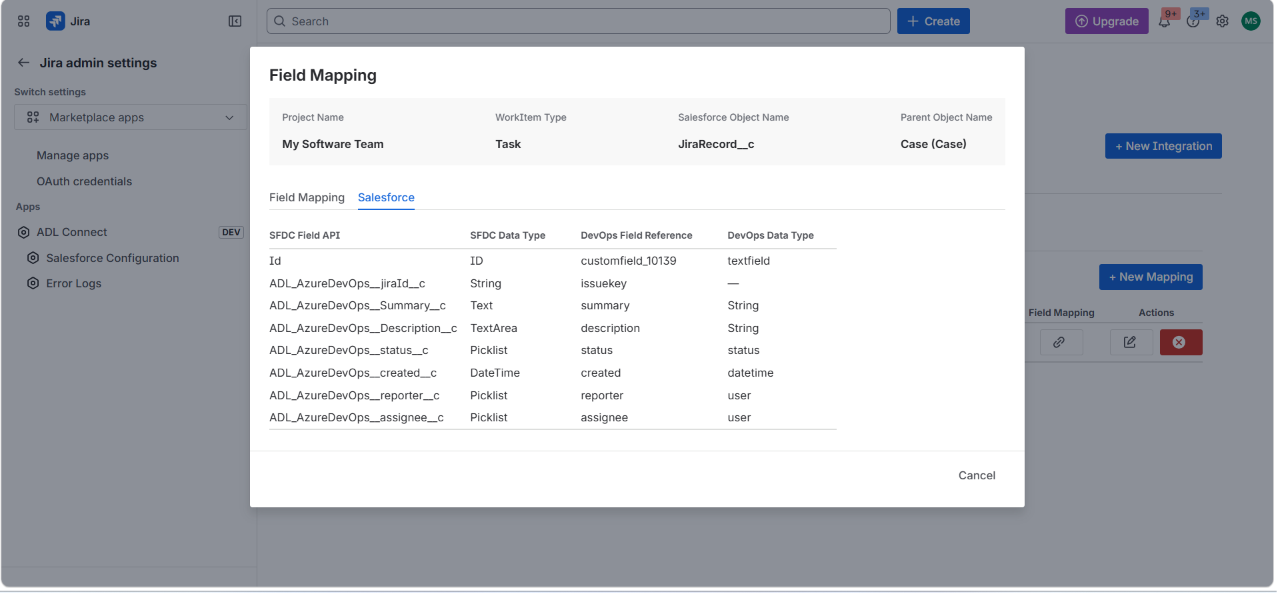
This is a read-only reference that lists every field on JiraRecord__c exposed by the installed managed package, along with:
- SFDC Field API — the Salesforce API name (e.g.,
ADL_AzureDevOps__Summary__c). - SFDC Data Type —
String,Text,TextArea,Picklist,DateTime,ID, etc. - DevOps Field Reference — the canonical Jira / DevOps field this Salesforce field is intended to mirror (e.g.,
summary,description,status,reporter,assignee,customfield_10139). - DevOps Data Type — the corresponding Jira-side data type (
String,Picklist,datetime,user,textfield, etc.).
Use this view to confirm:
- The mirror field exists in your org's installed package.
- The data types on both sides are compatible (e.g., don't map a Jira
userfield directly into a SalesforceStringwithout expecting display-name conversion). - Custom fields you've added to JiraRecord__c show up here before referencing them in the mapping editor.
There are no editable controls on the Salesforce tab — close it by switching back to Field Mapping, or click Cancel to dismiss.
6. Save the Mappings
When all rows are configured, click Save Mappings at the bottom-right of the Field Mapping tab.
The modal closes and the saved configuration are persisted against the (Org + Project + Work Type + Parent Object) tuple. The mapping row in the Project & Field Mapping table now reflects the saved state.
Validation: If a row is incomplete (e.g., Jira Field selected but no JiraRecord__c Field), or if the integration user lacks access to a referenced field, save is blocked and the offending row is highlighted. Fix the issue and click Save Mappings again.
7. Next Steps
With field mappings saved:
- Configure Panel Fields (grid icon on the mapping row) — choose which columns appear on the Jira issue panel for linked records of this parent. Required for the panel to display any rows.
- Open a Jira issue matching the (Project, Work Type) combination — the Salesforce Details panel will now show + New and Search buttons. Creating a new record will prefill values from the mapped Jira fields; linking an existing record will populate the panel using the configured Panel Fields.
Re-open the Field Mapping editor at any time to add, remove, or adjust rows as your Salesforce schema or Jira fields evolve. Existing linked records continue to sync using the updated mappings on the next change event.
Configure Issue Panel Fields — Choose Columns Shown on the Jira Issue Panel
After saving the Field Mapping, the final configuration step for each mapping row is to define which Salesforce fields appear as columns on the Jira issue panel for records of this parent object. This step is required — until at least one field is selected, linked records of this parent will not render on the Jira issue panel.
The Issue Panel Fields editor is scoped per mapping row, so you can show different columns for Cases than for Accounts or Opportunities, even within the same Jira project and work type.
1. Open the Issue Panel Fields Editor
From the Project & Field Mapping table, locate the mapping row and click the Panel Fields icon (grid icon) in the Panel Fields column.
The Issue Panel Fields — Task modal opens (the work type from the mapping row appears in the title).
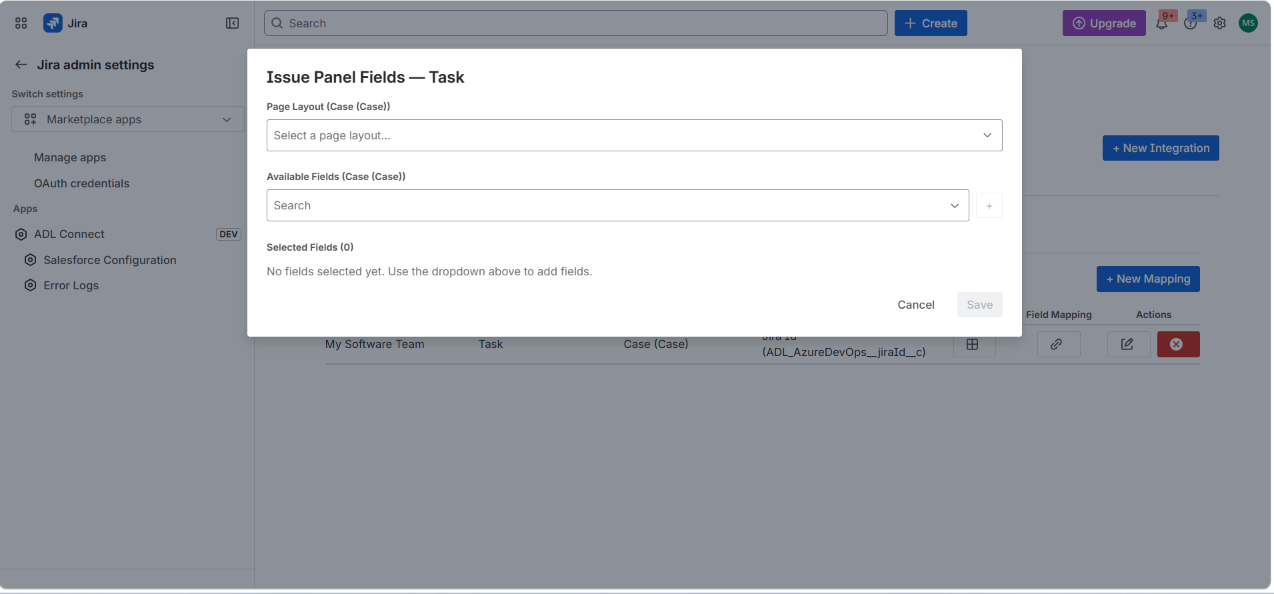
The modal contains three sections:
- Page Layout (Case (Case)) — choose which Salesforce page layout drives the available field list.
- Available Fields (Case (Case)) — searchable dropdown of fields exposed by the selected layout.
- Selected Fields — the ordered list of columns that will appear on the Jira issue panel.
The initial state shows:
No fields selected yet. Use the dropdown above to add fields.
The Save button is disabled until at least one field is selected.
2. Select a Salesforce Page Layout
Click the Page Layout (Case (Case)) dropdown.
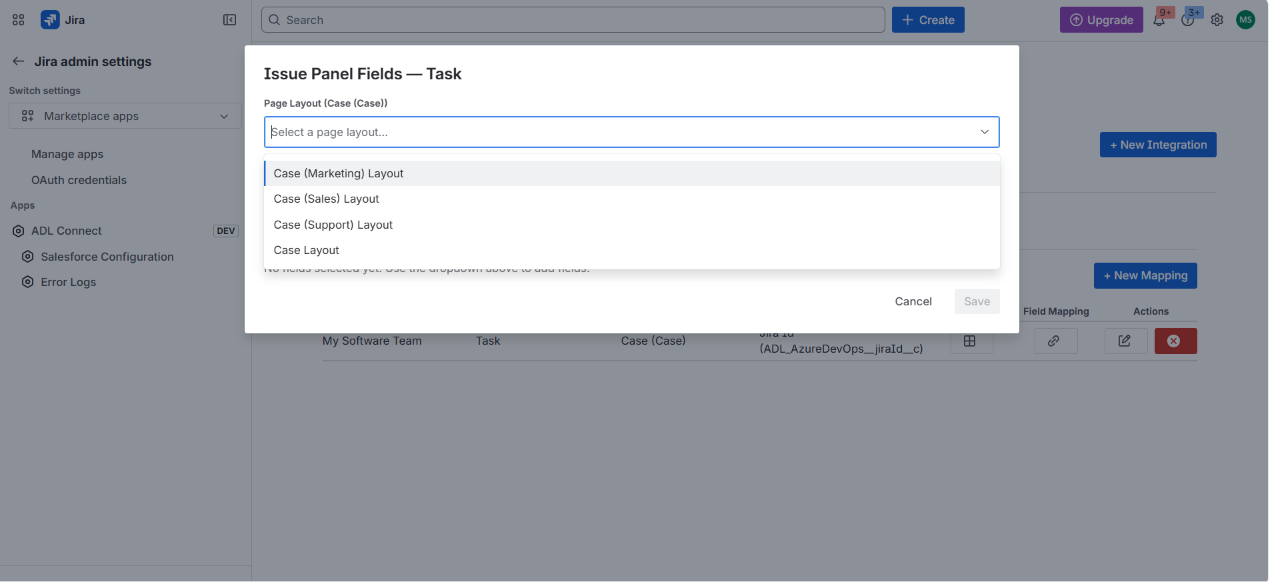
The dropdown is populated by reading the page layouts available on the selected parent object in the connected Salesforce org. For Case, typical entries include:
- Case (Marketing) Layout
- Case (Sales) Layout
- Case (Support) Layout
- Case Layout
Why page layouts? Layouts let you scope the field selector to a curated subset of fields that matter to a particular audience, rather than the full schema of the parent object. Pick the layout used by the team that will consume the data in Jira — for an engineering team triaging support cases, Case (Support) Layout is usually the right choice.
Select the layout that best matches the team's working context (e.g., Case Layout for a generic default).
Once a layout is selected, the Available Fields dropdown is populated with the fields from that layout, including standard fields (Subject, Description, Status, AccountId, Priority, etc.) and any custom fields included in the layout.
3. Add Fields to the Selected List
Click the Available Fields (Case (Case)) dropdown and either scroll or search by typing the field name.
use the + button to the right of the dropdown to add it to Selected Fields.
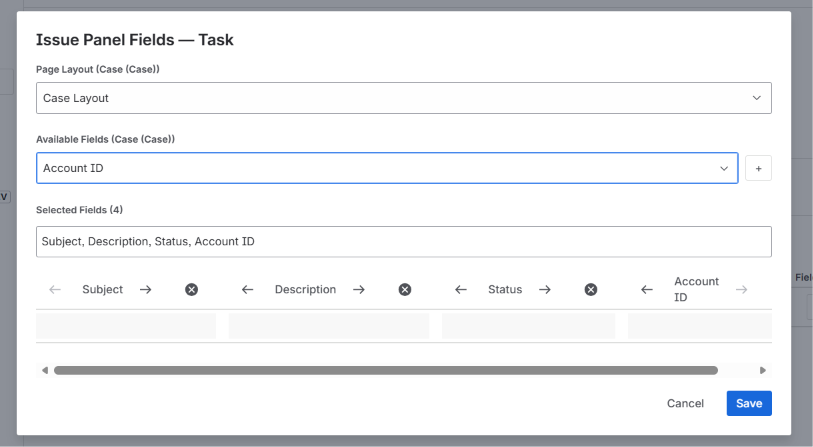
In this example, four fields have been chosen for the Jira issue panel:
- Subject
- Description
- Status
- Account ID
The Selected Fields (n) counter updates as you add fields, and a comma-separated summary is shown above the chip row for quick review (e.g., Subject, Description, Status, Account ID).
Reorder columns
Each selected field is displayed as a chip with ← → arrows on either side. Click these arrows to move the chip left or right — the order of chips matches the left-to-right column order on the Jira issue panel. Place the most important columns (e.g., Subject, Status) on the left so they're visible without horizontal scrolling.
Remove a field
Click the × button on a chip to remove it from the selected list. The field returns to the Available Fields dropdown for re-use.
A horizontal scrollbar appears beneath the chips when the selected list is wider than the modal — useful when you've chosen many columns.
4. Choose Fields That Are Useful at a Glance
The Jira issue panel is a compact summary view, so favor:
- Identifying fields —
Subject,Case Number,Name(so users can recognize the record without clicking through). - Status / stage fields —
Status,Stage,Priority(so the panel surfaces actionable signal). - Relationship fields —
Account ID,Contact,Owner(so users understand who the record belongs to). - Lightweight detail — short text fields, picklists, dates.
Avoid choosing long rich-text or HTML fields (e.g., a full Description) as panel columns — they push the table width past the panel viewport and dominate the layout. Such fields are better viewed by opening the linked record's detail dialog from the panel.
Tip: Fields you pick here are independent from the fields configured in the Field Mapping step. Field Mapping controls what is written into Salesforce; Panel Fields controls what is read back and displayed on the Jira issue panel. The same field can appear in one without the other.
5. Save the Panel Configuration
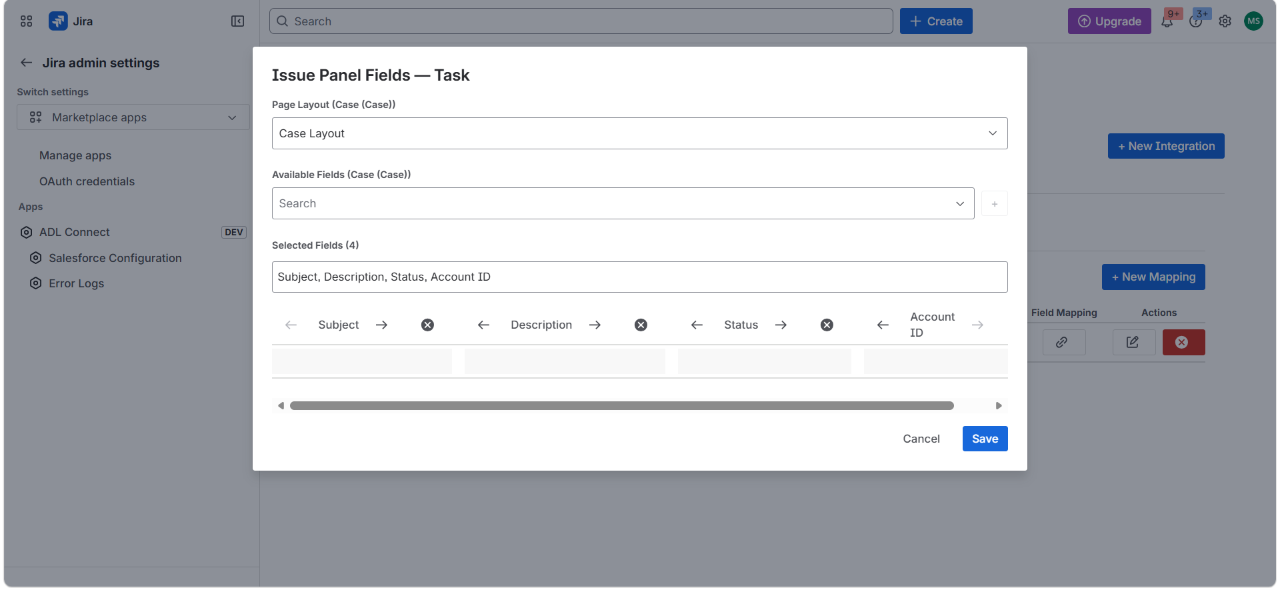
Once the desired fields are selected and ordered, the Save button becomes active.
Click Save to persist the panel configuration against this mapping row.
The modal closes and the mapping row in the Project & Field Mapping table reflects that Panel Fields are now configured (the grid icon remains enabled for further edits).
6. Verify on a Jira Issue
Open any Jira issue that matches the mapped (Project + Work Type) combination — for this example, any Task in the My Software Team project.
The Salesforce Details issue panel now displays:
- A Case section (matching the parent object configured in the mapping).
- Columns for Subject, Description, Status, Account ID (in the order you selected).
- + New and Search action buttons (governed by the Allowed Actions on the mapping row).
If you link an existing Case or create a new one from the panel, the row appears immediately with values populated from Salesforce, using the Panel Fields configuration you just saved.
7. Adjusting the Panel Later
Re-open the Issue Panel Fields editor at any time (grid icon on the mapping row) to:
- Add columns as new business needs emerge.
- Remove columns that turned out to be noisy or rarely used.
- Re-order columns based on user feedback.
- Switch the page layout if a different layout's field set becomes more relevant (e.g., moving from
Case (Support) LayouttoCase (Sales) Layoutas the team's focus shifts).
Changes take effect immediately — the next time a user loads a Jira issue with linked Salesforce records, the panel renders with the new column configuration. No re-link or re-sync is required.
Creating a New Salesforce Record from a Jira Issue
Once the connected org, project mapping, field mapping, and panel fields have been configured, end-users can begin creating and linking Salesforce records directly from any matching Jira issue. This section walks through the user-facing flow for creating a brand-new Salesforce record (e.g., a Case) from a Jira issue without leaving Jira.
Prerequisite — App must be deployed and installed on the Jira site.
The ADLConnect issue panel only appears on issues where the app has been deployed and installed. The developer publishes the app via
forge deploy(andforge deploy -e productionfor production), then installs it onto each Jira site withforge install/forge install -e production. End-users see the ADLConnect [DEV] lozenge on issues when the development build is installed, or no lozenge for production builds. After install, the panel is available on every issue whose project + work type matches a saved mapping row.
1. Open a Jira Issue and Add the ADLConnect Panel
Open any Jira issue that matches a configured (Project + Work Type) mapping — in this example, the Task DEV-27 Knowledge Case in the My Software Team project.
If the ADLConnect panel isn't yet attached to the issue, click the Apps button (gear/grid icon at the top of the issue body) and select ADLConnect from the dropdown.
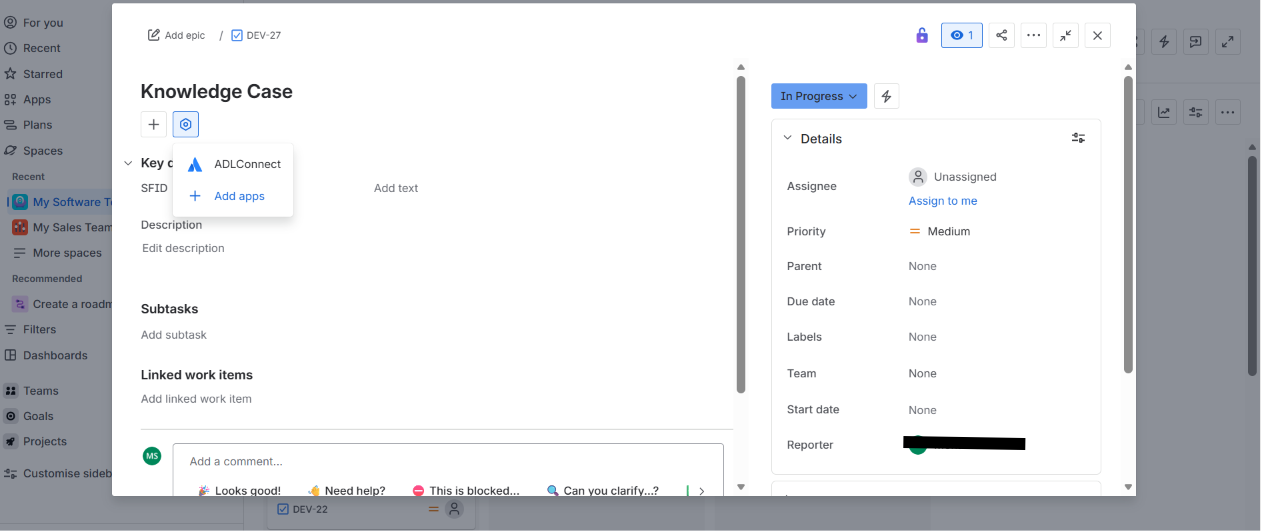
The Apps menu shows:
- ADLConnect — the app's issue panel module.
- + Add apps — install other apps from the Marketplace (not needed here).
Once added, the panel persists on the issue's view going forward — users won't need to re-add it.
2. The Salesforce Details Panel
The Salesforce Details panel appears in the issue body under Linked work items.
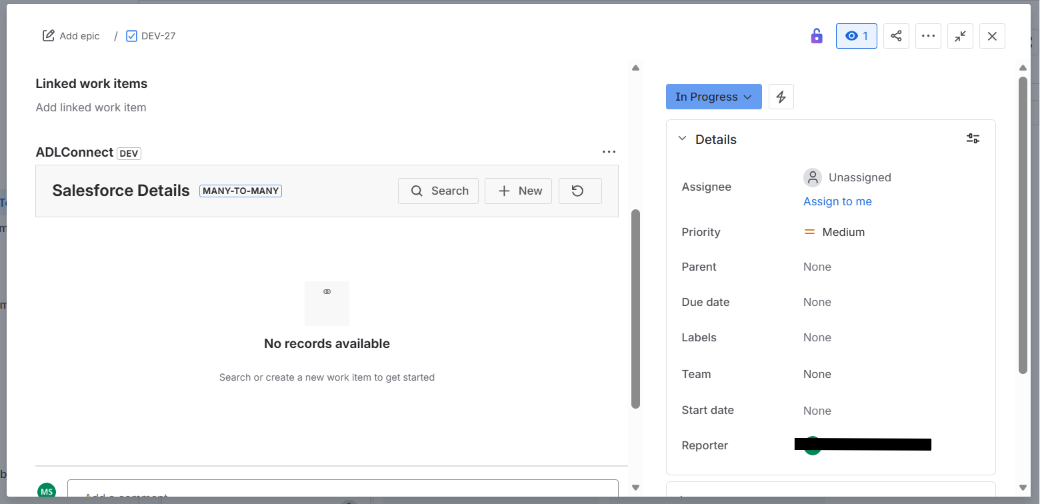
Key elements of the panel:
- ADLConnect [DEV] — the app name; the
DEVlozenge indicates a development build. - Salesforce Details title with a MANY-TO-MANY badge — reminding users that one Jira issue can link to multiple Salesforce records, and vice versa.
- Search button — search and link an existing Salesforce record (e.g., an existing Case).
- + New button — create a new Salesforce record from this Jira issue, prefilled with mapped Jira field values.
- Refresh icon — re-fetch linked records and panel data from Salesforce.
- No records available — empty state shown when the issue has no linked records yet, with a hint: Search or create a new work item to get started.
Click + New to launch the Create flow.
Note: If the org has multiple connected orgs, or the project + work type maps to multiple parent objects, the panel first asks which org and which parent to create against. With a single org and single parent (as in this example), it skips straight to the Review & Create Record modal — this is the auto-skip optimization.
3. Review & Create Record — Prefilled Values
The Review & Create Record modal opens with the fields defined by the saved Field Mapping for this parent object.
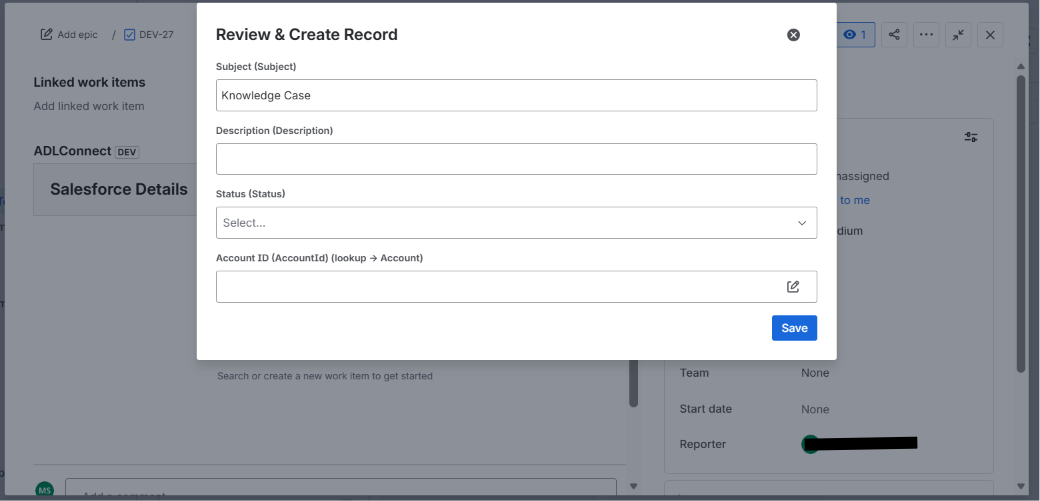
In this example, four fields are presented because the mapping maps Jira → Case in this way:
- Subject (Subject) — pre-filled with the Jira issue's Summary (e.g.,
Knowledge Case), per theSummary → Subjectmapping. - Description (Description) — pre-filled with the Jira issue's Description (empty here because the Jira issue has no description yet).
- Status (Status) — picklist with no prefill (no Jira field mapped to it; the user picks the initial status).
- Account ID (AccountId) (lookup → Account) — lookup field with a pencil icon for opening a reference-search; no prefill since no Jira field maps to it.
How prefill works: Any row in the Field Mapping table where a Jira Field is mapped pushes the Jira value into the corresponding Salesforce field at create time. Rows with a blank Jira Field (e.g.,
Status,Account ID) leave the field empty for the user to fill in.
The user can edit any of the prefilled values before saving.
4. Fill in Any Remaining Fields
The user edits each field to reflect the intended record state:
- Subject —
Knowledge Case from Jira(edited from the prefilled value). - Description —
Simple Description from Jira(entered manually since no Jira description existed). - Status — pick from the picklist (e.g.,
Working). - Account ID — click the pencil icon (reference picker) to open the lookup search.
Searching a Lookup Field (Account)
Clicking the pencil icon on a lookup field opens the Search Account modal — a chrome-less search panel scoped to the lookup's target object (Account in this case).
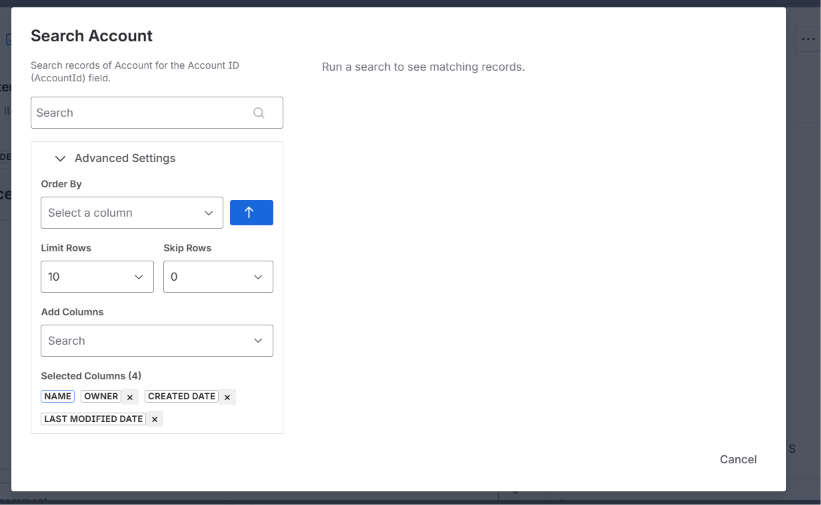
The lookup search supports:
- Quick search — type into the search box (e.g.,
Dummy) and matching Accounts appear immediately with default columns: Name, Owner, Created Date, Last Modified Date. - Advanced Settings (collapsible) — for power users:
- Order By — pick a column to sort the results, with an arrow toggle for ascending / descending.
- Limit Rows / Skip Rows — paginate through large result sets (default Limit 10, Skip 0).
- Add Columns — add additional Account columns to the results table.
- Selected Columns — chips showing the currently displayed columns (e.g.,
NAME,OWNER,CREATED DATE,LAST MODIFIED DATE); click the × on a chip to hide that column.
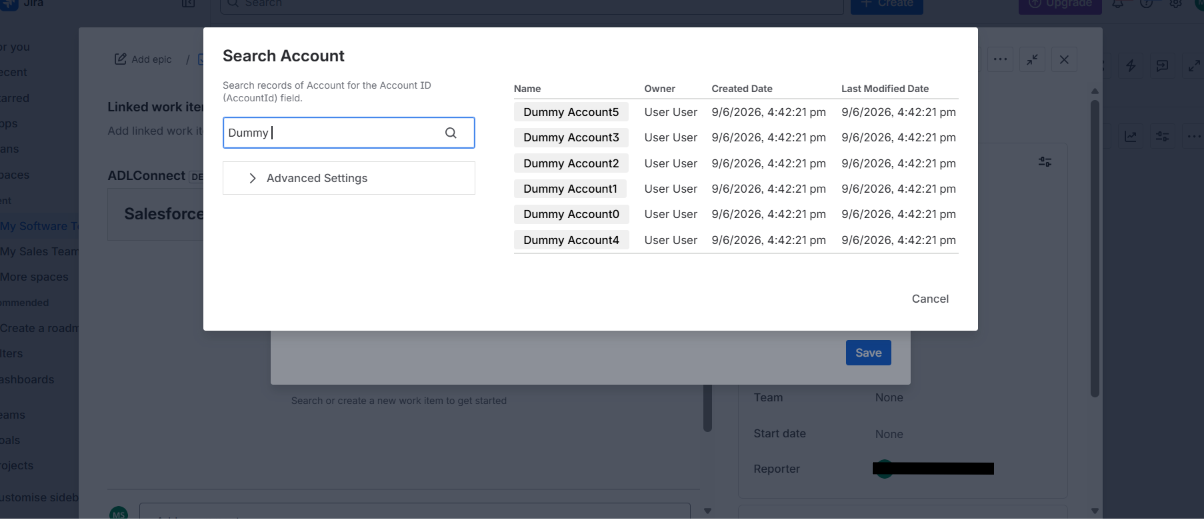
Click the Account name to select it (e.g., Dummy Account1). The lookup modal closes and the selected Account is written back into the field.
5. Confirm the Lookup Resolved Correctly
Back in the Review & Create Record modal, the Account ID field now shows the selected record name with the resolved Salesforce ID displayed beneath:
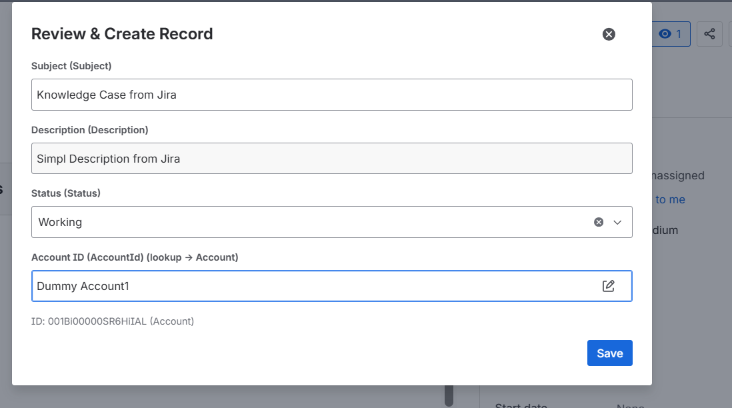
- Account ID (AccountId) =
Dummy Account1 - ID:
001Bi00000SR6HiIAL (Account)— confirms the underlying record reference.
Why the ID is shown: The ID line confirms which actual Salesforce record was chosen, since multiple records can share the same display name. It also gives the user a quick way to spot a wrong selection before saving.
If the wrong record was picked, click the pencil icon again to re-open the search and choose another.
Once all four fields are populated to the user's satisfaction, click Save in the bottom-right.
6. The Record Is Created and Linked
The app performs three operations behind the scenes when Save is clicked:
- Creates the parent record in Salesforce — a new
CasewithSubject,Description,Status, andAccountIdset as configured. - Creates a
JiraRecord__cmirror row — populated with the Jira issue's key (DEV-27) via the external ID field, plus any other mapped Jira → JiraRecord__c fields. - Creates a
JiraRecordLink__cjoin row — wiring the Case to theJiraRecord__cvia theCaseRecordLink__clookup field (or its namespaced equivalent), so the Jira issue and the Case are now formally linked as a many-to-many association.
The modal closes and the Salesforce Details panel refreshes to show the new linked Case:
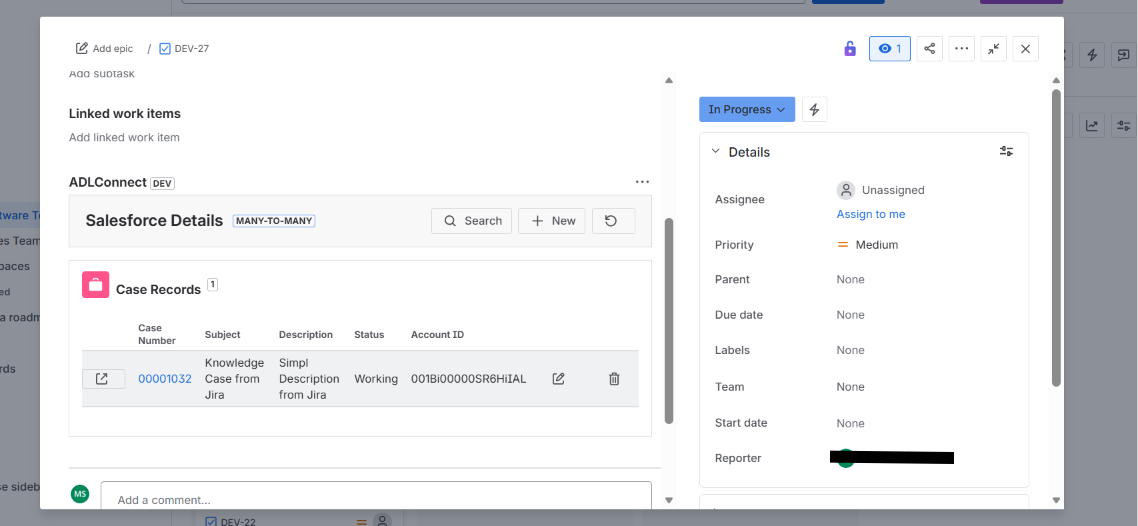
The panel now displays:
- A Case Records section header with a count badge (
1). - A row showing the Case columns configured under Panel Fields:
- Case Number —
00001032(auto-generated by Salesforce, displayed as a clickable link). - Subject —
Knowledge Case from Jira. - Description —
Simple Description from Jira. - Status —
Working. - Account ID —
001Bi00000SR6HiIAL.
- Case Number —
- Two row-level action buttons:
- Edit (pencil icon) — re-open the record in an edit modal to update any field; changes sync back to Salesforce.
- Delete (trash icon) — remove the link between this Jira issue and the Case. (Does not delete the Case itself; only the JiraRecordLink__c join row.)
- The Case Number is rendered as a hyperlink that opens the record in Salesforce in a new tab.
The same panel will now appear on this Jira issue for every user, and on the linked Case in Salesforce, the JiraRecordLink__c join row will surface the Jira issue key — completing the bidirectional link.
7. From Here
- Add more linked records — click + New again to create another Salesforce record (e.g., link an Account in addition to the Case), or Search to link an existing record.
- Edit a linked record — click the pencil icon on the row; updates are written straight back to Salesforce using the same field mappings.
- Unlink a record — click the trash icon to remove the join; the Salesforce record itself remains intact.
- Open the record in Salesforce — click the Case Number link (e.g.,
00001032) to jump to the record's detail page in Salesforce.
Tip: If a user expects the ADLConnect option to appear in the Apps menu but doesn't see it, either the app hasn't been installed on this Jira site, or the current issue's project + work type doesn't match any saved mapping row. The admin can verify the install status under Jira admin settings → Manage apps, and confirm the mapping exists under ADL Connect → Salesforce Configuration → Project & Field Ma
Viewing a Linked Salesforce Record — Details, Related, and Attachments
Beyond the summary columns shown on the Salesforce Details panel, ADL Connect for Jira lets users open a full detail view of any linked Salesforce record without leaving Jira. The detail modal exposes three tabs — Details, Related, and Attachments — giving the Jira user the same context they would see on the Salesforce record page, scoped to the configured page layout.
This view is read-optimized — for editing fields, use the row-level Edit (pencil) action. The detail modal is for inspection, related-record exploration, and attachment download.
1. Open the Record Detail Modal
From the Salesforce Details panel on a Jira issue, locate the linked row you want to inspect (for this example, 00001032) and click the open-record arrow (the box-with-arrow icon on the left of the row).
Two different actions, two different destinations:
- Arrow icon (left of the row) → opens the in-Jira detail modal described below — read-only, three tabs, never leaves Jira.
- Case Number link (e.g.,
00001032) → redirects to Salesforce in a new tab, opening the record's native Salesforce detail page. Use this when you want to edit the record in full Salesforce, see related lists Salesforce-side, or hand off the URL to a Salesforce user.
The Case: 00001032 modal opens, defaulting to the Details tab.
2. The Details Tab
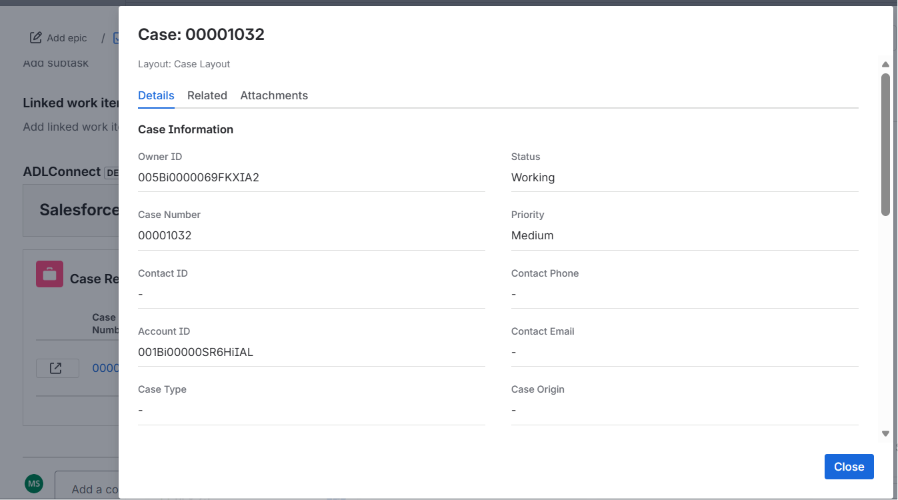
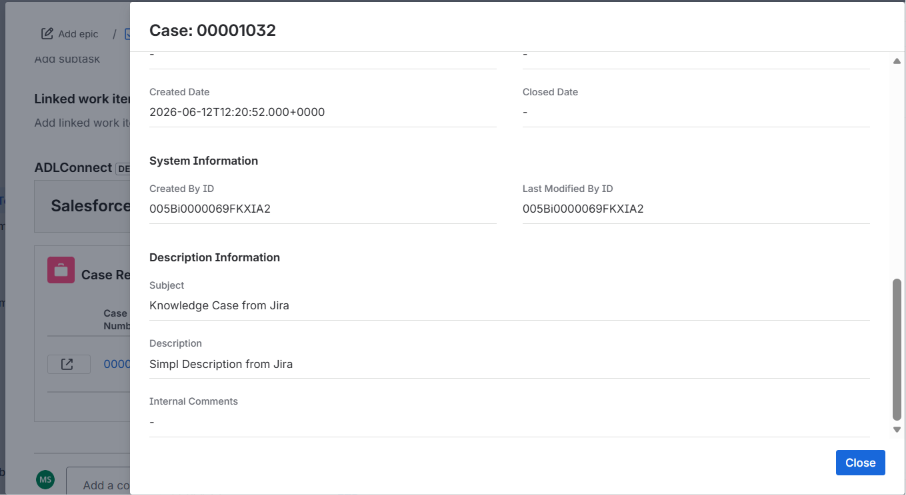
The Details tab shows the record's field values, rendered in the layout structure of the Salesforce Page Layout chosen during the Panel Fields configuration step.
Header elements:
- Case: 00001032 — the parent object name plus the record's Name / Number identifier.
- Layout: Case Layout — the Salesforce page layout used to drive both field selection and section grouping. Matches the layout you picked under Issue Panel Fields → Page Layout.
- Three tabs: Details, Related, Attachments.
Field sections are rendered as Salesforce groups them on the page layout — for example Case Information, with two-column field layout:
| Field | Value |
|---|---|
| Owner ID | 005Bi0000069FKXIA2 |
| Status | Working |
| Case Number | 00001032 |
| Priority | Medium |
| Contact ID | - |
| Contact Phone | - |
| Account ID | 001Bi00000SR6HiIAL |
| Contact Email | - |
| Case Type | - |
| Case Origin | - |
Empty fields display - to make the absence of a value visible at a glance. The modal scrolls vertically when the layout exposes many fields.
Why the page layout drives this view: Salesforce page layouts represent the field set and grouping that the team owning the object curated for that record type. Reusing the layout here means Jira users see Cases the way the Support team sees them, Accounts the way the Sales team sees them, etc. — without ADL Connect having to re-implement a separate display configuration per object.
Click Close in the bottom-right to dismiss the modal at any time.
3. The Related Tab
Click Related to switch to the Related-records view.
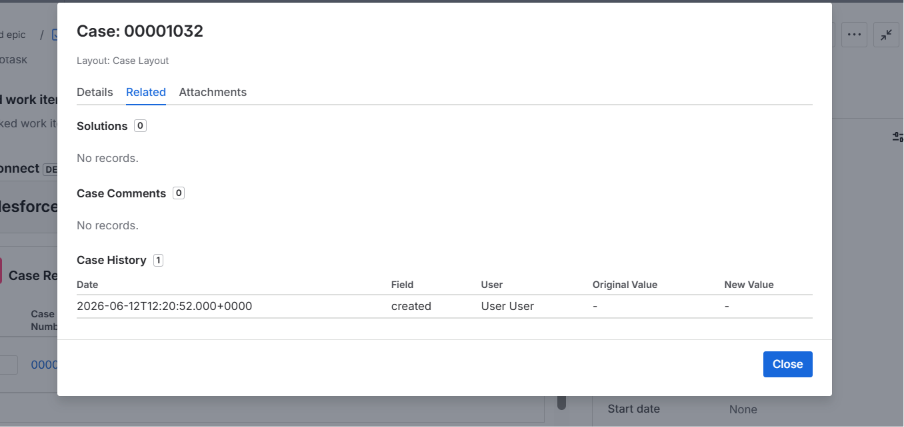
The Related tab surfaces child records and history associated with the parent record. The exact related lists depend on the parent object — for a Case, typical entries are:
- Solutions — knowledge-base solutions associated with the Case.
- Case Comments — internal/external comments logged on the Case.
- Case History — the field-change audit log of the Case.
Each section displays a count badge next to its name (e.g., Solutions [0], Case Comments [0], Case History [1]).
When a related list is empty, the message reads:
No records.
When records are present (e.g., Case History [1]), they render as a table with the related object's display fields:
| Date | Field | User | Original Value | New Value |
|---|---|---|---|---|
2026-06-12T12:20:52.000+0000 | created | User User | - | - |
Use this tab to:
- Verify what historical changes have been made to the record (Case History).
- See whether any solutions are already attached (Solutions).
- Read the comment thread without leaving Jira (Case Comments).
Note: Related-list fields shown here are pulled live from Salesforce per the integration user's permissions. If a user expects a record to appear and it doesn't, confirm the integration user has read access to the related sObject and at least the displayed fields.
4. The Attachments Tab
Click Attachments to switch to the file-attachments view.
The Attachments tab supports two display modes that the user can switch between with the segmented control in the top-right:
- List — a tabular view with file metadata.
- Thumbnail — a visual tile view with image previews.
List View
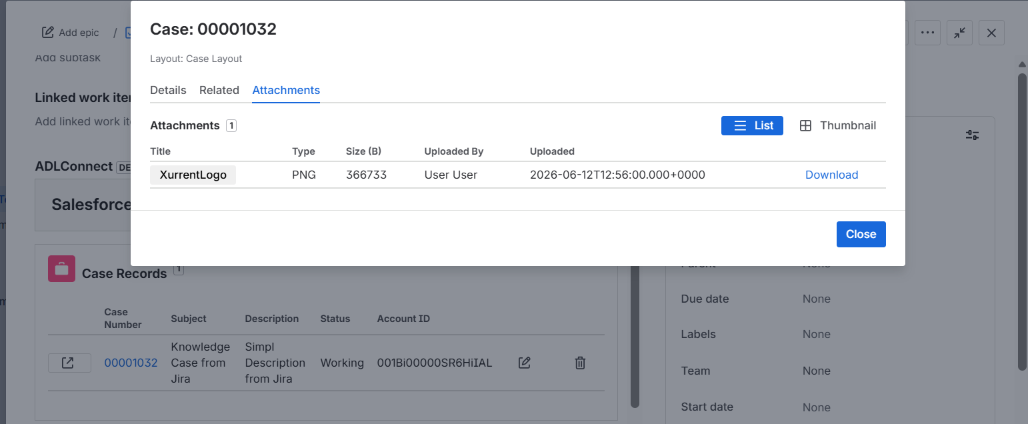
The default List view shows attachments as a table:
| Title | Type | Size (B) | Uploaded By | Uploaded | |
|---|---|---|---|---|---|
XurrentLogo | PNG | 366733 | User User | 2026-06-12T12:56:00.000+0000 | Download |
Columns:
- Title — the attachment's display name as stored in Salesforce.
- Type — file extension / MIME indicator (PNG, PDF, DOCX, etc.).
- Size (B) — size in bytes.
- Uploaded By — the Salesforce user who attached the file.
- Uploaded — ISO-formatted upload timestamp.
- Download — link to download the file directly from Salesforce.
The header shows the count badge Attachments [1] confirming how many files are linked to the record.
Thumbnail View
Click Thumbnail in the segmented control to switch to the visual tile view.
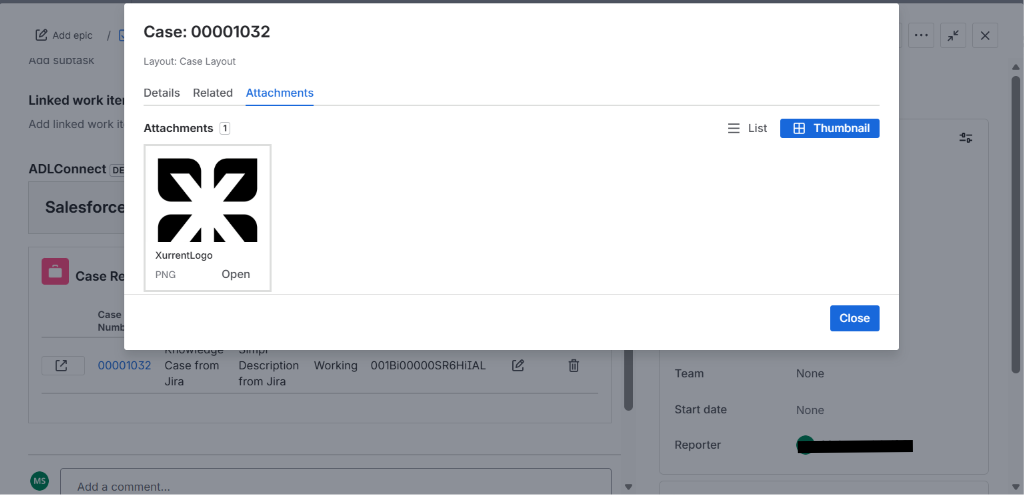
In thumbnail mode, image attachments render with a preview, while non-image attachments fall back to a file-type icon. Each tile shows:
- The image preview (or file icon).
- The attachment title (e.g.,
XurrentLogo). - The file type (e.g.,
PNG). - An Open link to open / download the file.
When to use which view:
- List view is best when users need to identify files by metadata (uploader, date, size) — typical for audit / compliance review.
- Thumbnail view is best for records with multiple image attachments (screenshots, logos, signed PDFs rendered as images) where visual recognition is faster than reading filenames.
5. Closing the Modal
Click Close in the bottom-right of any tab to dismiss the modal and return to the Jira issue view. The Salesforce Details panel beneath stays exactly as it was — no refresh is needed; the detail modal is read-only and doesn't modify the linked record.
The selected tab is not persisted across opens — the modal always reopens on the Details tab when launching a new view. Users who frequently jump to Attachments or Related on every record can re-click the desired tab once the modal opens.
6. Quick Reference — Row Action Icons
To keep the two destinations clear, here's a summary of every action available on a linked-record row:
| Control | Location | Action |
|---|---|---|
| Arrow icon (box with arrow) | Far left of the row | Opens the in-Jira detail modal (Details / Related / Attachments) |
Case Number link (e.g., 00001032) | Case Number column | Redirects to Salesforce in a new tab — opens the native Salesforce record page |
| Edit (pencil icon) | Right side of the row | Opens the edit modal to update field values; writes back to Salesforce on save |
| Delete (trash icon) | Far right of the row | Removes the JiraRecordLink__c join row — does not delete the Case itself |
7. Practical Use Cases
- Triage from Jira — engineering pulls up a Case's
Contact Email,Priority, and recent Case History without context-switching to Salesforce — use the arrow icon. - Solution lookup — check the Related tab's
Solutionslist to see if a knowledge article already covers the customer's symptom before writing a new fix. - Reproducing customer issues — download the screenshot/log file attached on the Case from the Attachments tab directly inside Jira.
- Audit trail — verify which Salesforce user transitioned the Case to
Workingand when, via the Case History related list. - Hand-off to Salesforce — when the work needs to continue in Salesforce (e.g., for a feature only available there like Case escalation rules), click the Case Number link to jump to the native record page.
Tip: If the Layout label at the top of the modal doesn't match the layout you expected, check the Issue Panel Fields → Page Layout setting for this mapping row. The detail modal honors the same layout selection that drives the panel columns, so adjusting it there immediately changes the detail view for all users of this mapping.
Searching and Linking an Existing Salesforce Record from a Jira Issue
When the Salesforce record already exists — for example, a Case raised earlier by the support team or an Account created during onboarding — there's no need to create a duplicate from Jira. The Search action on the Salesforce Details panel lets users find an existing Salesforce record and link it to the current Jira issue in a single step.
Because the integration is many-to-many, the same Jira issue can have multiple linked records (a previously created Case and a searched-and-linked Case), and the same Salesforce record can be linked to multiple Jira issues.
1. Click Search on the Salesforce Details Panel
Open the Jira issue and locate the Salesforce Details panel.
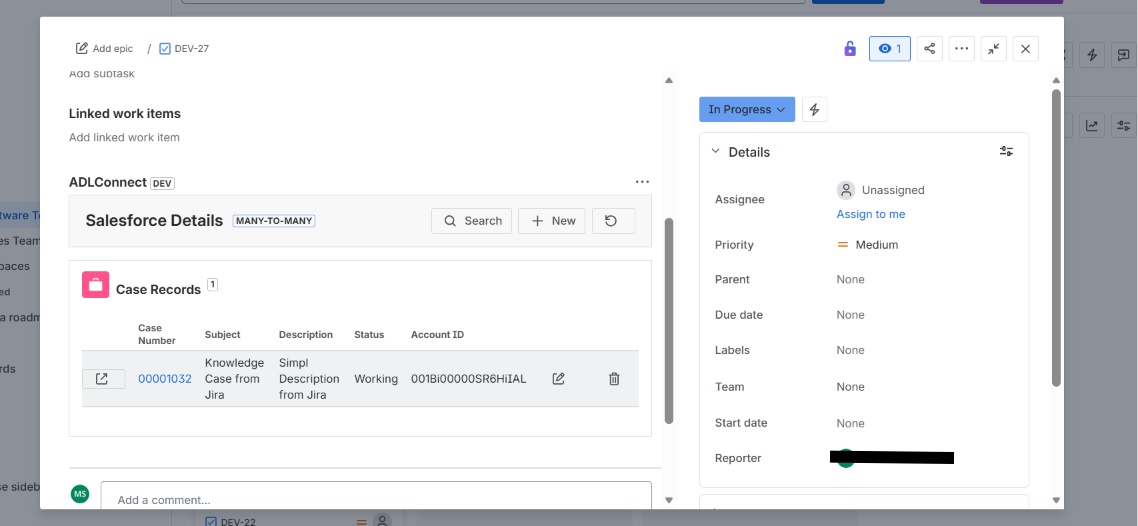
Click the Search button (magnifying-glass icon) in the panel toolbar.
The Search Case modal opens with the placeholder:
Run a search to see matching records.
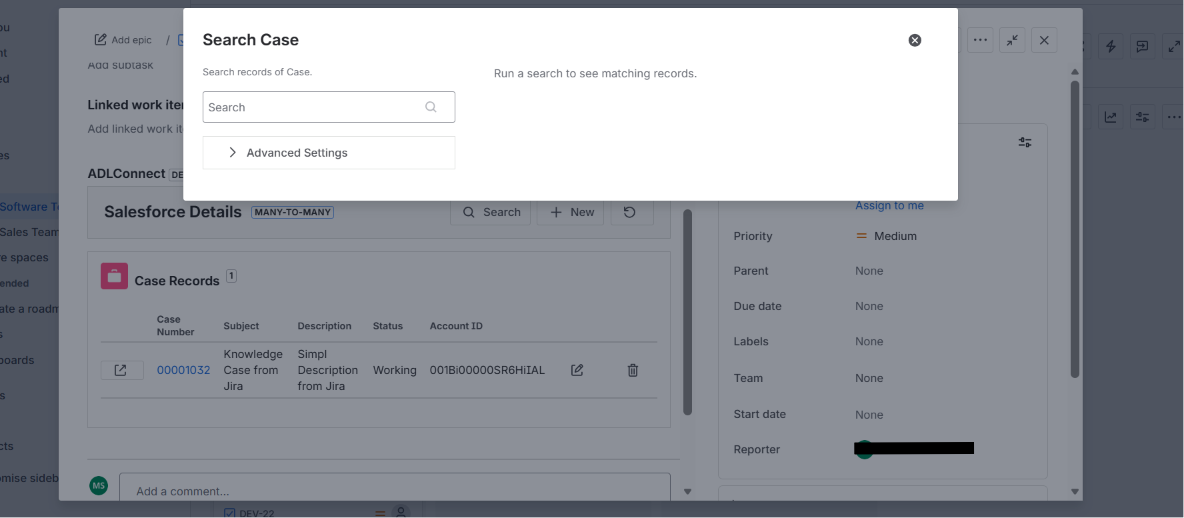
Two controls are available on the left:
- Search box — quick keyword search across the parent object's standard searchable fields.
- Advanced Settings (collapsible) — sort, pagination, and column controls for refined searches.
Note: The modal title and search scope are driven by the parent object configured on the mapping row. For the
Task → Casemapping in this example, the modal searchesCaserecords. If the mapping targetsAccount, the modal becomes Search Account, and so on.
2. Run a Search
Type a keyword into the Search box (e.g., test) and press Enter or click the magnifying-glass icon.
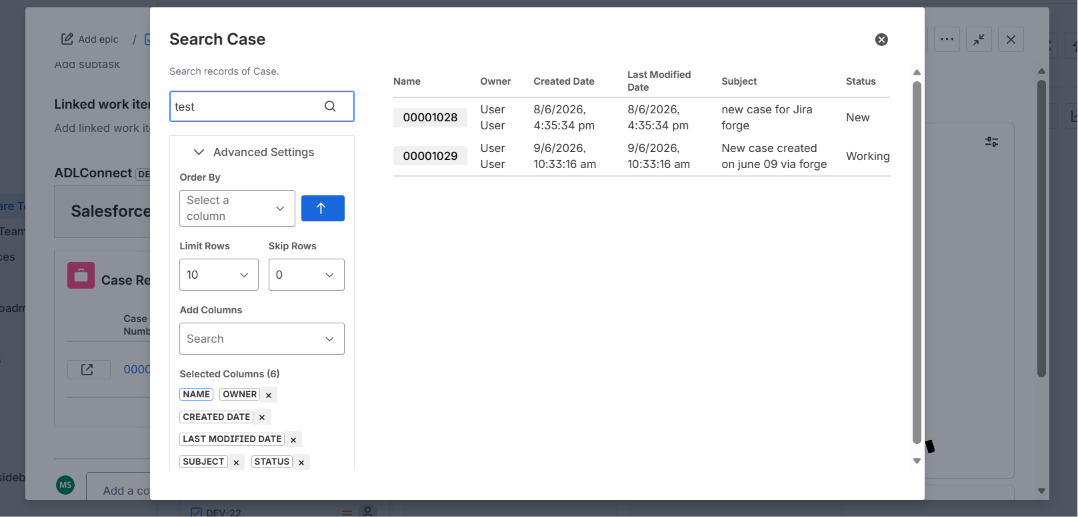
Matching records load in the right-hand results table. By default, results are limited to 10 rows and displayed with the columns configured in Advanced Settings → Selected Columns.
In this example, two matching Cases are returned:
| Case Number | Owner | Created Date | Last Modified Date | Subject | Status |
|---|---|---|---|---|---|
00001028 | User User | 8/6/2026, 4:35:34 pm | 8/6/2026, 4:35:34 pm | new case for Jira forge | New |
00001029 | User User | 9/6/2026, 10:33:16 am | 9/6/2026, 10:33:16 am | New case created on June 09 via forge | Working |
Advanced Settings
Expand Advanced Settings to refine the search:
- Order By — select a column (e.g.,
Created Date) and toggle the arrow for ascending or descending sort. - Limit Rows — number of rows returned per page (default
10; useful values: 10 / 25 / 50). - Skip Rows — how many rows to skip from the top (paginate through large result sets, e.g.,
0,10,20). - Add Columns — searchable dropdown to add more columns to the results table.
- Selected Columns — chips showing the current display columns (e.g.,
NAME,OWNER,CREATED DATE,LAST MODIFIED DATE,SUBJECT,STATUS). Click the × on a chip to hide that column from the results.
Adjusting any setting re-runs the query and refreshes the table immediately.
Tip: Add columns like
StatusorSubjectif the default columns don't carry enough signal to distinguish similar records. The chosen columns persist for the duration of the modal — they reset to defaults the next time the search modal is opened.
3. Pick a Record to Link
Click the Case Number (or Name) link of the desired row in the results table — for this example, 00001028 (Subject: new case for Jira forge).
The Search modal closes and the Review & Link Record modal opens with the chosen record's current values prefilled.
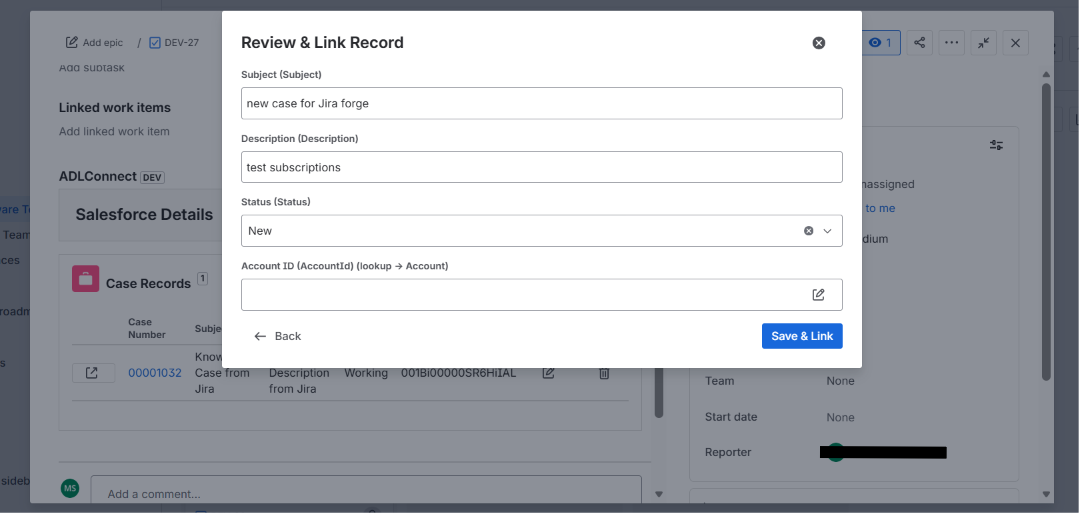
The Review & Link modal mirrors the Review & Create modal you've seen in the Create flow, but with two key differences:
- The title is Review & Link Record (not Review & Create Record).
- A ← Back link in the bottom-left lets you return to the Search results without losing context, in case the wrong record was picked.
- The primary action button is Save & Link (not Save).
The fields are prefilled with the picked Salesforce record's current values — fetched live from Salesforce at click time:
- Subject =
new case for Jira forge - Description =
test subscriptions - Status =
New - Account ID = (empty in the source record — leave blank or fill in here)
Why prefill from the picked record? Many users want to update the existing record's fields at the same time as linking it to the Jira issue. Prefilling lets them review the current state and optionally edit any field before saving the link — for example, setting an Account that was missing, or moving Status from
NewtoWorking. Editing here writes back to the existing Salesforce record (not to a new one) on Save & Link.
4. Optionally Edit Fields Before Linking
Edit any field whose value should change at the time of linking. Fields you leave alone are saved unchanged.
In this example, the user fills in the previously empty Account ID by clicking the pencil icon, searching for and selecting Dummy Account2 from the Account lookup.
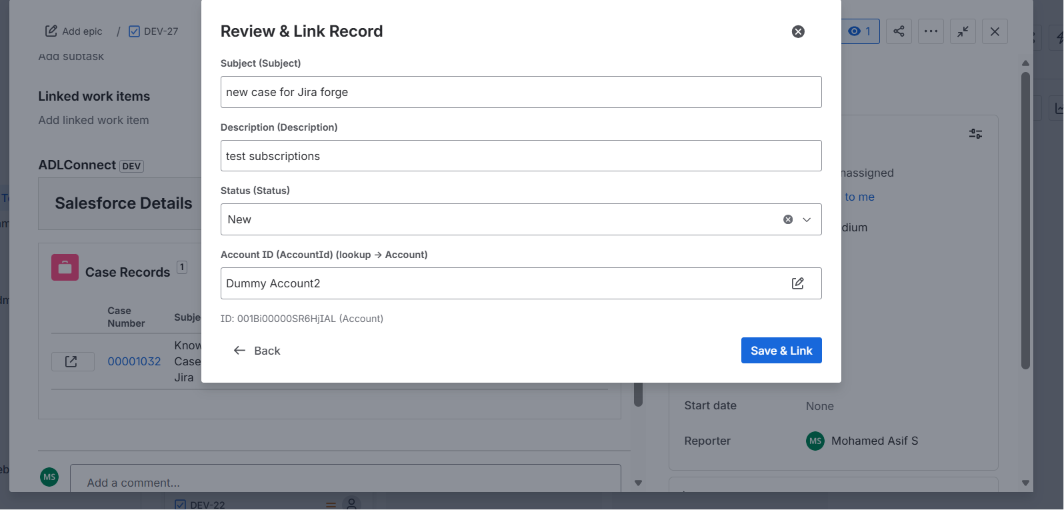
After picking the Account, the field shows:
- Account ID (AccountId) =
Dummy Account2 - ID:
001Bi00000SR6HjIAL (Account)— the resolved Account Salesforce ID for confirmation.
Other fields (Subject, Description, Status) keep their existing values from the source Case. They could be edited in the same way if needed.
If the wrong record was chosen entirely, click ← Back to return to the Search Case modal and pick a different row.
Once everything looks correct, click Save & Link in the bottom-right.
5. Behind the Scenes on Save & Link
On clicking Save & Link, the app performs two operations:
- Updates the existing Case in Salesforce — only the fields you edited in the Review & Link modal are written back; untouched fields remain unchanged.
- Creates a new JiraRecordLink__c join row — wiring the existing Case to a JiraRecord__c row for this Jira issue (creating the JiraRecord__c mirror first if one doesn't already exist for
DEV-27).
The Case itself is not duplicated — the same Case 00001028 is now linked to this Jira issue in addition to whatever other Jira issues or Salesforce relationships it had before.
6. The Linked Record Appears on the Panel
The modal closes and the Salesforce Details panel refreshes. The Case Records section now shows both the previously created Case and the newly linked one:
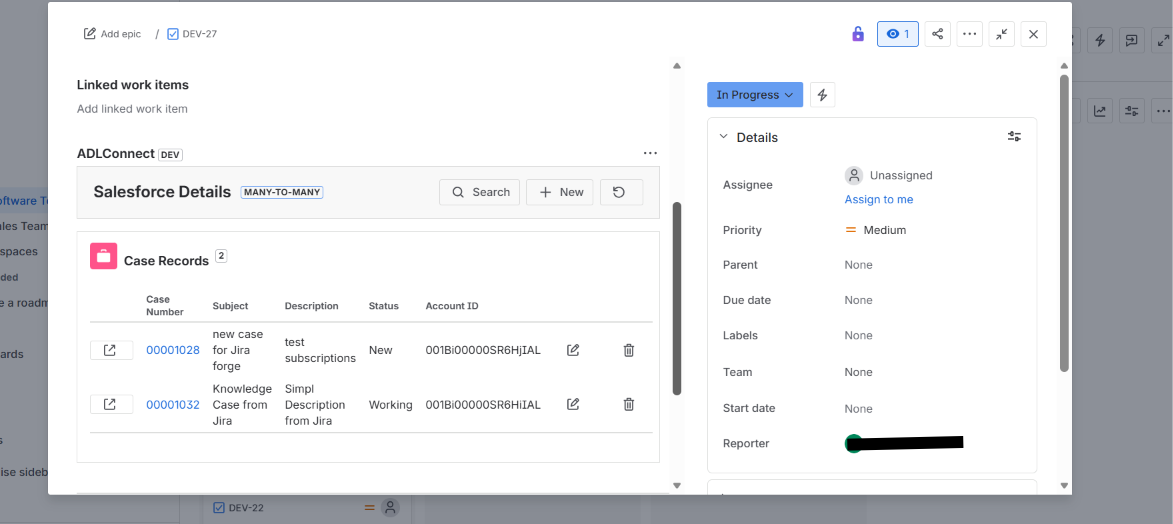
The panel now reflects:
- Case Records (2) — count badge updated to reflect the new link.
- Row 1 —
00001028new case for Jira forge /test subscriptions/New/001Bi00000SR6HiIAL(the searched-and-linked Case). - Row 2 —
00001032Knowledge Case from Jira /Simpl Description from Jira/Working/001Bi00000SR6HiIAL(the Case previously created via + New).
Each row exposes the same actions as before:
- Open in Salesforce (external-link icon) — opens the Case detail page in Salesforce.
- Case Number link — also opens the record in Salesforce.
- Edit (pencil icon) — re-open the record in the edit modal to update fields. Changes sync back to Salesforce immediately.
- Delete (trash icon) — remove the link. Does not delete the Case — only the
JiraRecordLink__cjoin row is removed, leaving the Case intact in Salesforce.
From the Salesforce side, the Case 00001028 now shows a JiraRecordLink__c join row pointing to the DEV-27 Jira issue, so the bidirectional link is visible to both Jira and Salesforce users.
7. Practical Use Cases
- De-duplication — before creating a new Case from Jira, run a quick search to confirm one doesn't already exist for the customer or symptom.
- Multi-issue linking — link the same Account to several Jira issues representing different engineering work streams against that customer.
- Status alignment on link — when linking a Case from a Jira escalation, update its Status to
Workingin the same step so the support owner immediately sees engineering has picked it up. - Many-to-many traceability — link multiple Salesforce records (e.g., a Case and the related Opportunity) to a single Jira Epic to capture all customer touchpoints at once.
Tip: If the search returns no results for a customer or keyword that should exist, check:
- The integration user has read access to the parent object and the searched fields.
- The keyword is spelled correctly (search is exact-match against the object's standard searchable fields).
- The connected org is the right one — switch the org tab on the Salesforce Configuration page to confirm the mapping points to the org you expect.